Tag: GA4

  • How to Set Up AI Traffic Tracking in GA4

    Key Insights

    • AI platforms are regularly sending real users to websites. This traffic exists today, even if it hasn’t been tracked or discussed widely yet.
    • GA4 doesn’t clearly identify AI-driven visits on its own. Without proper setup, those sessions get grouped with other referrals and are easy to overlook.
    • Visits from AI tools don’t behave the same way as traditional search traffic. They often come from users researching, comparing, or trying to solve a specific problem.
    • Channel-based tracking makes AI traffic easier to find and analyze. Custom channel groups help isolate these visits and keep reporting consistent as AI tools evolve.
    • AI measurement works best when you focus on trends, not perfection. Directional insight is enough to evaluate performance and make smarter decisions.

    Traffic from AI tools is already reaching your website. It’s happening now, and it’s measurable, even if it has never appeared clearly in your reporting. Google’s AI Overviews, ChatGPT, Perplexity, Claude (and so on) are sending users to third-party sites every day.

    The issue isn’t whether AI traffic exists. It’s whether you can see it at all. In Google Analytics 4 (GA4), AI-driven visits are typically classified as Referral traffic, which strips away context and minimizes impact.

    Seeing AI traffic clearly changes how performance is evaluated. Let’s break down how AI traffic shows up in GA4, how to surface it deliberately, and how Search Influence turns those signals into dashboard-level insights that teams can use to make confident decisions.

    What Counts as “AI Traffic” in GA4?

    Before you can track AI referral traffic, you need to be precise about what qualifies. AI traffic isn’t a vague concept or a future trend. It refers to a specific type of visit with a distinct source and intent.

    How AI traffic is defined

    AI traffic includes sessions that originate from AI-powered tools when those tools link users to third-party websites as part of an answer, recommendation, or explanation. These visits happen when a user chooses to leave an AI interface and click through for deeper context, validation, or next steps.

    Pictured: An AI Overview in Google Search showing cited sources alongside the generated response. When a user clicks one of these linked citations to learn more, that visit is sent from the AI interface to the publisher’s website. In GA4, that click-through is classified as AI traffic.

    This type of traffic is already present across many websites. In a 2025 Ahrefs analysis of 3,000 anonymized sites, 63% recorded at least one visit from an AI source.

    Common AI tools that send traffic today include:

    • Google’s AI Overviews
    • ChatGPT
    • Perplexity
    • Claude
    • Gemini
    • Copilot

    If a user clicks a link from one of these platforms and lands on your site, that session counts as AI traffic.

    What AI traffic is not

    AI traffic is often confused with other acquisition channels, which leads to inaccurate assumptions about its role.

    AI traffic is not:

    • Organic search traffic from Google or Bing
    • Paid search or display traffic
    • Standard referrals from publishers, directories, or partners

    Even when AI tools surface content that originally ranked in search, the visit itself does not come from a search engine. The source is the AI platform, not the SERP.

    Why AI-driven visits behave differently

    Users arriving from AI tools typically have a different mindset than traditional search users. In many cases, they are:

    • Researching a specific question or comparison
    • Looking to confirm information they’ve already seen
    • Narrowing options rather than browsing broadly

    As a result, AI-driven sessions often enter deeper into content, focus on fewer pages, and show engagement patterns that don’t always align neatly with organic search benchmarks.

    Why this definition matters

    Without a clear definition of AI traffic, reporting becomes inconsistent fast. Teams end up blending unlike sessions together, misreading intent, or minimizing AI’s contribution altogether.

    Agreeing on what counts as AI traffic makes it possible to:

    • Track it consistently over time
    • Compare it meaningfully against other channels
    • Analyze behavior without muddy attribution

    Once AI traffic is clearly defined, the next challenge becomes visibility (specifically, where this traffic actually shows up inside GA4).

    Where AI Traffic Lives in GA4 by Default

    When AI traffic reaches your site, GA4 has to decide where to put it. That decision happens automatically, based on how GA4 assigns sessions to its Default Channel Groupings.

    GA4 groups traffic by matching source and medium patterns. When a visit doesn’t meet the criteria for search, paid, social, or email, it’s typically assigned to the Referral channel. This is where most AI-driven visits end up.

    Why AI traffic gets classified as Referral

    AI tools send users to websites using standard web links. From GA4’s perspective, there’s nothing about these visits that signals a unique acquisition channel. As a result, traffic from AI platforms is treated the same way as any other external link click.

    That means AI traffic is not labeled, flagged, or separated by default. It’s folded into Referral alongside a wide range of unrelated sources.

    What this looks like in reporting

    In practice, AI traffic blends in with referral sources such as:

    • Software platforms
    • Documentation sites
    • Blogs and media outlets
    • Partner or vendor domains

    Without deliberate segmentation, there’s no clear way to distinguish an AI-driven session from any other referral visit.

    Why this makes AI traffic hard to analyze

    Referral traffic is often reviewed at a high level, if at all. It’s rarely trended with the same attention as organic or paid channels, which makes emerging patterns easy to miss.

    As a result:

    • AI traffic is difficult to isolate over time
    • Growth from AI platforms can go unnoticed
    • AI’s contribution to acquisition and engagement is underrepresented

    AI traffic isn’t invisible in GA4. It’s simply buried, and understanding where it lives by default is the first step toward surfacing it intentionally.

    How AI Traffic Tracking Works in GA4

    Once you know AI traffic is folded into Referral reports by default, the next question is how to surface it consistently. In GA4, that starts with custom AI traffic channel groups.

    Why channel groups work

    Channel groups operate at the acquisition layer in GA4. When AI traffic is defined as its own channel, it becomes visible across standard reports, comparisons, and dashboards without relying on one-off views or manual analysis.

    This approach:

    • Applies consistently to past and future data
    • Integrates cleanly into existing reporting workflows
    • Makes AI traffic comparable to other acquisition channels

    Why filters and ad hoc reports aren’t enough

    Temporary filters and explorations can surface AI traffic, but they don’t scale. They require constant upkeep, fragment reporting, and make trend analysis harder over time.

    Channel groups solve the problem structurally by establishing AI traffic as a distinct acquisition category.

    How AI traffic is identified

    AI traffic is grouped using session source values, not behavior or content signals. When a known AI platform appears as the source, GA4 can assign that session to the appropriate channel.

    This keeps attribution clean and allows rules to evolve as new AI tools emerge.

    A scalable, industry-aligned approach

    Custom channel groups are already a best practice for managing complex acquisition sources in GA4. Applying that same framework to AI traffic creates visibility without overengineering and keeps reporting aligned as AI-driven discovery continues to change.

    High-Level Steps: Setting Up an AI Traffic Channel in GA4

    AI traffic doesn’t need to be created or inferred. It already exists in GA4. The goal of setup is to surface it in a way that’s consistent, durable, and usable across reports.

    1. Create a custom channel group for acquisition analysis
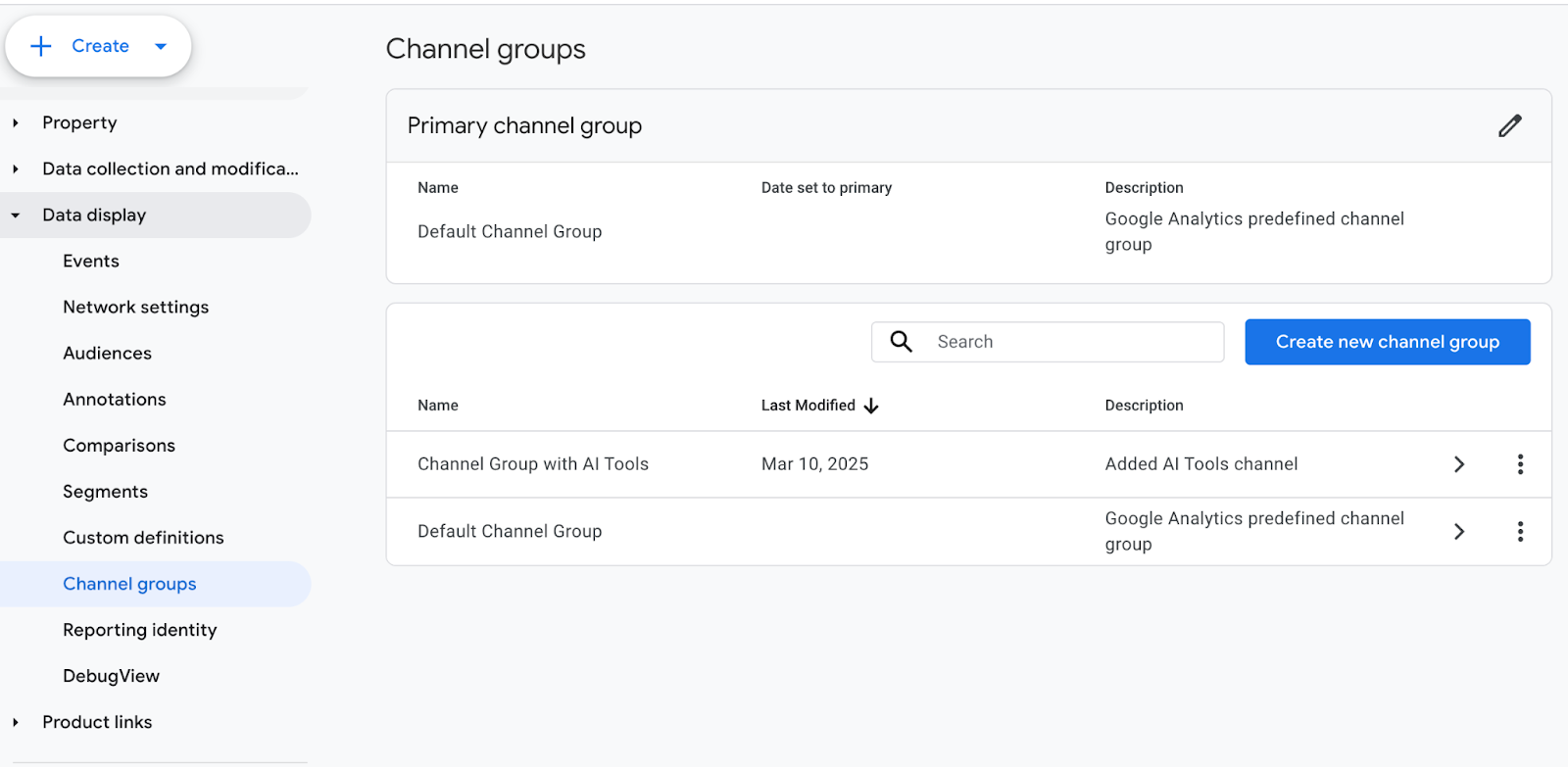
    AI traffic tracking starts with a custom channel group. Channel groups determine how sessions are categorized throughout GA4’s acquisition reporting, which makes them the right layer for isolating AI-driven visits.

    This establishes AI traffic as a first-class acquisition channel.

    2. Add a dedicated channel labeled “AI Tools”

    Within the new channel group, a dedicated channel is defined specifically for AI-driven sessions. A clear label like “AI Tools” keeps reporting readable and reduces ambiguity when data is shared across teams.

    At this stage, simplicity matters more than over-segmentation.

    3. Identify AI traffic using session source values

    As stated above, AI traffic is identified using session source values rather than behavioral or page-level signals. When a session originates from a known AI platform, GA4 can assign it to the AI Tools channel.

    This keeps attribution consistent and avoids guessing user intent.

    4. Apply regex logic to group known AI platforms under one channel

    Known AI platforms are grouped together using pattern-based logic. This allows multiple tools to roll up into a single channel while keeping the structure flexible as AI-driven discovery continues to evolve.

    As new AI tools are released or gain adoption, this regex can be updated to include additional referrers without changing the overall reporting framework. This keeps AI traffic consolidated, prevents fragmentation across referral sources, and ensures visibility keeps pace with the expanding AI ecosystem.

    The channel evolves through periodic refinement, not constant reconfiguration, which makes it sustainable over time.

    5. Reorder channels so AI traffic is evaluated before Referral

    Channel order determines how GA4 assigns sessions. Placing the AI Tools channel above Referral ensures AI-driven visits are captured intentionally rather than falling into the default referral bucket.

    This step prevents AI traffic from being hidden again.

    6. Validate AI traffic visibility in GA4 acquisition reports

    After setup, AI traffic should appear clearly across standard acquisition reports. At that point, teams can begin trending performance, comparing AI traffic against other channels, and incorporating it into regular reporting.
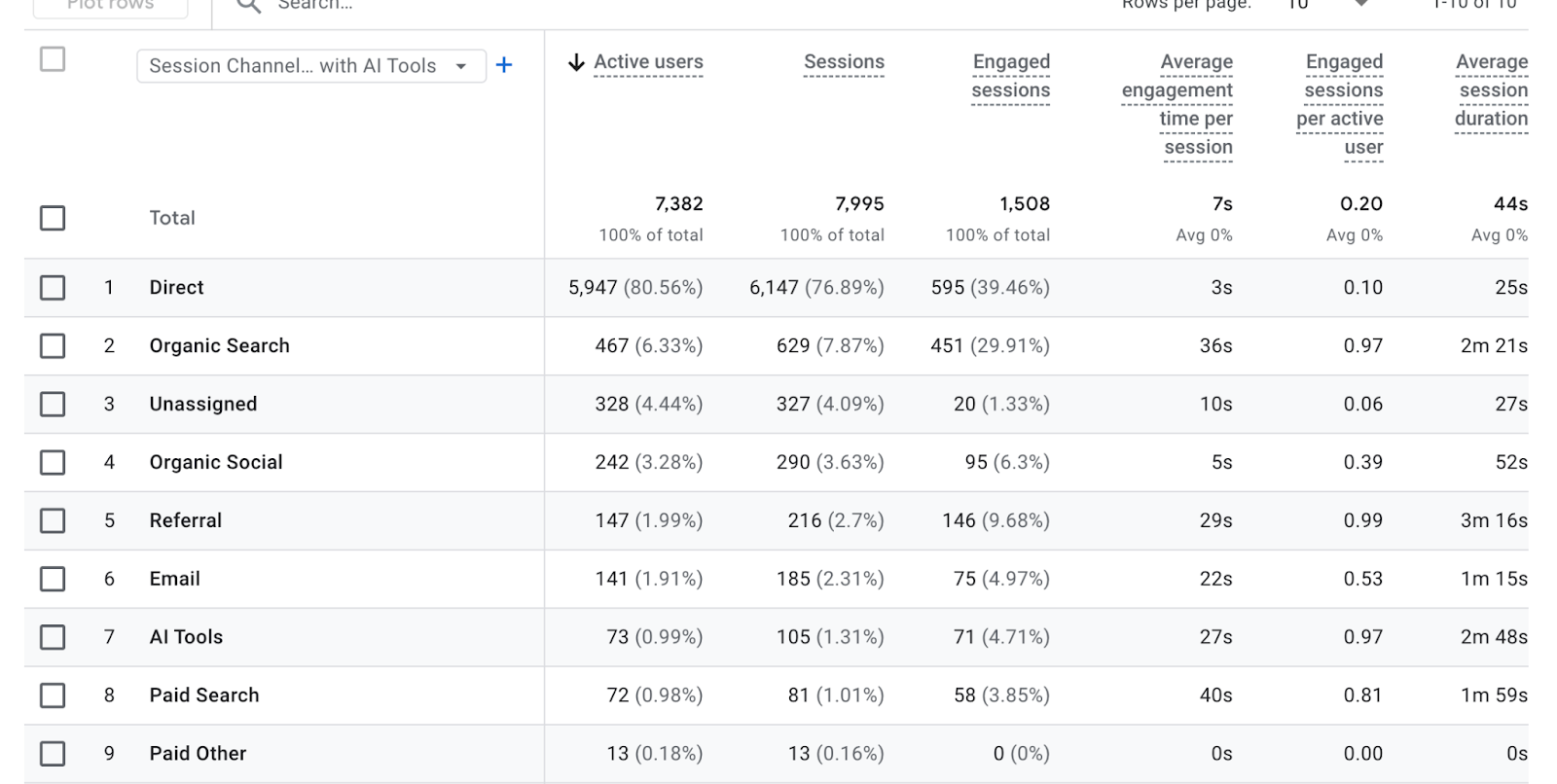
    This setup doesn’t change how GA4 captures data. It simply surfaces AI-driven sessions that were already there, pulling them out of the referral background and into a form that teams can actually use.

    For a more detailed, step-by-step walkthrough of this setup, see Dana DiTomaso’s “How to Track and Report on Traffic from AI Tools (ChatGPT, Perplexity) in GA4.”

    Separating ChatGPT From Other AI Tools

    After AI traffic is surfaced as a channel, some teams notice that one source tends to stand out. In many cases, that source is ChatGPT.

    Why ChatGPT often dominates AI traffic

    ChatGPT often represents a larger share of AI-driven sessions due to its broad adoption (it became the fastest-growing app in history, reaching 100 million active users within two months of launch) and frequent use for explanations, comparisons, and next steps. As a result, it’s often the first AI signal teams notice once tracking is in place.

    How ChatGPT traffic can behave differently

    Not all AI traffic behaves the same. ChatGPT-driven sessions may show different patterns than traffic from tools like Perplexity, Claude, or Gemini.

    Common differences include:

    • Deeper entry points into content
    • Longer engagement on explanatory pages
    • Strong alignment with informational or evaluative intent

    These differences reflect how users interact with various AI tools, rather than their performance quality.

    When separating ChatGPT adds value

    Separating ChatGPT into its own channel can improve clarity when it accounts for a meaningful share of AI traffic or when teams want platform-specific insight. In these cases, segmentation supports analysis rather than adding noise.

    When it’s better to keep AI traffic sources grouped

    For many teams, especially early on, grouping all AI tools under a single channel keeps reporting simpler and trends easier to interpret. Segmentation should be introduced only when it helps answer real questions.

    AI Tool Referrals vs AI-Generated Search Clicks

    AI tools vs AI search features

    AI-driven traffic doesn’t follow a single pattern. One of the most common points of confusion is the difference between AI tool referrals and AI-generated search features.

    AI tools send traffic directly from their own interfaces. When a user clicks a link inside a tool like ChatGPT or Perplexity, that visit arrives as a standard referral session.
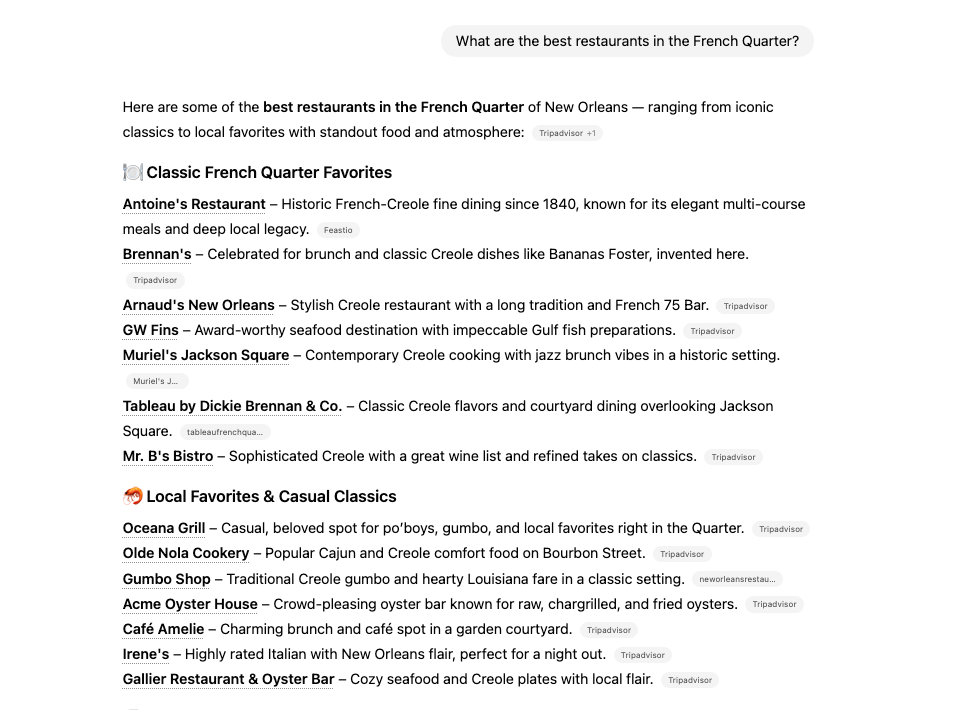
    Pictured: A recommendation list generated inside ChatGPT, where each item includes a clickable external source. When a user selects one of these links and lands on a website, the visit is recorded as a referral from ChatGPT, distinguishing it from clicks that originate within a search engine results page.

    AI-generated search features work differently. These include:

    • AI Overviews
    • Featured Snippets
    • People Also Ask

    In these cases, the user is still on a search engine results page. The click originates from a Google-owned surface, not from an external AI tool.

    Why this distinction matters in GA4

    Because AI tools and AI search features generate different types of URLs, they behave differently in analytics. Channel groups can reliably capture traffic from AI tools because those visits have identifiable external sources.

    AI-generated search clicks, however, often share source and medium values with traditional organic search. As a result, they can’t be isolated cleanly using channel group rules alone.

    Understanding this distinction prevents misreporting. AI tool referrals and AI-generated search features both influence discovery, but they require different tracking approaches inside GA4.

    When Event-Based Tracking Is Needed for AI-Generated Search Links

    Channel-based tracking captures traffic from AI tools, not from AI-generated search features.

    When discovery happens inside AI Overviews, Featured Snippets, or People Also Ask, a different measurement approach is required.

    How event-based tracking fills the gap

    Event-based tracking provides a way to measure clicks from AI-generated search features by identifying specific URL patterns and triggering custom events. This approach typically requires Google Tag Manager and a deeper understanding of how search feature URLs are structured.

    Rather than reclassifying traffic into a new channel, this method captures interactions as events that can be analyzed separately inside GA4.

    What to expect from this approach

    Event-based tracking adds useful context, but it comes with limitations. Teams should go into this with the right expectations:

    • Tracking is partial, not comprehensive
    • URL structures change, which can break rules over time
    • Visibility is directional, not exhaustive

    Because of that, event-based tracking works best as a complement to channel-based AI traffic reporting, not a replacement for it.

    When it’s worth implementing

    This approach is most useful for teams that:

    • Want deeper insight into AI Overviews and other SERP features
    • Have the technical resources to maintain tracking rules
    • Are already comfortable working beyond standard GA4 reports

    For teams looking to explore this layer in more detail, Dana DiTomaso offers a technical deep dive in “How to Track Traffic from AI Overviews, Featured Snippets, or People Also Ask Results in Google Analytics 4”.

    Using GA4 Audiences to Analyze AI Traffic

    Channels show where traffic comes from. Audiences show what users do after they arrive. Once AI traffic is visible as an acquisition channel, audiences become the primary way to understand its quality, intent, and impact.

    How audiences extend AI traffic analysis

    GA4 audiences enable teams to categorize users based on their entry points and subsequent actions. When AI-driven sessions are used as audience criteria, behavior can be analyzed across engagement, conversion, and retention metrics.

    This shifts AI reporting from volume-focused to outcome-focused.

    Common AI-focused audience examples

    Teams often create audiences such as:

    • Users who arrived via AI tools
    • Users who engaged after an AI-driven session
    • Users who converted following AI traffic
    • Returning users whose first session came from an AI source

    Each audience answers a different question about how AI-driven discovery influences performance.

    What audiences reveal that channels can’t

    Channels make AI traffic visible. Audiences make it interpretable.

    With AI-based audiences, teams can evaluate:

    • Engagement depth compared to organic or paid users
    • Conversion rates tied specifically to AI discovery
    • Whether AI traffic introduces net-new users or supports return behavior

    This helps separate curiosity clicks from meaningful acquisition.

    Using audiences to guide reporting and decisions

    AI audiences can be applied across standard GA4 reports, comparisons, and dashboards. Over time, they help teams identify patterns that inform content strategy, UX decisions, and measurement priorities.

    Rather than asking whether AI traffic exists, audiences help answer the more useful question: what that traffic actually contributes.

    What Search Influence Tracks for AI Traffic

    Surfacing AI traffic is only the first step. The real value comes from understanding how that traffic performs, how it changes over time, and how it contributes to broader acquisition and conversion goals.

    Search Influence focuses on a focused set of metrics that balance visibility, behavior, and impact.

    Core AI traffic metrics

    At the foundation, we track AI traffic volume and growth trends over time. This establishes whether AI-driven discovery is increasing, stabilizing, or declining.

    Key metrics include:

    • Total AI sessions and month-over-month change
    • AI traffic share relative to organic search
    • Engagement indicators, such as pages per session and engagement time
    • Conversion performance tied to AI-driven sessions

    These metrics provide directional clarity without overfitting analysis to short-term fluctuations.

    Understanding performance by AI tool

    Beyond aggregate volume, we break AI traffic down by platform to understand how different tools contribute to discovery and engagement.

    This includes:

    • Traffic distribution by AI channel
    • Engagement and conversion behavior by tool
    • Early identification of new or emerging AI referrers

    Comparing tools side by side helps teams spot meaningful differences without assuming all AI traffic behaves the same way.

    Visualizing AI Traffic With Custom Dashboards

    Why GA4 alone isn’t enough

    GA4 can store the data, but it’s not built for fast, repeatable AI reporting across a team. Most AI questions require clicking through multiple reports, changing dimensions, and rebuilding the same views every time.

    Common friction points include:

    • AI traffic gets buried unless you know exactly where to look
    • Views are hard to standardize across stakeholders
    • Trend checks take too long to repeat weekly or monthly
    • Non-analysts struggle to pull the same story consistently

    If AI visibility matters, reporting has to be easy to access, easy to trust, and easy to repeat.

    How Search Influence dashboards surface AI insights

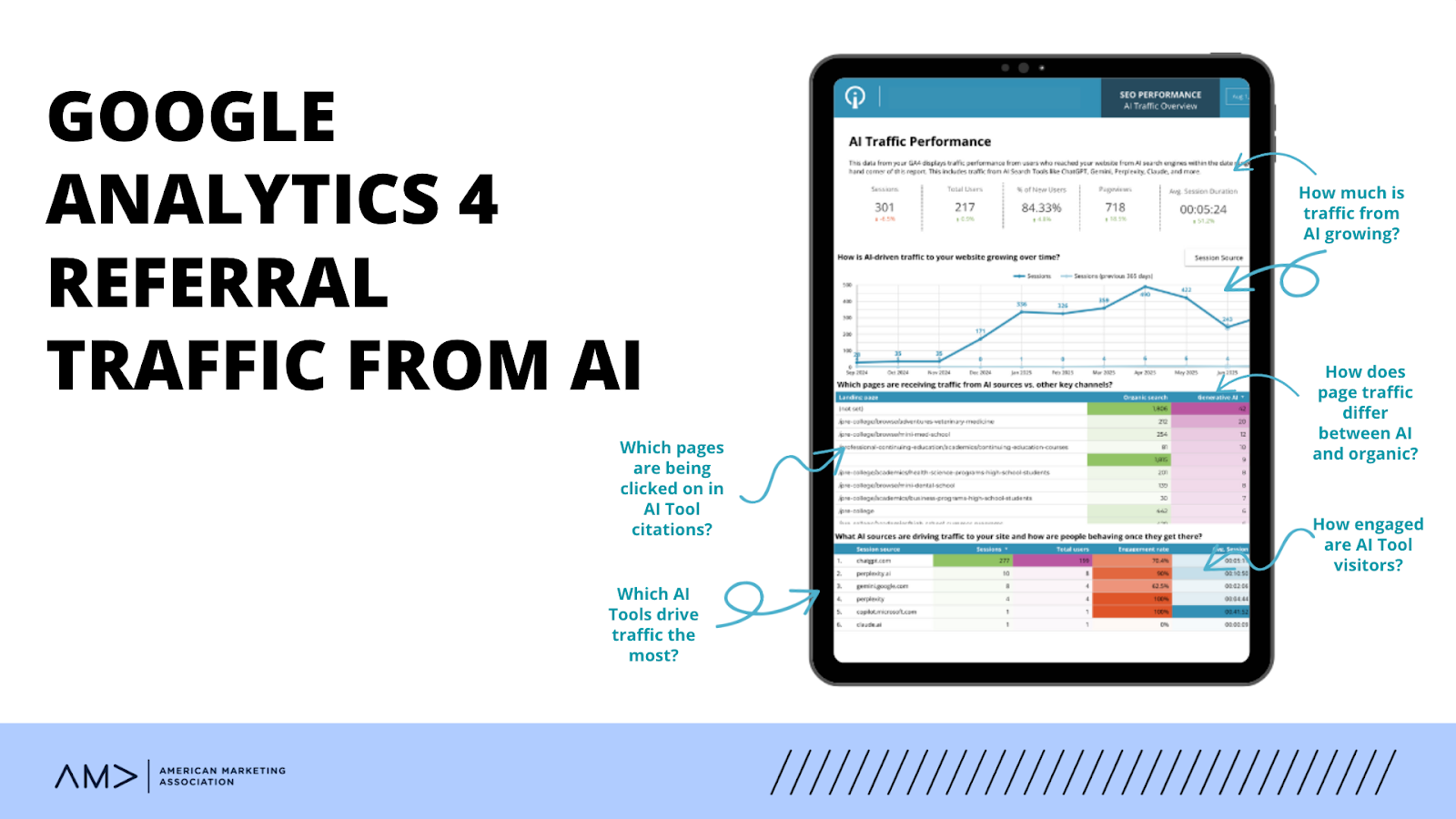
    Dashboards translate AI tracking into a shared, repeatable view that teams can rely on. Instead of rebuilding reports, AI performance is surfaced alongside organic and paid channels in a consistent format.

    Our custom-built dashboards typically show:

    • AI session volume and trend movement over time
    • AI traffic share relative to organic and paid
    • Engagement and conversion behavior from AI-driven sessions
    • Platform-level detail when it supports analysis (e.g., ChatGPT vs other tools)

    This shifts AI reporting from exploration to execution, making it part of an ongoing performance review rather than a one-off analysis.
    AI Tracking Tools Beyond GA4

    While GA4 remains the foundation for measuring what happens on your site, other platforms are beginning to surface how brands appear across AI-driven experiences.

    Today, these tools generally fall into three roles:

    • AI visibility tracking tools (such as Scrunch)
      Help teams understand where and how a brand shows up inside generative AI tools, including citation patterns and brand presence.
    • SEO platforms expanding into AI signals (including SEMrush and Ahrefs)
      Provide early indicators around AI citations, content reuse, and discovery, often alongside traditional search performance.
    • GA4 as the system of record
      Confirms what AI-driven discovery actually produces once users arrive, including engagement, conversion behavior, and downstream impact.

    Together, these tools answer different questions. Visibility platforms show where discovery happens. SEO tools reveal how content is reused or cited. GA4 validates what that traffic does next.

    The Reality of AI Traffic Tracking Today

    AI traffic tracking is not static. Referrers change, AI interfaces evolve, and attribution rules shift over time. Precision at the session level will never be perfect.

    What matters is consistency.

    When AI traffic is tracked the same way over time in GA4, patterns become visible. Teams can evaluate momentum, engagement quality, and contribution alongside other channels, even as the ecosystem changes.

    The goal is a usable signal, not a flawless measurement.

    FAQs

    1. Can GA4 automatically identify AI traffic without configuration?

    No. GA4 does not currently recognize AI-driven visits as a distinct channel on its own. By default, traffic from AI tools is classified as Referral, which makes it difficult to identify or analyze without additional setup. Custom channel groups are required to surface AI traffic consistently.

    2. Is AI traffic replacing or supplementing organic search traffic?

    At this stage, AI traffic is best understood as a supplement, not a replacement. Most AI-driven visits reflect users researching, validating, or comparing information before taking action. These behaviors often overlap with search intent, but they represent a different discovery path rather than a direct substitute for organic search.

    3. How accurate is AI traffic tracking in GA4 today?

    AI traffic tracking in GA4 is directional rather than exact. Known AI referrers can be reliably grouped using session source values, but attribution is not perfect and will evolve as AI tools change. The goal is consistent trend visibility over time, not precise session-level certainty.

    4. When should AI traffic be reported separately from organic traffic?

    AI traffic should be reported separately once it reaches a volume or strategic relevance that affects analysis or decision-making. Separating it too early can add noise, but grouping it indefinitely can hide meaningful patterns. The right timing depends on scale, stakeholder questions, and reporting needs.

    5. How often should AI tracking rules and definitions be reviewed?

    AI tracking rules should be reviewed periodically, typically quarterly or when major AI platforms introduce changes. New tools, referrer behaviors, and interface updates can affect how traffic appears in GA4. Regular review helps ensure definitions stay accurate without requiring constant adjustment.

    Turning AI Visibility Into Actionable Insight

    AI-driven discovery is already shaping how users find, evaluate, and engage with content. When tracked intentionally, it provides clear signals that strengthen SEO strategies, content decisions, and performance reporting.

    Search Influence brings structure to this complexity through proven tracking frameworks, executive-ready dashboards, and analytics that teams can act on with confidence.

    To gain clear visibility into how AI traffic is impacting your site, get in touch to explore our SEO, reporting, and analytics support.

    This post is informed by analytics frameworks and methodologies shared publicly by Dana DiTomaso. Our approach builds on those foundational concepts, adapted to how Search Influence configures reporting, analyzes performance, and delivers AI traffic insights through custom dashboards for our clients.


  • 3 Tips to Choose the Right Attribution Model for GA4

    Man using GA4 with help from New Orleans marketing agency, Search Influence

    Key Insights

    • It’s essential to choose the right attribution model in GA4 to understand how your marketing efforts contribute to user interactions and conversions (key events).
    • GA4’s default data-driven model offers a dynamic approach to attribution, but marketers beware: this model isn’t ideal for all websites.
    • A knowledgeable digital marketing agency can help you choose the right attribution model for your business.

    Does your attribution model show the real value of each touchpoint? Or does it mislead your strategy?

    As you sunset your Universal Analytics property and welcome Google Analytics 4, we recommend you use this time to rethink how you track user engagement.

    But, with so many options, choosing the best way to collect data on user behavior can be challenging.

    Allow our experienced analytics tracking team to make it simple for you, starting with the basics.

    What Is GA4?

    Google Analytics 4 (GA4) represents the next generation of Google Analytics, designed to replace the now-obsolete Universal Analytics. As of July 1, 2023, Universal Analytics ceased processing new data, marking a significant shift in how digital analytics will be managed moving forward. By July 1, 2024, Google will cut all access to the Universal Analytics interface, and its API will be completely discontinued.

    Google Analytics 4 introduces various innovative features to understand and analyze data across platforms. Unlike its predecessor, which primarily focused on session-based data collection, Google Analytics 4 is built on an event-driven data model. This allows for a more flexible and comprehensive approach to tracking users’ interactions with websites and apps.

    Business people understanding GA4 with help from New Orleans marketing agency, Search Influence

    What Are Attribution Models in Digital Marketing?

    Attribution models help marketers understand which marketing channels, campaigns, or interactions contribute most significantly towards achieving their business goals, such as sales and conversions (now called key events in GA4).

    The last-click model has traditionally been the most commonly used model by platforms like Google Ads, Facebook Ads, Universal Analytics, and various other programmatic display networks. But the AI-driven predictive analytics available with Google Analytics 4 is sure to shake things up — more on this later!

    Why might the conversion data between Google Ads and Google Analytics 4 be different?

    Mismatched data across platforms is a common point of confusion for those spending their days in the depths of data collection and user metrics.

    While both Google Ads and Google Analytics 4 capture user interactions, their reporting structures can vary, thus leading to mismatches in key event data.

    For example, using the last-click attribution model in Google Ads but data-driven attribution (GA4’s default) in Google Analytics 4 can lead to Google Ads saying you have three key events, but your GA4 property says two.

    Google Analytics 4 uses the last click as the attribution model for all Google Ads conversions based on key events. Only key events where Google Ads is the last non-direct click are used to create conversions in Google Ads, even if a non-last-click attribution model is selected in Ads.

    If you wish to compare key events for an attribution model in Google Ads against an attribution model in Google Analytics 4, you must select paid and organic channels’ last click to get an accurate comparison of the data.

    The most important thing is to understand the various nuances of attribution across platforms so that you can better analyze what data is being reported on and use that to make decisions.

    If that feels too in the weeds, a knowledgeable analytics and lead tracking agency can help.

    Types of Attribution Models


    In the digital realm, the importance of collecting data is undeniable (some might even call me a data hoarder).

    But how you choose to collect new data or even decipher historical data can make all the difference in understanding customer behavior.

    About the attribution models in GA4:

    • Paid and Organic Data-Driven Attribution: Uses advanced machine learning to analyze each touchpoint’s impact across the customer’s journey, dynamically assigning credit based on the data-driven insights it gathers.
    • Paid and Organic Last-Click Attribution: Credits the key event to the final interaction, whether from a paid ad or an organic search result, focusing on the last point of contact before a purchase or key event.
    • Google Paid Channels Last-Click Attribution: Specifically targets the last ad clicked from Google’s paid channels as the sole contributor to a key event, emphasizing the effectiveness of final paid interactions.

    Other attribution models to be aware of:

    • First-Click Attribution: Prioritizes the initial engagement by assigning all key event credit to the first marketing touchpoint, highlighting what initially attracted the customer.
    • Linear Attribution: Spreads credit equally among touchpoints throughout the entire customer journey on the path to a key event, recognizing each step’s contribution to the journey equally.
    • Time Decay Attribution: Assigns increasing credit to touchpoints nearer to the time of the key event, acknowledging that interactions closer to the sale may have more influence.
    • U-Shaped Multi-Touch Attribution: Allocates more credit to the first and last interactions (typically 40% each) and distributes the remaining credit among the middle interactions, valuing the roles of both initiating and concluding engagements.

    With Universal Analytics, all of these attribution models were available, but as of November 2023, Google Analytics 4 and Google Ads have sunset first-click, linear, time decay, and position-based attribution models, leaving two primary models: data-driven and last-click.

    Understanding the New Default Data-Driven Attribution Model in GA4

    Google Analytics 4 uses a sophisticated data-driven attribution model that shifts from the models used in Universal Analytics. This default model in Google Analytics 4 leverages advanced machine learning algorithms to analyze both converting and non-converting paths across web stream data, providing a nuanced understanding of how various touchpoints influence user actions.

    The mechanics of GA4’s data-driven attribution

    Google Analytics 4’s data-driven attribution model collects data from each interaction or event on your site or app. This attribution model takes everything it knows about a person and then assigns a value to each source based on its understanding of that person’s journey.

    While doing this, it considers multiple factors, such as:

    • The timing of interactions relative to key events
    • The type of device used
    • The number of ad interactions
    • The order of exposure to various marketing initiatives

    This approach allows GA4 to assign partial value to each source, effectively measuring its impact on the user’s journey toward a key event.

    Compared to other models

    Google Ads has used data-driven attribution for years. Many marketers feel it provides a more balanced view that accounts for the entire customer journey rather than just the first or final interaction before a key event.

    This can help guide strategy decisions by not over-weighting lower-funnel tactics that are more likely to result in last-click conversions and under-valuing all of the touchpoints that may influence the customer’s decision.

    Our team believes the default data-driven attribution setting is ideal for large sites where you want to understand how various touchpoints on the customer’s journey lead to a key event. However, the downfall of this model is that Google doesn’t reveal exactly how the model makes these decisions. This means you just kind of have to trust it.

    Early days but promising 

    It’s still the early days for the new Google Analytics setup process and data-driven attribution. While you should be cautious about fully relying on this new default attribution model, its ability to analyze data dynamically and adapt to new web and app data streams is undeniably intriguing.

    Pro tip: To ensure the most accurate results, we believe you should be cautious of data from any and all attribution models, not just data-driven attribution.

    Just like the humans interpreting this data, attribution models have their own quirks that can lead to skewed information. Because of this, our team double-checks all data to ensure the utmost accuracy.

    Tips for Choosing the Right Attribution Model in GA4

    The first step in saying goodbye to Universal Analytics is selecting the optimal attribution model in Google Analytics 4. This step is crucial for harnessing the full potential of your web data streams and improving overall website performance.

    Here are a few tips to ensure your attribution model aligns well with your digital marketing framework.

    Small sites should consider last-click attribution

    For smaller websites with less complex customer journeys, the last-click attribution model may be ideal. This model attributes all the key event values to the last touchpoint before a key event, simplifying analysis and decision-making for sites where single interactions often directly lead to key events. There are two main reasons for using last-click over data-driven for these smaller sites:

    • There is not likely to be much of a difference when comparing these two models, as the data will be limited.
    • Additionally, as Google states, “Depending on data availability, data-driven attribution models may leverage aggregate data from data sharing settings.” This means that conversions could be attributed to sources that aren’t even part of your marketing strategy.

    Large sites should consider data-driven attribution 

    Larger sites with more complex customer journeys should use GA4’s data-driven attribution. This will provide a more complete view of the impact of each marketing channel to better inform decisions.

    Compare models and experiment as much as possible

    Within GA4, you can use the attribution model report to compare last-click to data-driven attribution and see how various channels or sources drive conversions with each model. It is important to note that it is best to look at Chrome browser users only, as other browsers have implemented privacy features that make it less likely that users are tracked across devices or for extended periods of time.

    Don’t hesitate to experiment with different attribution models in GA4. The platform’s flexibility allows you to switch between models to see which offers the most valuable insights, using custom reports to track performance against new metrics.

    By incorporating these strategies, you can enhance your marketing effectiveness through more accurate attribution in GA4, ensuring that your approach not only reflects the complex nature of modern web and app engagement but also aligns with evolving business goals and industry practices.

    Contact the Attribution Tracking Experts at Search Influence

    The time is now: You must transition from Universal Analytics to Google Analytics 4 to track and analyze traffic, marketing campaigns, and audience interactions.

    At Search Influence, our expertise in data-driven digital advertising allows us to capture every lead and assess the quality and source of these leads to fine-tune your marketing strategies for future success. Our team is adept at setting up and customizing GA4 to meet your specific needs, ensuring you can track and maximize the impact of your marketing activities.

    Contact the experts at Search Influence for help transitioning to Google Analytics 4 and to learn more about all of our digital marketing services.

    Image 1: https://images.unsplash.com/photo-1593437955835-fc8c51725430?q=80&w=1970&auto=format&fit=crop&ixlib=rb-4.0.3&ixid=M3wxMjA3fDB8MHxwaG90by1wYWdlfHx8fGVufDB8fHx8fA%3D%3D

    Image 2: https://img.freepik.com/free-photo/businessman-making-presentation-with-his-colleagues-business-strategy-digital-layer-effect-office-as-concept_1423-123.jpg?t=st=1716398015~exp=1716401615~hmac=7b9cc7746e9b67bf0dcbe7e0f015285bfd421a1d171d09b5c89b4f40321a3cd9&w=1800

  • No. Don’t “Upgrade” to Google Analytics 4 (GA4). Instead, install it and run it in Parallel.

    Don’t “Upgrade” To Google Analytics 4 (GA4) Just Yet

    Google has been urging Analytics users  – mostly by email – to “Upgrade” to Google Analytics 4 (GA4).

    At Search Influence, we are installing GA4 but not “upgrading” just yet.

    No doubt, GA4 will be a great improvement, but there are a few really compelling reasons not to go all in just yet.

    A while back, David, our senior web developer, wrote a pretty comprehensive blog post about switching to Google Analytics 4, which you should check out. Below, I’ll reiterate a couple of his points, plus a few more.

    Google Analytics 4 user interface - Should you upgrade to GA4?

    Google Analytics And The Cookie-less Future

    In short, a big reason for this change is to accommodate a cookie-less world. As users can now opt out of tracking, it may be more difficult to gather user experience data if cookies are the way you get that done.

    Google Analytics 4 is not yet a fully baked product. Google tends to take an agile development approach and test new products and features with users.

    Even though it is Cookie-based, Universal Analytics – the current version – is a stable product.

    Do You Even Track Metrics, Bro?

    Google Analytics is great, but there are things it doesn’t do well. Some of the tools that you use to supplement Google Analytics may be negatively impacted if you make the switch too early.

    Some examples:

    In short, just because the Google Analytics team is ready for you to switch doesn’t mean everybody else is. Third parties and even some Google Properties development teams have to catch up to the GA4 APIs and interface changes.

    Third-party tool providers need a chance to get caught up with the new Google Analytics.

    Search Influence And GA4 For Clients

    Google plans to deprecate Universal Analytics as of July 1, 2023.

    In the next few weeks, we will be installing the GA4 tracking code on our client sites (again, alongside Universal Analytics) or recommending their developers do if we don’t have access.

    This way, we will have a full year’s worth of data when Universal Analytics sunsets.

    We’re not making a wholesale switch right now for the reasons above, but we feel it’s important to start collecting data in the new tool to enable good historical reporting in future years.

    We use CallRail and Google Data Studio for most of our client reporting and some internal dashboards, too. We are not willing to risk the integrity of that data for decision-making and reporting to move the newest, coolest Google toy.

    Again, David’s post goes into much more detail about switching to GA4, but I hope this gives a high-level view of the Search Influence approach to integrating this new platform.

    And, of course, if you need help setting up Analytics, Tracking, and Reporting for your organization, please get in touch. We’d love to help.

  • Should You Switch to Google Analytics 4?

    Key Insights:

    • A new version of Analytics is available and comes with some major changes.
    • Google Analytics 4 (GA4) is more beneficial to those with both website and app properties to track together than for website-only users.
    • We recommend setting up both old (Universal) and new (GA4) properties to run concurrently and change over fully only when that seems comfortable for the user and situation.

    In October 2020, Google officially launched its new form of Google Analytics properties known as GA4. GA4 originates from the integrated “App + Web” properties, which Google rolled out as an option for Universal Analytics properties years ago, but GA4 makes App + Web configuration the standard for all online properties. If the prior iterations of Google Analytics were variations on a theme, then GA4 is a completely different song.

    Since many businesses depend on Google Analytics data to assess their success and address the user experience of their online properties, any major change to the platform will have a significant impact. In this post, we’ll look at the details behind some of those changes and help you determine if the transition to GA4 is immediately beneficial to you.

    A person typing on the computer

    What Makes GA4 Such a Major Change?

    The major, fundamental difference between GA4 and prior Google Analytics versions comes down to reporting mechanisms.

    Prior versions of Google Analytics treated Pageviews as the primary metric for web property activity reporting, with a Session as the primary identifier for an individual user’s path. This measurement and reporting was based entirely on data stored in browser cookies. There are many, many resources for a thorough technical breakdown of how Universal Analytics and prior Analytics versions define and utilize Sessions and Pageviews and how they used cookies to collect that data.

    For our purposes here, we need to know that Google defined Sessions as an activity reported via a browser cookie from one browser (interpreted as a “user”) before either removal of the Analytics tracking cookie or 30 minutes of inactivity on the reporting website. Within that basic Session framework, the reporting on that user’s activity centered on Pageviews, with user-defined Events as an auxiliary means to target and measure specific user actions. You could find plenty of data about your users’ paths to and across your web properties without using Event measurement at all.

    The key conceptual change with GA4 is that Google made Events the foundational metric of reporting, with a Pageview treated as a specific type of Event rather than a separate entity. While GA4 still measures Sessions (and still utilizes browser cookies to do so), the identification of distinct users and their activity is no longer as dependent on cookies or Sessions to organize web activity. Instead, GA4 primarily uses data pulled from device identifiers and contextual Event analysis to identify distinct users and align them with their measured activity on a website or app.

    If you are using Analytics for reporting on a single website with no connected applications or alternate platforms, this change is likely only relevant to your developers. But if you are using Analytics to track app activity, you’ll have cleaner data that’s more representative of how users interact with applications without that data tracking being reverse engineered to fit the way users interact with a standard website in a browser.

    There are many other changes to reporting and measurement, and the most significant changes are broken down thoroughly by Bounteous. Likewise, the structure and nature of Event and Conversion reporting have changed a great deal, which earned the full Simo Ahava treatment shortly after launch last year.

    Why Make This Major Change Now?

    The biggest reason for these changes is to unify and consolidate Analytics tracking across multiple distinct web properties. The most obvious and direct use case is the fact that GA4 was directly born out of the App + Web property versions.

    Important background for the GA4 changes from the website tracking perspective goes back to the ongoing browser wars against cookies and cross-site tracking. Browsers’ evolving approaches toward user privacy and cookie policies constitute an entirely separate can of worms, but relying less on browser cookies is definitely a solid future-facing plan given the way browsers, internet software, and devices have trended toward greater privacy considerations. We have gone into great depth previously about how changing cookie and privacy policies impact cookie-based Google Analytics tracking.

    Google’s continued use of cookies for Analytics tracking in GA4—combined with the fact that, in most cases, the Google Analytics cookie is not being set as a dreaded third-party cookie—means that the actual difference in tracking capabilities for traditional websites is insignificant.

    Concepts like Sessions and Pageviews don’t apply to apps the same way they do to websites because of how these online properties are built and used. GA4’s biggest and most impactful immediate step forward is establishing a unified measurement system across these contrasting user platforms.

    While we’re still learning the capabilities and possibilities with the new GA4 properties, it’s difficult to point to any clear advantage of using the new GA4 properties for website-only organizations at this stage.

    Change Is Good Though, Right?

    There are a few specific changes that are causing significant adjustments for working with our clients’ tracking and reporting at Search Influence so far:

    User Explorer takes a full 24 hours to populate with user data.

    User Explorer has been a huge piece of our testing and QA process for our clients when testing ad campaigns, especially E-commerce Tracking. It lists site users by an anonymized identifier known as a “client ID,” showing the full activity history of each user, including:

    • Session breaks
    • Goal completions
    • E-commerce transactions via E-commerce Tracking

    There’s no way to identify a specific user just by looking at the client ID in your reports. But if you are the user and note your own client ID as you’re using the website, you can see what Google sees, which is extremely helpful in ensuring Goals and transactions are reporting properly.

    In the past, this User Explorer data was usually available to view within 10-20 minutes of performing the activity. If we had to test E-commerce Tracking reporting for a test purchase on a client’s website, we could complete the transaction and expect to see whether or not it tracked correctly pretty quickly. If it did, great! If it didn’t, we could investigate, adjust, and try again almost immediately.

    Currently, in GA4, it takes a full 24 hours for User Explorer data to populate. The results of this can dramatically slow down the process of setting up complex tracking configurations. With GA4, we cannot verify if anything is working until a full day after our tests. If something is not reporting as expected, the best-case scenario is making quick updates and performing another test…and then waiting another 24 hours to see if our adjustments solved the problem. What previously could have been 30 minutes to an hour of work now is spread across at least two full days.

    Many previously standard dashboard reporting sections need to be manually configured.

    For detailed breakdowns of specific dashboard and reporting changes in GA4 vs. Universal Analytics, Krista Seiden has already broken it down more thoroughly than I could. A general takeaway from what we’ve experienced so far is that many reports and metrics combinations that were accessible options straight from the dashboard menu now need to be set up directly by the user. I think in the long term, this will end up being a good thing since the Universal Analytics dashboard had gotten a bit bloated and overwhelming. But we could access several important reports for client reporting purposes “out of the box” that now need to be “manually” generated by modifying options and dimensions for other more general reports.

    Eventually, this will be beneficial, as it’ll allow users to have more control over what they can see and help them understand what data they see.

    A screen showing the pages views of a site

    So, Should I Use GA4 or Not?

    The short answer here is a clear and resounding, “Probably, but don’t completely flip out about it just yet.” There is little doubt that GA4 will eventually replace Universal Analytics as the standard, and as such, it’s appropriate to start considering a transition to the new property type. For organizations trying to unify reporting across websites and apps, some immediate benefits might accelerate the payoff of using the newer version.

    But for website-only businesses and content creators, the immediate benefits of transitioning to the new properties seem pretty marginal, with a lot of organizational strain engrained in adjusting to the new configurations and reporting structure. All Analytics users were forcibly transitioned from Classic Analytics to Universal Analytics in 2016, but as of now, Classic Analytics tracking code and syntax still fundamentally work and report effectively. The situations are not directly analogous, but it’s highly unlikely that Universal Analytics will be deprecated to any meaningful extent any time soon.

    In my opinion, the better immediate option (and what we’re beginning to employ for new clients and strategize for existing clients at Search Influence) is to track Universal Analytics properties and GA4 properties concurrently.

    One of the benefits of GA4 and Universal Analytics being entirely separate properties that don’t acknowledge or interfere with each other is that we can set up both to report simultaneously without any conflicts. This allows us to monitor and learn about the differences between the properties without any major irreversible overhaul to what we already have set up for our clients.

    Once we’re confident that we’re getting everything we need from GA4 so that Universal Analytics is truly redundant, we can then pull the trigger on switching fully. By that point, we’ll already have accumulated some reporting data to avoid any unfillable gaps in comparative historical data.

    To see our most recent thoughts on how to handle the release of GA4, check out this blog post written by our CEO Will Scott.

    Whether you’re trying to decide if your business should make the move to GA4 or want to brush up on your analytics and lead tracking, Search Influence is ready to help! Reach out to one of our digital marketing consultants for a free strategy session.

    Image Sources:

    Person on a laptop

    Computer screen