Tag: apple maps

  • Five for Friday: Go Natural, Rock Your SEO, Navigate Apple Maps, and More

    1. How Your Band Can Rock SEO – Moz

    Most people don’t discover new music by Googling “indie rock bands.” Folks are more likely to discover a band through other means and then turn to the Internet to search for tour dates, song lyrics, etc. If you’re a musician, this presents a unique opportunity for optimizing your band for search engines. Learn how to reach a wider online audience with these tips for improving your band’s search engine optimization.

    2. Want to Transfer Your YouTube Account to the Proper Google+ Page? – Search Engine Roundtable

    Does this YouTube predicament ring a bell? Say you’ve been uploading industry-related videos to your YouTube account, which is connected to your personal Google+ page. You’ve finally gotten around to creating a Google My Business account for your company, and you want to transfer your industry-focused YouTube account over to your business page. Now you can! The only catch is that this move can’t be undone, so make sure it’s really what you want to do.

    3. Apple’s Maps App Gets Reviewed – Blumenthals

    Apple’s Maps app, which has heretofore only partnered with Yelp for integrated customer reviews of businesses, has now expanded to incorporate reviews from TripAdvisor and Booking.com. It’s still pending an announcement from Apple, and it’s unknown whether this change is still in its testing stage, but you will likely begin seeing reviews from a wider audience across multiple platforms.

    4. Beat the Competition with Natural Content – Marketing Land

    Google’s algorithm updates are all focused on one thing: improving online content. Search engines have gotten smarter, and so have people. If your business is just providing “common sense” information with keywords stuffed in, you are not likely to convert a lot of searchers to customers or clients. Optimize your content for intent by providing natural, factual, quality information that tells your company’s unique story!

    Act Natural Search Influence Image

    5. Facebook Dominates Ad Spending – Marketing Land

    Where have businesses been focusing their advertising efforts? The numbers are in! In 2014, social media advertising grew 41 percent, and perhaps unsurprisingly, Facebook pulled in 75 percent of total advertising spending on social networks globally, accounting for $11.4 billion of the total $15.3 billion spent.

    Image sources:
    Act natural

  • Avoid Detours: Claim and Edit Your Apple Maps Listing with Maps Connect!

    In the past, the only way you could edit Apple Maps listing was through user feedback on the mobile app. Recently, with our company’s big move from Uptown to the CBD New Orleans, the best way to go about getting our address updated in Apple Maps at that time was to email the whole company and have them mass-submit user feedback about the address change. (P.S. it worked!) These kind of mass-effort cleanup requirements made editing your business information as difficult as crossing The Narrow Sea in Game of Thrones. Thankfully, with the release of Maps Connect from Apple, you can now claim, verify, and edit your Apple Maps listing via mapsconnect.apple.com without the hassle of the above process.

    While the data provided to Apple Maps still primarily comes from Yext and major data feeds, such as Localeze, Factual, and Acxiom, the new Maps Connect allows businesses to be in direct control of their Apple Maps information. Businesses no longer have to rely on data feeds to change their information.

    While it’s a pretty intuitive and user friendly process, I’m going to walk you through it!

    Step 1:

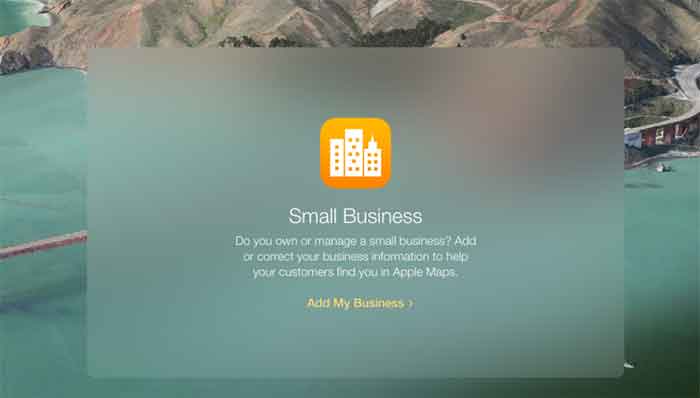
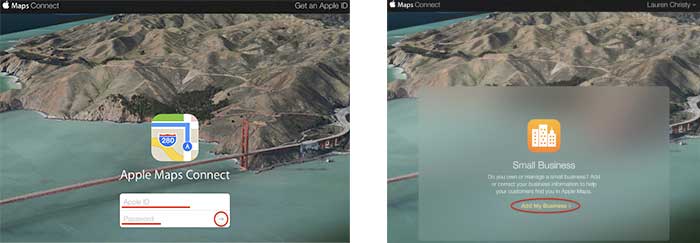
    Click “Add My Business” to get going.

    Step 2:

    Log in with your Apple ID or create a login if you don’t already have one.

    AppleMapsConnectImage

    Step 3:

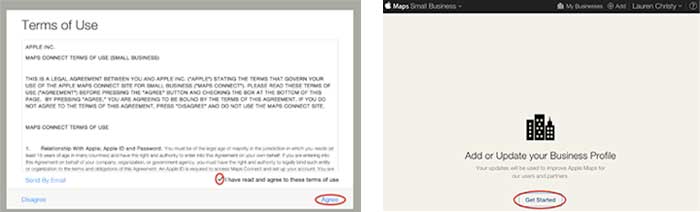
    Read the “Terms of Use,” check “I have read and agree to the terms of use,” then click “Agree.”

    Step 4:

    Click “Get Started” to finally start the actual claiming process.

    GetStartedAddorUpdateBusinessProfile

    Step 5:

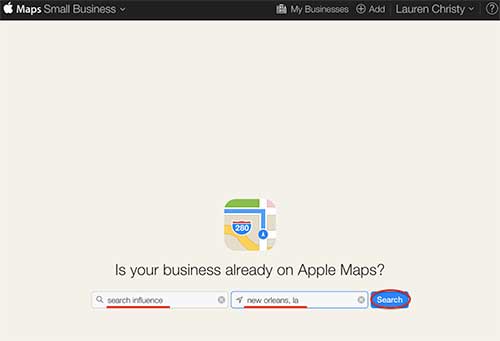
    Search to see if your business is already on Apple Maps by entering your business name, city, and state in the respective fields, then click “Search.”

    IsYourBusinessonAppleMapsImage

    Step 6:

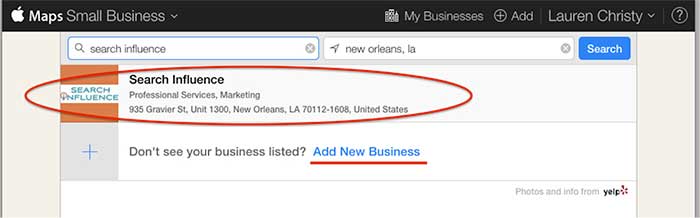
    Based on the results you get, either click on your pre-existing listing to claim it, or click “Add New Business” if yours is not already on Apple Maps.

    NOTE: You should always try searching for truncated versions and any possible variations of your business name before assuming it’s definitely not in a directory.

    AddNewBusiness

    Step 7a:

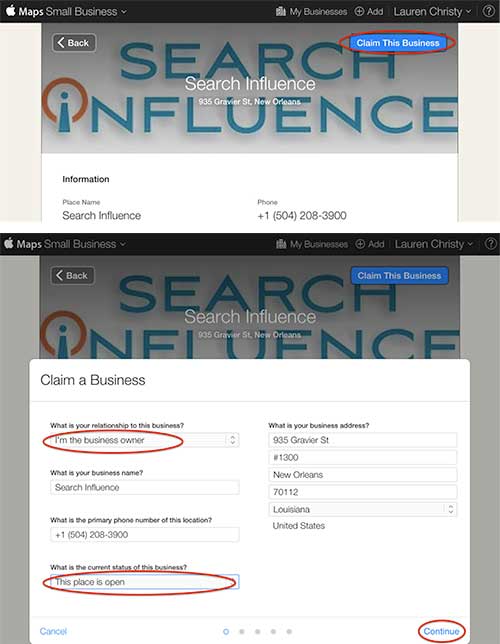
    If claiming a pre-existing listing, you’ll be taken to the live listing of your business where you can click “Claim This Business” in the top right-hand corner. Then you’ll choose your relationship to the business, change any of the business information that is inaccurate, choose the status of the listing, and click “Continue.”

    ClaimThisBusiness

    Step 7b:

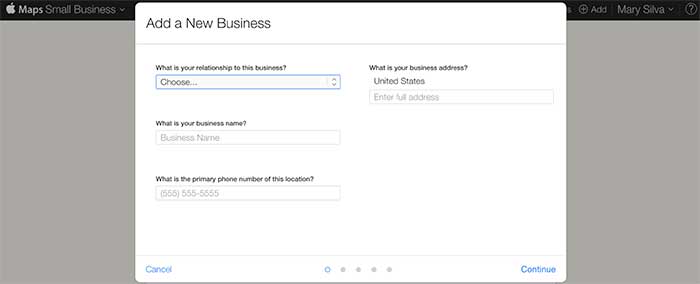
    If creating a new listing, you’ll be taken to a screen to fill out your businesses NAP (Name, Address, Phone Number) and your relationship to the business.

    FillOutBusinessNAP

    Step 8:

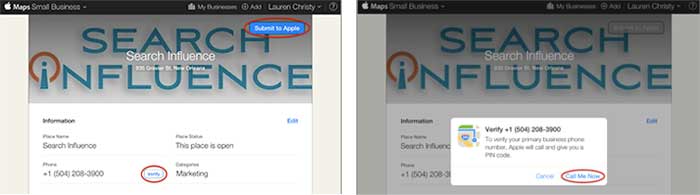
    In either case, the last step is a phone verification. By clicking “Submit to Apple” in the top right corner or “Verify” next to your number, you’ll be taken to a screen to verify your phone number by clicking “Call Me Now.”

    SubmitToApple

    Much like other higher-level directories (think Google, Yahoo, Bing,and Yelp) this phone verification is an immediate, real-time call to the business number to relay a pin. If the phone call with the code doesn’t work the first time, much like Apple’s process for bad pin-code entries on products like the iPhone and iPad that have passcode locks, you have to wait 1 minute to try again, then 5 minutes the next try, and 25 minutes after that. You can circumvent the wait time, however, by logging out of Maps Connect and logging back in.

    Since this is an automated process, businesses like ours with phone tree systems will suffer the inability to phone verify for now. I reached out to Apple Support to see if there’s an option to request a manual phone call to verify or some kind of domain-email verification. Within 24 hours the replied that they “manually reviewed and approved [our] profile” which I assume was because of our domain email being used in our account. Hopefully they’ll take a tip from from Google, Bing, and Yahoo and eventually allow a postcard verification option. Maps Connect is also currently only available to U.S. businesses.

    According to the folks at Search Engine Land, “Updates or new listings will show up within a week or could show up more quickly depending on the situation and whether the listing was flagged and/or there’s additional verification required. Beyond this, Apple has additional fraud prevention measures in place, but didn’t discuss them extensively.” So be patient when making any updates or edits.

  • Is Apple Pay Keeping Google Wallet Away? Yelp Gets Posh + More!

    1. Apple Pay Launches as a part of iOS 8.1
    – Mashable

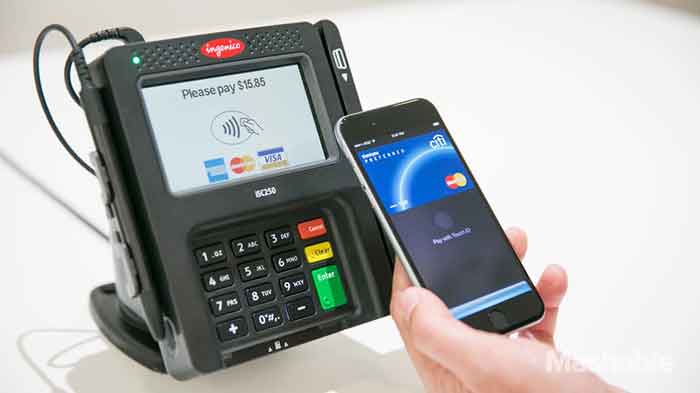
    On Monday, one of iOS 8’s most anticipated features, Apple Pay, went live. iPhone 6 and iPhone 6 Plus users only had to download the iOS 8.1 update and add a credit card to Passbook to start using the feature. In theory, a user only need connect a card, hold their iPhone to a pay terminal, use their personalized Touch ID and be on their way.

    Apple Pay does not link with loyalty cards, nor can it bypass the seemingly never ending prompts you encounter at supermarkets and drugstores. The near field communications (NFC) feature can work with most payment terminals, with most major banks and the list of participating merchants is expected to continue to grow.

    ApplePayImage-SearchInfluence

    2. Google was here first with Google Wallet
    – Mashable

    Although Apple Pay has greatly overshadowed it, Google has had a similar system since 2011 called Google Wallet. But if Google really was the hipster of cellular device tap and pay, why is Apple getting all the credit (pun intended)?

    Apparently, it’s the service providers such as AT&T, Verizon, and T-Mobile that have been obstructing the visibility of Google Wallet for the past three years. While Google controls the Android software that carries Google Wallet, the service providers control the hardware and carried minimal phones capable of using the feature. Apple, on the other hand, controls the hardware and software of their devices.

    Google hopes to gain more media and user attention following the launch of Apple Pay because unlike Apple, Google Wallet is compatible with any bank and any credit card.

    3. Drivers for Uber Protest Company Policies
    – Business Insider

    Drivers for the ridesharing service, Uber, are not happy this week. On Tuesday, drivers organized across the country to protest the company’s policies, including those on reduced fares, tipping, the driver rating system, and driver safety.

    Drivers say that because of Uber’s reduced fares, they are losing money and find shorter trips not worth the cost of gas they require. They feel the company’s automatic tipping policy, that requires drivers to deny cash tips from customers that wish to give one, is only adding to their struggles. Drivers also face concerns over their personal safety when dealing with disgruntled or intoxicated passengers.

    Uber has yet to comment on the matter.

    UberProtestImage-SearchInfluence

    4. Yelp Adds Hotel & Winery Reservations to Business Pages
    – MarketingLand

    Remember last year when Yelp teamed up with OpenTable to make booking a restaurant reservation as simple as a tap of a button? Instead of food, this time it’s rooms and wine. Early on Monday, the company announced that business pages would now do hotel bookings, via Hipmunk, and winery reservations, via CellarPass. Yelp has also expanded its booking services to a number of other third party delivery and reservation services.

    While Yelp does not charge businesses directly for access to these features, the third party providers do and give Yelp a share.

    5. Maps Connect – An Aspirin for the Maps Corrections Headache
    – Search Engine Land

    On Tuesday, Apple launched Maps Connect, a free service that allows small business owners to manage listings on Apple Maps via their Apple ID. The process requires a one-step verification phone call. After that, the business owner is free to manage their listing or listings seamlessly. Updates or newly created listings show up within a week or sooner.

    The service does require an Apple ID, so those without it will need to download it. It also is intended for small business owners themselves, or authorized representatives, but not third party agencies.

    Currently, Maps Connect is only available stateside, but Apple plans to expand overseas in the future.

    AppleMapsUpdateImage-SearchInfluence

    Image Sources:

    Thanks to Mashable for the Apple Pay photo, Maya Kosoff of Business Insider for the Uber protest photo, and Search Engine Land for Apple Maps Self-Service photo.

  • In The Game Of Maps, You Either Get There, Or You’re Using Apple Maps

    NotSureIfWhen you think of Apple Maps, you probably think of the disaster that was the iOS 6 Apple Maps update.

    Apple Maps is infamous for directional errors like having turn-by-turn directions that instruct users to drive across an airport runway to get to an airport. We’ve also experienced client business issues with Apple Maps.

    For example, Apple Maps users were being taken to a location 50 miles away from our client’s actual listed business location when using turn-by-turn navigation in the app. We had to then figure out how to edit business information in Apple Maps, as there is no desktop way to access Apple Maps, and you can only access it through the mobile app.

    The data in Apple Maps is mostly powered by data from Yelp, TomTom, Factual, Localeze, and Acxiom as you can see in Moz’s local search ecosystem. By making sure your business information is as accurate as possible on these sources, you could help avoid errors on the sites that they feed to. Often, however, when it comes to issues with Apple Maps, it’s best to figure out how to fix them at the source.

    YeahItUsesAppleMaps

    So here I’m going to walk you through how to edit information in Apple Maps via your mobile device.

    Step 1:

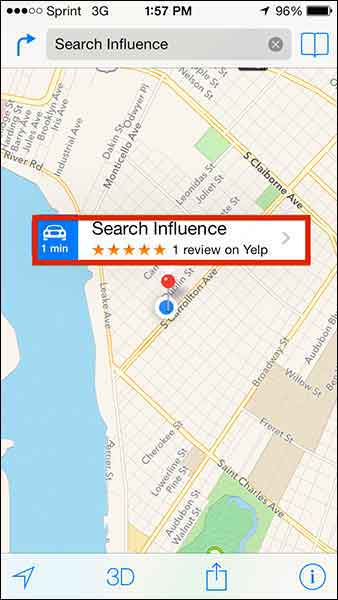
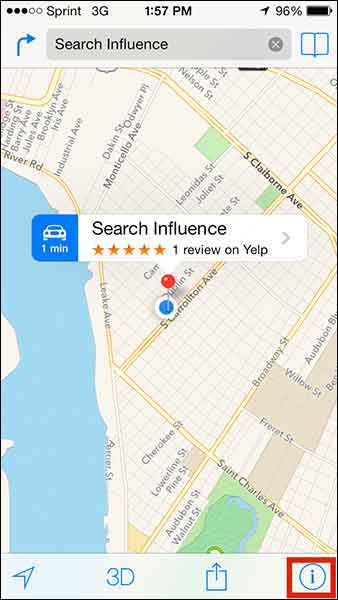
    Search for the business that you’re looking to update.

    Step 2:

    If you’re looking to add a business that is not appearing in search or to update directions that aren’t appearing properly, click on the ‘i’ (for information) icon in the bottom righthand corner. If you’re trying to edit particular business information like name or address, skip to Step 5.

    Step1

    Step 3:

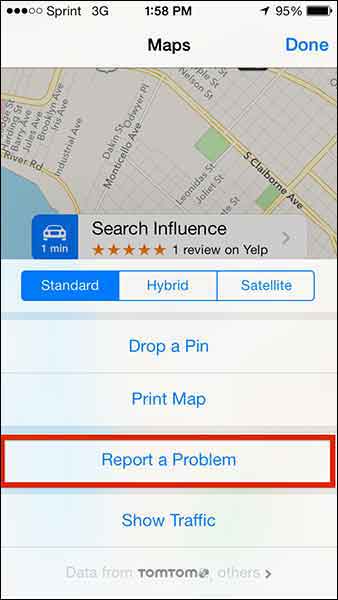
    From this popup dialog you will choose “Report a Problem”.

    Step2

    Step 4:

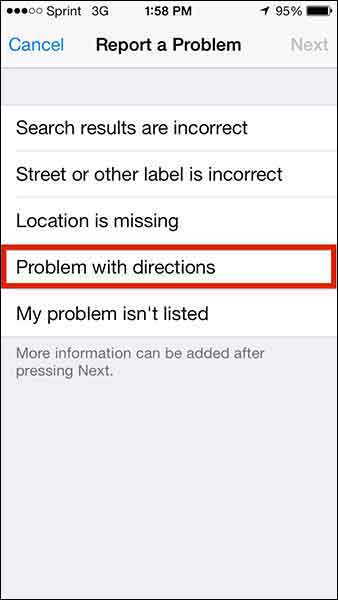
    This “Report a Problem” page will allow you to choose to report that

    • Search results are incorrect
    • Street or other label is incorrect
    • Location is missing
    • Problem with directions
    • My problem isn’t listed

    Select your issue (in our client’s case, we chose “Problem with directions” to indicate that the map was taking people somewhere it shouldn’t in turn-by-turn directions) and submit your problem!

    Step3

    Step 5:

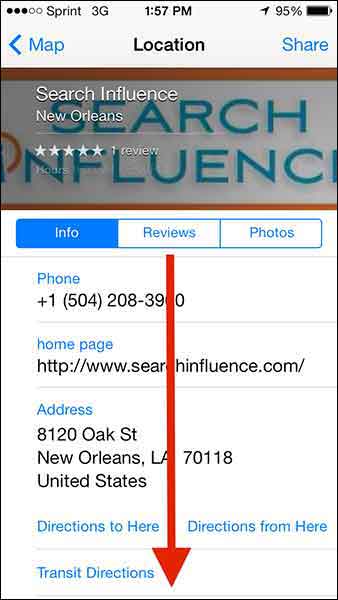
    To make more specific Apple Maps updates about a particular business, click on the business name in the search results.

    Step4

    Step 6:

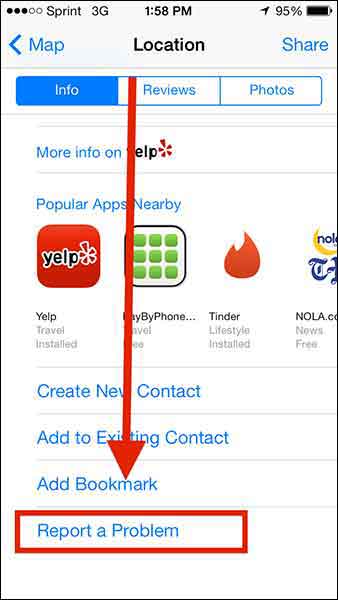
    Then scroll down “Report a Problem” on the “Location” dialog box, and CLICK IT!

    Step5

    Step6

    Step 7:

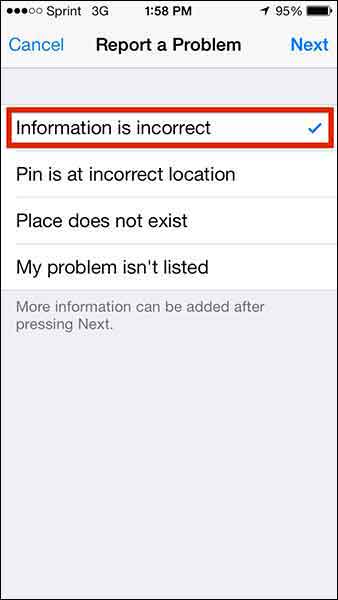
    Choose from the list of issues (most likely you’ll want to report that “Information is incorrect”) and click “Next” in the top right corner.

    Step7

    Step 8:

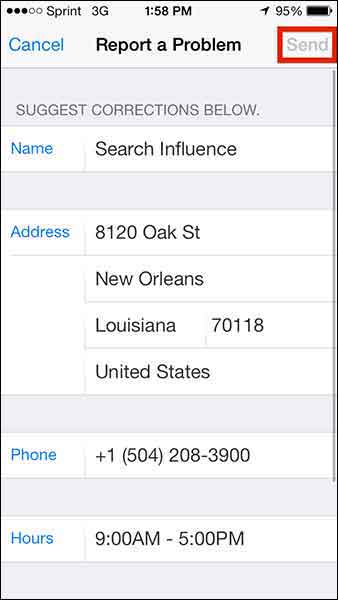
    Edit whatever details you need (obviously this page will differ depending on what problem you’re reporting) and click “Send” to send the report.

    Step8

    1O7UpdateApple maps has been gaining momentum in user numbers as it is the default app on all iPhones. Apple crushes all. It is known.

    With this in mind, one can only hope that Apple Maps’ future will have a formal business portal for claiming and managing your business information, but until then, we’ll have to live with this limited access process.

  • Apple Maps + Local Search Kicks Google Maps to the Curb in iOS 6

    Along with 200+ other new features on the new iOS6, the long awaited improvement to driving directions on your iPhone and iPad is here. No, it’s not a new and improved Google Maps app, but a homebrewed maps solution by Apple, including a local search database. As if I didn’t love Apple enough already, they’ve come up with something that can trump even Google Maps.

    Apple Local Search through Siri on iOS 6 Apple Local Search in iOS 6

    Apple’s press release today states “Local search includes information for over 100 million businesses with info cards that offer Yelp ratings, reviews, available deals and photos.”

    Thanks to Greg Sterling’s Search Engine Land post, we know that Localeze is powering the local search listings database. You may recall that Localeze also the sole provider of Facebook Places data when it was first released.

    How does this affect you as a business owner?

    Well, if Google Maps have given you trouble in the past, you’re in luck. If you are one of the many businesses whose customers relied on GMaps to get them to you, you may have less customers driving to the wrong location now, provided your Localeze information is up-to-date and correct.

    To ensure your business information is correct through Localeze, you can always submit to Localeze.com. There is a premium fee in order to get listed directly with their team; you should be sure to ask them about what’s already listed in their database that may already have your name, address, or phone number on it. Updating of your Localeze information comes with any organic or local SEO service with Search Influence, so if you’re working with us or plan to, you can rest easy that this is covered. (Of course, there are always some issues that might be stickier to solve, so just let us know if you think Localeze has got you wrong!)

    We feel a bit better about directions being powered by this database, as we’ve found it much easier to “clean up” your presence if there are issues. The Google Maps system pulls from many different data sources, but since Localeze is just one, clean-up will be much easier to take on. It doesn’t hurt that this update brings a fresh face lift to the app, as well as turn-by-turn directions.

    In addition to checking up on Localeze, you’ll also want to check up on your Yelp listing(s), including the sentiment of your ratings and reviews. These will also be integrated, just as they already are with Siri.

    There will definitely still be lots to learn once we get our hands on iOS 6 and get to test out our customers’ listings in the new database, so until then, stay tuned!