Author: Tracy Stoller

  • The Most Important Facebook Ad Metrics for Achieving Your Goals

    By now, most marketers buy into the idea that they need to advertise on Facebook and Instagram, but how do they know if those ads work? Enter about a million metrics to analyze.
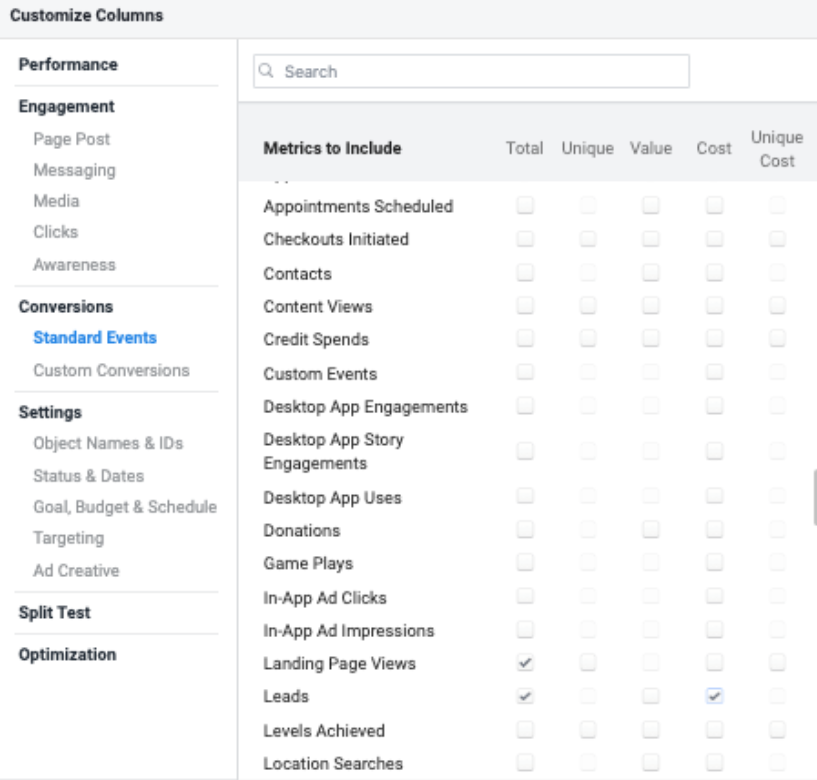
    A screenshot of some Facebook Ad metrics available

    That’s only a fraction of what is available, and yes, it can get overwhelming pretty quickly. The first step to figuring out which Facebook Ad metrics you need to monitor is figuring out your goals. Campaign goals usually break down to these four categories:

    • Increasing brand awareness
    • Driving traffic to your website
    • Generating leads
    • Generating sales

    Let’s look at these and determine what your primary KPIs (key performance indicators) should be for each goal, as well as some secondary KPIs to watch.

    To see some of these metrics, you’ll need to customize your columns. Some of these are not included in the preset table views. Select Customize Columns from the Columns dropdown menu.
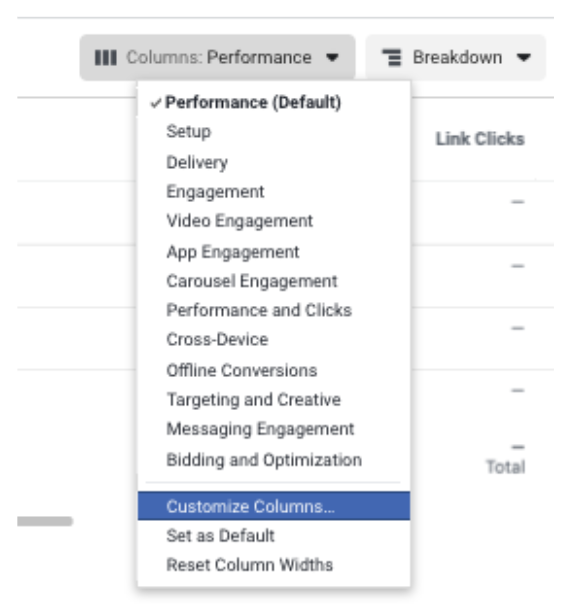
    The columns dropdown menu of Facebook ads

    Increase Brand Awareness

    When increasing brand awareness is your goal, you’ll probably want to show your ads to as many people within your target audience as possible. You’ll also want to show them those ads enough times to make an impression, but not so much that you drive them crazy.

    Brand awareness campaigns are a necessary and often undervalued piece of the marketing funnel. Their impact is notoriously difficult to measure, which means people often overlook their importance. Think about it; you can’t exactly put a number to how “top of mind” your brand is to your audience.

    Primary KPI

    Estimated Ad Recall Lift
    Estimated Ad Recall Lift (EARL) is a tricky metric because it doesn’t measure an action, which is what most other Primary KPIs will measure. Estimated Ad Recall Lift (People) is an “estimate of the number of additional people who may remember seeing your ads, if asked, within two days.”

    Secondary KPIs

    Estimated Ad Recall Lift Rate, Cost per Estimated Ad Recall Lift
    These are calculated based on the Estimated Ad Recall Lift metric. The rate is found by dividing the EARL by the Reach. The cost is found by dividing the Amount Spent by the EARL.

    Since EARL isn’t an action, it doesn’t tell us if the campaigns are “working,” but looking at the rate and cost does help us understand which creative is resonating for the audience and is best used as an indicator when optimizing campaigns. For example, when reviewing ad copy, the ads with the highest Estimated Ad Recall Lift Rate are the ones most likely to be remembered by a user.

    Drive Traffic to Your Site

    If your main goal is to get people to click through your ad and to your site, you might think clicks would be the primary KPI, but you would be wrong. Firstly, Facebook has several click metrics that can confuse newbies.

    The Clicks (All) metric measures ANY click on your ad. So if someone clicks the page name to go to your Facebook page or likes the post, that all gets counted. Link clicks are only counting clicks on your link. This link could be in the text description or the CTA button. Even this isn’t the main metric you want to watch, though.

    Primary KPI

    Landing Page Views
    While clicks on your ad are good (and necessary to get users to your site), what you really need to be reporting on is landing page views. A landing page view is counted when someone clicks the ad and then “successfully loads the destination webpage or Instant Experience.”

    Secondary KPIs

    Link Clicks
    While you don’t want to focus too much on link clicks, you do want to monitor the delta between link clicks and landing page views. If you are getting a lot of clicks and a drastically lower number of landing page views, your site might be too slow. When people lose patience with a slow loading page, they bounce.

    Cost Per Landing Page View
    When looking at creative or targeting performance, the cost per landing page view can help you optimize for efficiency.

    Click-Through Rate
    The CTR is the percentage of impressions that resulted in a click and is often a measure of your ads’ effectiveness. A high CTR is an indication that your ad is resonating with your audience. This measurement doesn’t necessarily mean that it’s a “good” ad; it just means it’s a good ad for that audience. Your top CTR ad for an audience of women over 40 in Manhattan might not perform as well with an audience of millennials in Los Angeles, even if the offer appeals to both.

    Generate Leads

    This one is pretty obvious…

    Primary KPI

    Leads
    If your goal is leads, make sure you have your pixel set up to track your calls, form fills, and other conversions. Hopefully, you’re already using the Facebook Pixel to track the success of your campaigns. This tool is a must for any campaign with a goal that occurs off of Facebook (leads, app downloads, sales, etc.)

    Secondary KPIs

    Cost Per Lead
    The only thing better than a lead is a cheap lead. Watch the CPL to monitor effectiveness.

    Generate Sales

    You would think the first thing you look at is sales, but what you really need to focus on is your return.

    Primary KPI

    Return on Ad Spend
    Your ROAS is a simple little formula—Revenue/Ad Spend—but it’s a big deal. Ten transactions for a $50 item is probably worth more to your business than 15 transactions for a $20 item. But if you spend $5,000 to get those ten transactions and only $100 to get those 15 transactions, you’re looking at 10% ROAS compared to 300% ROAS. Looking at the number of transactions or revenue alone does not give you the full picture. ROAS does.

    Secondary KPI

    Transactions and Revenue
    Though these don’t provide the same context as ROAS, they are still significant and should be monitored along with transaction rate (transactions/clicks) and average order value (revenue/transactions).

    Bonus KPI to Watch

    Frequency
    This indicator is the average number of times each person saw your ad. It is calculated by dividing the number of impressions by reach. It’s essential to monitor your ad frequency to make sure you are hitting the sweet spot between the audience not noticing your ad and users screaming if they have to look at it again. We’ve all experienced an ad that follows us around the Internet or shows up every time we log into Instagram.

    You’ll usually want people to see your ads more than once, but ad fatigue is real. People will start ignoring your ads entirely if they have seen them too many times. It might be a good idea to plot frequency along with your primary KPI to see how your rate affects performance. This Adspresso blog explores frequency’s effect on CTR and CPC. One last tip: once you figure out the KPIs you need to track, you can save your columns by checking the box at the bottom left of the Customize Columns box.
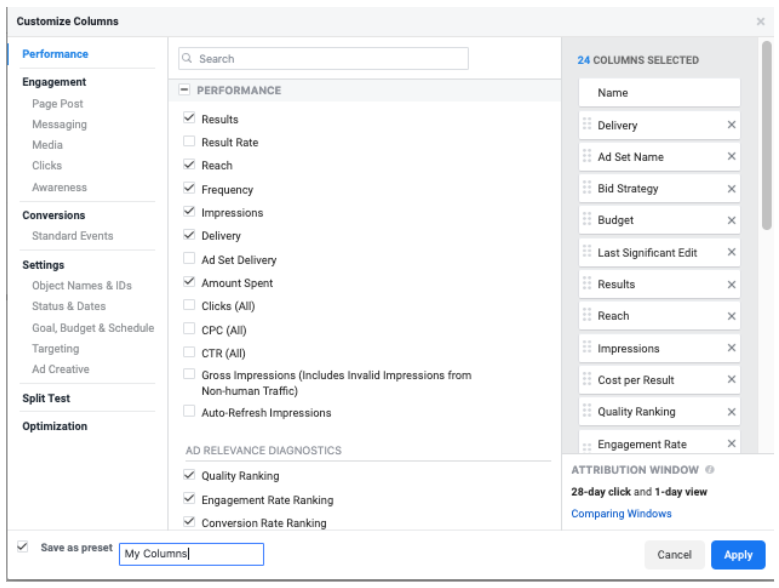
    A screenshot of some Facebook Ad performance metrics available

    By the way, if you’re wondering if there are a different set of metrics you need to monitor for your Google campaigns, we can help you sort through the metric options in Google Ads too. At Search Influence, we’ve helped businesses across the country improve their digital advertising campaigns. To take the performance of your ads to the next level, contact one of our strategists today.

    Images:
    Laptop

  • Drive Conversions With Instagram Shopping Product Tagging

    Ever have one of those “OMG I need it” moments when scrolling Instagram? What if I told you your customers can go from “Oh my God” to “It’s mine” in just a few taps? Instagram is making it even easier for you to give potential customers seamless shopping experiences with Instagram Shopping’s product tags. As all digital marketers know, it’s easier to convert shoppers if there are fewer steps between “I want it” and “It’s mine.”

    Product tagging makes it easier for users to view your products, and it also helps them get to your site without having to put ad spend behind the post to get that “Shop Now” CTA button or using the dreaded “Link in bio.” In fact, product tagging cannot be used on ads, so this can really help beef up your organic posts.

    See It, Like It, Want It, Tap It

    After setting up your mobile storefront, any post can become shoppable.

    The Jungalow example Instagram post showing tagging features

    Once a user taps to see your products, they’ll get a product image, a description, and even related items in your store.

    The Jungalow products show in the Instagram shopping platform

    Users can even save items to their Wish List—which is a private collection of saved products—so they can come back later to make a purchase.

    And though it’s still in beta and only available to select brands, Instagram Checkout will one day allow users to go from discovery to purchase without leaving the app.

    Drive Discovery

    One of the greatest benefits to using product tagging is that your posts can show up in the Discovery feed for users who like pages, businesses, or content that is similar to yours.

    Example of the Instagram discovery feed for products

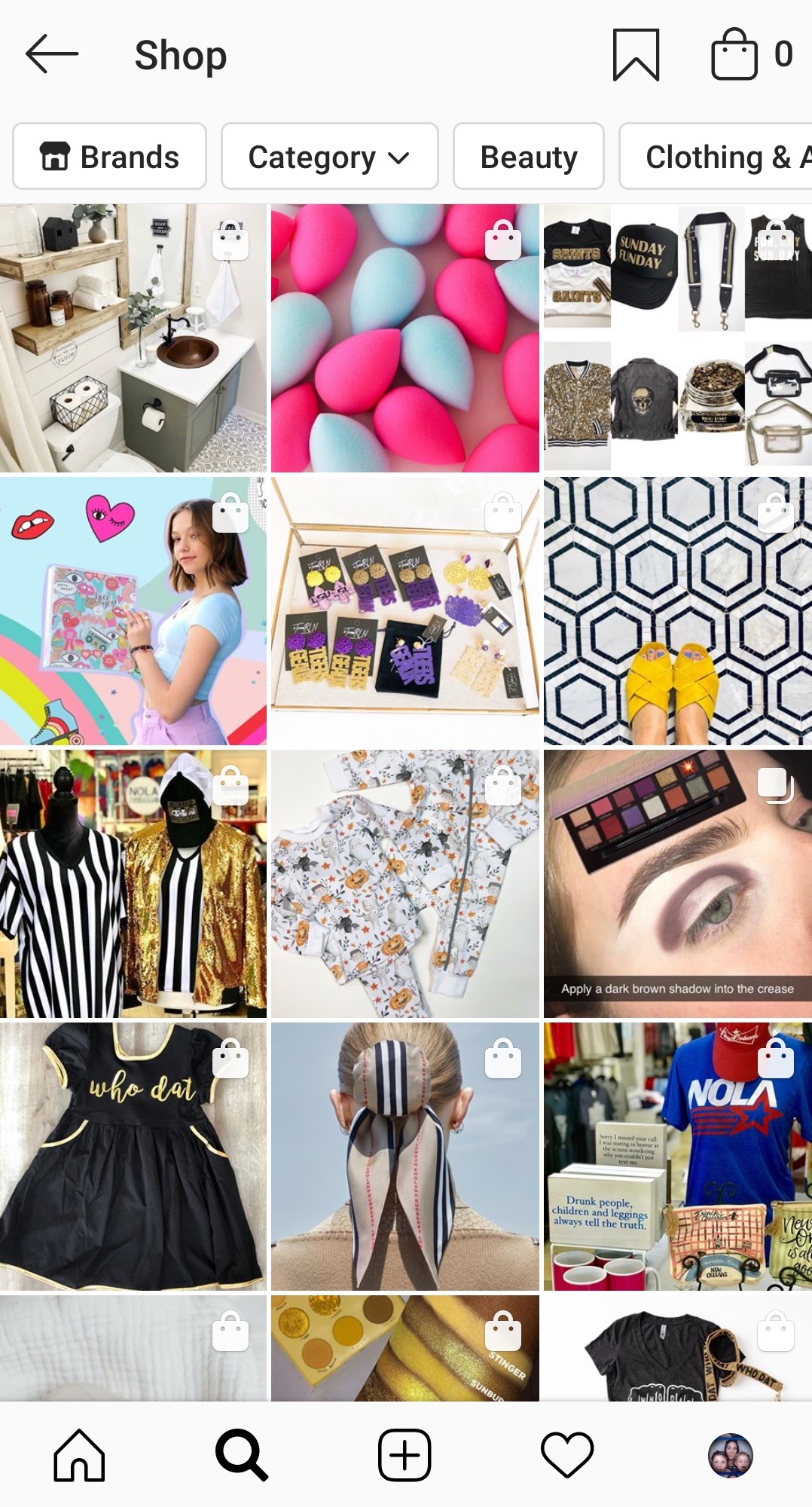
    Users can also filter shopping results by category or by brand. This means that you could be reaching people who are actively looking for the type of product you offer.

    Instagram shopping page found from the discover feed

    But even when users aren’t necessarily looking to shop, these shopping posts blend seamlessly with the rest of the feed, giving you a chance to showcase your products “in the wild.” This is huge in the fight against ad fatigue and ad blindness. As most Instagram users (actually most Internet users) know, we end up tuning out those ads after a while and just keep on scrolling.

    How To Set Up A Mobile Storefront

    You might be asking, “How do I tag my products on Instagram?” Unfortunately, you can’t just set up a profile and go. There are a few steps you need to take before you can start using Instagram Shopping. First, you need to make sure you are eligible.

    1. You Have to Be in a Supported Market

    See the complete list of available markets here. There are several eligible countries.

    2. You Need to Sell Physical Goods

    Services, downloads, and subscriptions to digital services are not supported at this time.

    3. You Can’t Sell Prohibited Items

    Tobacco, supplements, weapons, animals, alcohol, and “adult products,” to name a few, are prohibited. If you think your product might be in a gray area, check the full list here.

    4. You Need an Instagram Business Account and Facebook Business Page

    Your Instagram Business Account must be connected to a Facebook Business Page.

    5. Connect to a Facebook Catalog

    This is going to need to be created and managed either on Facebook using Business Manager or Catalog Manager. You can also manage your catalog through BigCommerce or Shopify platforms.

    Once you have all the pieces in place and make sure you comply with the policies, you’ll have to submit your account for review. In your profile, go to Settings > Business > Shopping on Instagram. Follow all the steps, and in a few days, you should be good to go and ready to tag.

    Tips For Your Shopping Posts

    Now you’re ready to get to tagging. This is the easy part. Any image or video you would normally post to your Instagram Feed or Stories can now be tagged.

    • Get creative: This is your chance to move beyond boring still images of products against a white backdrop. Show us your fashions on real people out in the world. Let us get a peek behind the curtain to your factory floor or your drawing board. How is your product made? How is it used? The sky’s the limit.
    • Stay true to your brand: You want your posts to represent the overall image of your company.
    • Be visually compelling: Not only do you need to stand out in the Feed or on Stories, but you also want to stand out on the Discover Feed. Use bold colors and patterns; beautiful scenery or backdrops; and interesting angles or crops. You need to stop those thumbs from zooming by.
    • Showcase your whole collection: You can tag up to 5 products in a single image or video and up to 20 products in a post with multiple images.
    • Plan your tagged posts: Just because you can turn all posts shoppable doesn’t mean you should. Users might feel bombarded if suddenly you’re posting all your products at once. Use a scheduler to plan out your creative.
    • Feature your customers: When users tag you in images featuring their products, repost them with tags!

    If managing your company’s presence on social media is taking up too much of your time, Search Influence can help. We have years of experience using social media campaigns to drive more customers to businesses. Learn more about how we can help grow your business by contacting one of our digital marketing strategists at (504) 208-3900.

    Images

    Insta-prism

  • Your Guide To Google’s Newest Search Ad Type: Responsive Search Ads

    It seems lately that the changes to Google Ads and the types of ads you can create have been coming faster than some advertisers can handle. A few years ago, expanded text ads were a revelation. More headlines and higher character counts had us all loving the extra real estate we were able to have on the SERP. But now Google has come out with a whole new game changer—Responsive Search Ads. RSAs will save you time and management by relying on automation and machine learning to deliver the most relevant ad for each query. How do you take advantage of all this? By exploring this guide to adding responsive search ads to your paid search campaigns.

    What Are Responsive Search Ads?

    Responsive search ads are a new ad type that’s still in beta, and they might not be available in all Google Ads accounts. Unlike expanded text ads, where you create one static ad, responsive search ads use Google’s machine learning to assess which of the multiple headlines and descriptions that you create will combine to show the most relevant ads to searchers.

    How Do Responsive Search Ads Work?

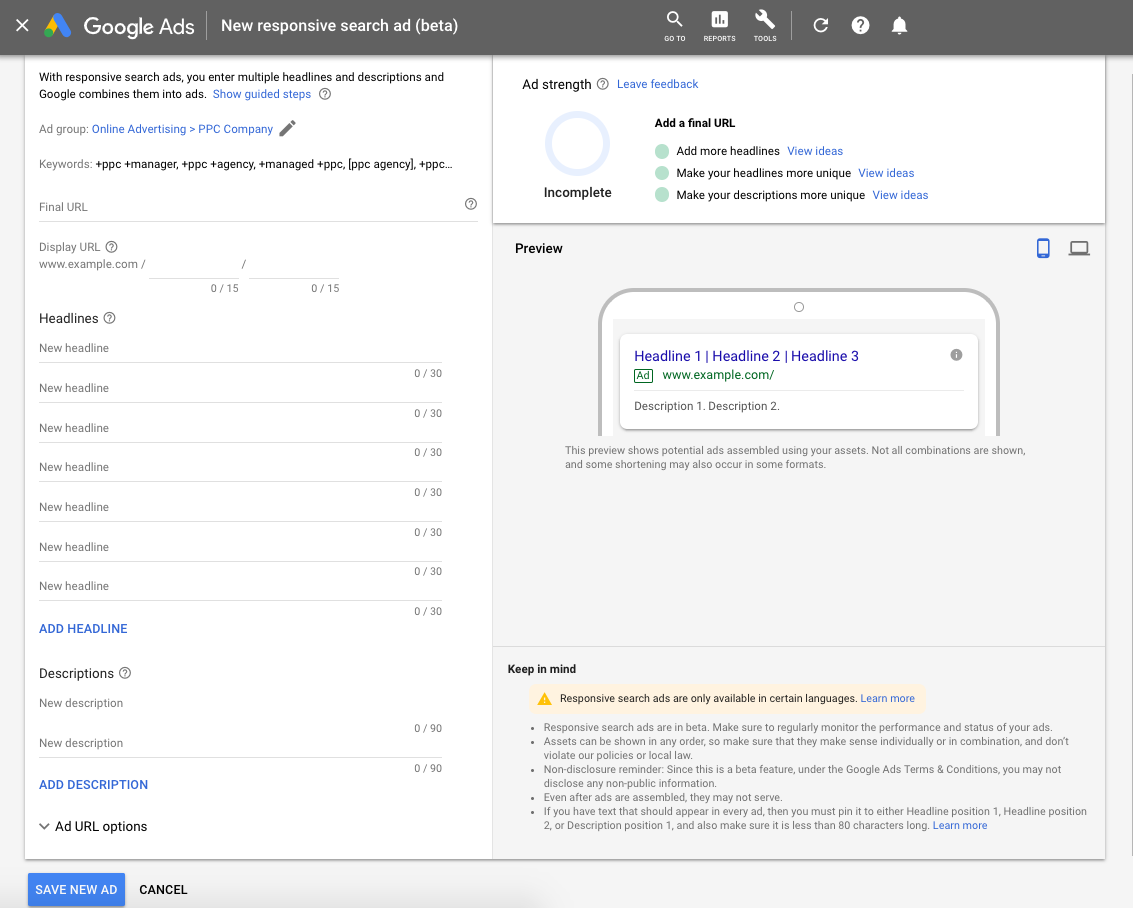
    An advertiser enters up to 15 unique headlines (30 characters each) and four unique descriptions (90 characters each) to create an RSA. When a search triggers your ad, Google reads all of the signals available (search term, intent, device, time of day, and many many more) and uses machine learning to determine which of your ad assets will be the most relevant to the searcher. That is the ad combination that gets served.

    Example of Google responsive search ads work performed by Search Influence in New Orleans, LA

    Responsive Search Ads Vs. Expanded Text Ads

    You might be wondering which ad type to use, and the answer is both. In fact, Google’s Matt Lawson writes that, because RSAs are still in beta, they aren’t going to capture all of the traffic that an ETA might.

    “Try to implement at least three ads per ad group with an optimized ad rotation. If you have access to responsive search ads already, you should remember to have at least one additional text ad in each of your ad groups. Responsive search ads are still in beta, and some traffic won’t be included in that experiment. You need a text ad to capture those impressions.”

    As for the differences between RSAs and ETAs, here’s a breakdown of assets:

    Responsive Search Ads Expanded Text Ads
    Number of Headlines Shown on the SERP 2 or 3 2 or 3
    Number of Headlines Written 3 – 15 2 – 3
    Characters in Each Headline 30 30
    Number of Descriptions Shown on the SERP 1 or 2 1 or 2
    Number of Descriptions Written 2 – 4 1 – 2
    Characters in Each Description 90 90

    As you can see, the searcher won’t be able to tell the difference between the two ad types. When responsive search ads were first announced, there was a lot of rejoicing of “more real estate on the SERP,” as the expanded text ads had lower character limits; however, the character counts of ETAs have been expanded once again to match the RSA character limit.

    What Are the Benefits of Using Responsive Search Ads?

    The most immediately obvious benefit of RSAs is that Google does the testing for you, virtually eliminating the need for you to run A/B tests. This can save tons of paid search account management time. Google claims that the constant testing will lead to the most relevant ad being shown for different search terms. This is something that a lot of advertisers need help with. Though there are scripts that can create reports approximating this effect, there is no way to segment ad copy performance by search term in the Google Ads interface.

    What About Disadvantages to Using Responsive Search Ads?

    All this time-saving automation comes at a price, of course: control. Someone with lots of time to test minor tweaks and analyze an abundance of data might prefer to conduct their own tests.

    Though there are options to “pin” a couple headlines and descriptions so that they always show (useful for compliance reasons or companies with strict branding), you are really limited in controlling the final version of the ad.

    Reporting options are subpar so far. We are offered very little insight into how each asset is performing, but we do have an asset-level report that shows how many impressions each headline and description has gotten, and a combination report that shows impressions for each combination.

    From this, you can infer which assets are performing best, but it’s only an assumption that’s based on trusting Google to properly optimize. Google says poor performers won’t be delivered, so if you see an asset getting few impressions, it might be underperforming.

    Along with the lack of control, RSAs also don’t support ad customizers at this time, with the exception of dynamic keyword insertion, which is actually encouraged. This means that you are unable to use countdowns, IF functions, inventory customizers, etc. with RSAs.

    Responsive Search Ad Best Practices

    Before you create responsive search ads, you might want to brainstorm a few benefits, features, and calls to action that you’ll want to include in your ads. Some of these features and tactics include…

    Unique and Varied Headlines

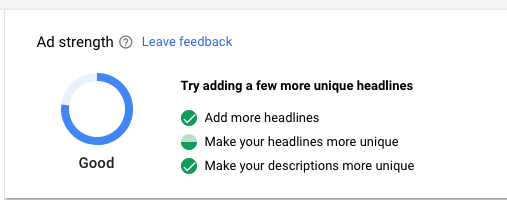
    You want your headlines to be distinct. Google says it has controls in place to prevent redundant assets from being served together, but headlines need to be different enough from each other that the system can adequately distinguish between them and serve relevant combinations. When building your ads, you will notice the Ad Strength meter in the upper right of your screen assessing the quality of your ads. This is what it might look like if your headlines are too similar:


    Pay attention to the ad strength and get creative. You’ll also see the meter telling you to add more headlines. Strive to fill all 15 spots with a unique headline.

    You should also vary the length of your headlines. You don’t want to use all 30 characters in every headline. As with the content of the headlines, this gives Google more factors to test. Also, that third headline is more likely to show if it is short.

    Use Your Keywords—But Do So Sparingly

    You’ll want to include your keywords in some of your headlines, but not all of them. I like to keep only three or so keywords in the headlines and then maybe one or two in my descriptions. This leaves room for more of the business’ benefits, features, etc., and gives more variety. In addition to three keywords, I also use DKI in one of the headlines.

    Use Google’s Recommendations

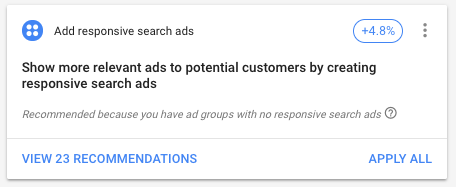
    If you haven’t started implementing responsive search ads yet, but are opted into the beta program, you might see recommendations to do so in Google Ads.

    Recommendations provided by Google Ads prior to starting campaign

    This is a great way to get started. When you view the recommendations, you’ll see that Google has already created some RSAs from headlines and descriptions that you are already using in your ETAs. Review these recommendations and make any necessary changes, then hit “Apply,” and you’ve got yourself a responsive search ad.

    Once you have ads running, you might also notice that when you go to add new headlines, Google will make suggestions based off your other ads and your landing page. Some of these might not be relevant to the particular keywords in your ad group, but some likely are relevant.

    More recommendations from Google prior to launching ad campaign

    How Many Responsive Search Ads Should I Use in an Ad Group?

    It’s best practice to have at least one RSA with two or three ETAs in an ad group, but you can include up to three responsive search ads in each ad group. Most advertisers won’t need this many, but if you are pinning headlines and descriptions, you might want to test pinning vs. not pinning, or A/B test the headlines you are pinning.

    Don’t Forget to Monitor Responsive Search Ad Performance

    Especially while RSAs are still in beta, advertisers need to be monitoring if they are performing as well or better than your ETAs. As always, focus on your bottom line, not solely on click metrics like CTR. Watch that Google’s optimizations aren’t suppressing your most profitable ad in favor of your most clickable ad. I recommend reading this piece on Search Engine Land about not relying too heavily on CTR and conversion rate for more information on this topic.

    A strong campaign for your business’ online advertising requires experts who are up-to-date on all of the latest roll-outs from Google and other advertising platforms. Search Influence can expand your business’ online presence. Start a conversation with one of our digital marketers today to grow your business.