Author: Teri Murphy

  • How to Use Consideration Content to Move Prospects Down the Funnel

    Key Insights

    • Understanding the buyer’s journey is key to developing content that leads to conversions.
    • The goals of consideration content are showing prospects how you can address their problem and getting them to add your business to their list of options.
    • There are several types of consideration-level content that can be created and tracking methods to determine if your content is successful.

    Imagine you’re the marketing coordinator for a small college that caters to working adults looking to change careers. Your ideal prospect is at home with their kids, frustrated with their current employment, and they decide they’d like to go back to school and get a degree or certification. They’ve now identified their need for your service.

    They begin researching going back to school and land on a blog on your college’s site titled “8 Reasons to Consider Going Back to School.” Your team’s goal is now to get the prospect from the very top of the funnel to the consideration phase and through to conversion. But, how? In this post, we’ll discuss the consideration stage, what consideration content looks like, how to plan content creation, and how to track its success.

    A woman on a laptop

    What Is the Consideration Phase?

    The consideration phase is a stage in the marketing funnel. The marketing funnel visualizes the path that your potential customers will travel through on their purchase journey. This funnel consists of five stages: awareness, consideration, decision, conversion, and delight.

    • Awareness: The prospect is aware of their problem or need and potential solutions to address it.
    • Consideration (also sometimes referred to as Interest and/or Evaluation): The prospect shows interest in solving their problems by evaluating their options.
    • Decision: The prospect is actively evaluating your brand and maybe others.
    • Conversion (also referred to as Commitment or Close): The prospect closes and becomes a customer.
    • Delight: This stage involves maintaining communication with your customers after they’ve made a purchase. Your goal is to establish brand loyalty and make customers promoters of your business.

    Understanding the buyer’s journey is a key to developing content that leads to conversions. You’ll want to create content that understands your prospects’ problems and help them understand the options to mitigate their problem. The consideration phase in the buyer’s journey is where you want to offer your target audience content that will have them actively consider your business as a solution to help solve their problem. You’ll want this content to be informational but not too sales-y and overly promotional.

    Defining Consideration Content

    During the consideration phase, your content should highlight your products and services. What makes your product or service unique? What do your current customers and clients think about you? Are there free trials or demonstrations you can offer? You’ll want to help your prospect decide on their solution, and there are several types of content you can create to guide them to the decision phase.

    Downloadable Content

    Downloadable content can help usher your prospects from consideration to conversion. There are multiple types of downloadable content, including:

    • White Papers: A report or guide that informs the reader about a specific topic. White papers are usually an authoritative, in-depth persuasive piece that presents a problem and then provides the reader a solution.
    • E-Books: These longer-form downloads are similar to physical books. In contrast to white papers, they may be longer in length and even more in-depth. E-books may include a layout that makes information easier to digest.
    • Content Downloads: This type of content is usually in the form of a PDF and shorter than both a white paper and an e-book and includes informational content about a topic related to your product or service.

    Videos

    Video content is great for storytelling and demonstrations. This could be a how-to video or a customer giving a riveting review of their experience with your services. The great news: you can create effective and engaging video content in-house with online resources.

    Cost Calculators

    Everyone has a budget, and cost calculators can help your prospect see the projected cost of your services or product and if there are any money-saving bonuses available. Cost calculators allow a user to input a few variables and get an estimated cost for the product or service. These are common across colleges and universities to calculate student tuition but can be useful for other industries like software companies or home improvement businesses.

    Webinars

    These virtual events can be a workshop, lecture, or even a simple presentation. Webinars allow your prospects to engage with your business while gathering relevant information about your product or services.

    Planning Consideration Content: How to Brainstorm

    You should build your consideration content around two things:

    • Answering your prospects’ questions
    • Addressing their pain points

    Here are some ideas to help brainstorm and begin planning out consideration-level content.

    Tap Into Customer Feedback

    You can utilize customer feedback from review sites, surveys, and testimonials to get an idea of your customers’ frequent questions, concerns, and general feedback. This creates relevant, helpful content since it’s based on what your customers are already saying and asking about your business.

    Focus on the Sales Process

    During your sales process, you probably get a lot of good questions from prospects. This is a great place to get content ideas. If a prospect has a specific question during a consultation, it’s likely other people who may be researching your product or service have it as well.

    Use Search Phrases

    Doing keyword research can give you an idea of questions people have about your industry and services. This can be done in a few ways:

      • Google Search Console: With Google Search Console, you can see which queries give impressions to your website. Look for queries that have high impressions but no clicks; these may give you ideas of what people are looking for and provide questions to answer.
      • Google Auto Suggestions: If there are phrases or questions you know your customers or prospects use to find you or ask, you can place these into Google and take note of the suggestions Google presents to you. These searches are so common that Google is suggesting them to you.
      • Google Keyword Planner: Google Keyword Planner is usually used for Google Ads campaigns, but you can use it for organic content development as well. Similar to above, add the phrases to the tool to get more keyword ideas.
      • Answer the Public: This tool visualizes search questions and suggested searches. Drop a keyword related to your product or service, and Answer the Public will provide you with hundreds of questions that can be used to help you develop your content.

    A man writing notes with a pen and paper

    How to Set Goals and Track Success

    Now that you know what consideration content is and how you can start planning your own content, how do you get users and prospects to engage with your content? To get them to take that desired next action, you’ll need the right call to action. What is the next step to expect from a prospect at this stage? You’ll need to understand your buyer’s journey to know what the appropriate call to action is.

    Typically, moving into the consideration stage involves the prospect making a small commitment in exchange for their contact info for one of the pieces of downloadable content we mentioned above.

    Depending on your buyer’s journey, the next step could be a light or hard ask to:

    • Visit your website
    • Sign up for a webinar
    • Download a PDF or white paper
    • Filling out an inquiry form

    When your prospect takes whatever action you define, this will move them into the consideration stage of the marketing funnel.

    How will you know if your content is successful? What metrics should you measure? To successfully track and measure your digital marketing efforts, you should set up Google Analytics to report site traffic, visits, conversions, and other tracking metrics.

    At the consideration stage, you should be measuring:

    • Call-to-action performance
    • Content downloads
    • Site traffic
    • Time on site
    • Bounce rate
    • Comments
    • Video watch time

    Consideration content is all about engaging your prospects, answering their questions, and moving them to the next stage in the funnel. Now that you know how to create content, what will you work on first?

    Partner with Search Influence to develop a custom marketing strategy that aligns with your business goals and helps move your prospects down the marketing funnel and closer to the sale. Schedule a free consulting session with one of our strategists to get started.

    Image Source:

    Woman on a laptop

    Man with a notepad

  • Why You Should Reply to Your Reviews—Especially The Negative Ones

    Whether we’re using social media to keep up with friends, watching videos on YouTube, or even searching the Web to find a doctor, most of our daily activities involve our phones and other devices with access to the internet. Many of us will turn to reviews, along with recommendations from our friends, to find restaurants to eat dinner at or even when choosing an apartment community to live in. Having positive reviews on your online listings as a business owner is important, but responding to them is even more important. Especially when it comes to negative reviews.

    Why Are Customer Reviews Important?

    Your reviews are a representation of your business. They usually say a lot about the company long before you’re able to speak for it yourself and tell your brand’s story. Potential customers or clients will use reviews to gauge if your products or services are worth the money. According to Vendasta:

    • 92% of consumers will read reviews to determine the quality of a local business
    • 72% of consumers say that positive reviews make them trust local businesses more
    • 80% of customers say they trust an online review or recommendation just as much as a personal recommendation from a friend

    Having enough positive reviews to prove your value is important for garnering new customers. Negative reviews are also important and have an impact on your brand perception. About 86% of people will hesitate to purchase from a business that has negative reviews. 

    The good news is, outside of providing exemplary products and services to your customers, there are ways to reach out before a customer leaves a negative review and thereby get more positive reviews over time. For our client, K. Mathew Warnock, we were able to get him 100 positive reviews in about five months.

    Why Is Responding to Reviews Important?

    You should absolutely be responding to every review you receive. Not only is there the benefit of building relationships with your customer base and having social proof for future customers, but there is also an SEO benefit as well. Responding to reviews shows prospective clients, as well as search engines, that you are committed to satisfying customers and maintaining an active presence on your listings. Google has confirmed via one of the Google My Business Help pages that responding to reviews shows them you value your customers and that high-quality, positive results can improve your business’s visibility in the Search Engine Results page.

    Experts in our field have long believed that in terms of local SEO, review signals were an important factor in Google’s ranking factors. In fact, in 2018 as a part of Moz’s yearly Local Search Ranking Factors, they listed Review Signals as 15.44% of the algorithm when your business is shown in the Maps pack, following closely behind having a well-optimized Google My Business profile with accurate categories, keywords, and being in proximity to your potential customers.

    Person using their smartphone to access local business information

    Google isn’t the only place your customers should be leaving reviews. Depending on your industry, you’ll also want them to leave reviews on other local directories like Yelp, social sites like Facebook, and niche sites like HealthGrades or Home Advisor. 

    How Do I Respond to My Reviews?

    There are some general rules of thumb for responding to reviews that should be followed, regardless of whether they’re good or bad:

    • Respond On Time
      • Some things, like negative reviews, may require you talk offline with your team to craft a response, and that’s okay. But you don’t want to leave reviews sitting for weeks without some sort of response.
    • Customize Your Response
      • Having templates or drafts of responses you use to respond to customers can save administrative time, but you don’t want your customers to feel like you’re giving them a cookie-cutter response.
    • Always Thank Your Customer
      • Good or bad, the reviewer did business with your company and took time out of their day to leave you a review. Reassure them that you are dedicated to providing the best customer service experience possible.

    How to Respond to Negative Reviews

    Bad reviews happen. Don’t fret and don’t overreact. There are some simple ways to make responding to negative reviews as breezy as possible. 

    • Apologize
      • This can be a hard one, but do it and keep it professional and not defensive. Apologize if the reviewer has expressed dissatisfaction with your product or service. Sympathize with them and show them that you can understand their frustration or disappointment. Don’t blame the customer or shift blame on to your staff. Accusing the customer of lying or exaggerating can be offensive as well. 
    • Connect
      • Offer the negative reviewer contact information, either yours as the business owner or a manager’s, so that you can ask more questions about their dissatisfaction. Keep it short and sweet. 
    • Offer Reassurance
      • If you know the customer and what their issue was with your product or service, offer a resolution like a refund or free products. If bad service was the issue, let the customer know that you are taking the necessary steps to ensure if they’d like to visit or purchase from you again, their experience will have improved.

    5 star review custom graphic for Search Influence blog

    How to Respond to Positive Reviews

    Responding to positive reviews is a bit easier, right? You’ve gotten a glowing review from a recent customer. They can’t help but gush about your service and the attention they received. They love your staff. They love your business. How do you respond to that?

    • Show Acknowledgement & Gratitude
      • Don’t forget to be polite and acknowledge the reviewer by their first name; this adds a bit of personalization over generic greetings. Thank them for patronizing your business. In the case of both positive and negative reviews, gratitude goes a long way.
    • Use Keywords 
      • Using keywords, your business name, and location specific information in your response can help improve the visibility of the positive review.
    • Market 
      • Invite the customer back to your business. A simple “we can’t wait to see you again” can work. You can also let them know about other products and services you offer. If a customer came to your restaurant and enjoyed your espresso, for example, maybe entice them to try it next time with your favorite pastry offering. 

    Coffee being served

    Do You Need Help Managing Your Online Reputation?

    Search Influence can help your local SEO efforts. We’re a digital marketing agency in the Gulf South dedicated to helping our clients optimize their potential through dynamic marketing strategies. Request your free marketing analysis to learn about how we can help drive qualified leads to your business.

    Images

    Smartphone

    Cappuccino

    5 stars

  • Common Google Analytics Terms Explained

    Google Analytics is a free service provided by our friends at Google that automatically collects and allows you to analyze data about your website visitors. Google Analytics is an essential tool for digital marketers, businesses, bloggers, and everyone in between with a website.

    Google Analytics can help guide your decision-making processes and marketing strategies. You can figure out why your website visitors are bouncing, learn about the demographics of your audience, monitor progress towards your goals, and more.

    With the plethora of information available in Google Analytics, it can be difficult to understand all of its dashboards and metrics.

    Google Analytics Terms for Beginners

    • Users

      • The number of people who viewed your website at least once within a given time period is represented by users.
    • Pageviews

      • Pageviews is the number of times visitors to your site view a page. Every page visit is included in this number, including if someone refreshes the same page. Pageviews is a great metric to look at when you want to determine which pages are your website’s most popular.
    • Sessions

      • Sessions are the individual periods of time someone visits your website. A session resets in increments of 30 minutes. A website visit ends when 30 minutes have passed. If a visitor leaves and returns to your site within 30 minutes, that counts as one session.
    • Bounce Rate

      • Bounce rate is a number that is found by dividing the number of total bounces by total visits. This represents the percentage of people who visit one page on your website and then leave without going to any other pages. Bounce rates can be applied to an entire website or individual pages.

    Dimensions

    Dimensions are attributes of your Google Analytics data. Some examples of dimensions are the source/medium, which we’ll discuss later, or location. There are several options, including device category, language, and campaign. Dimensions are helpful for making sense of the data generated by different reports.

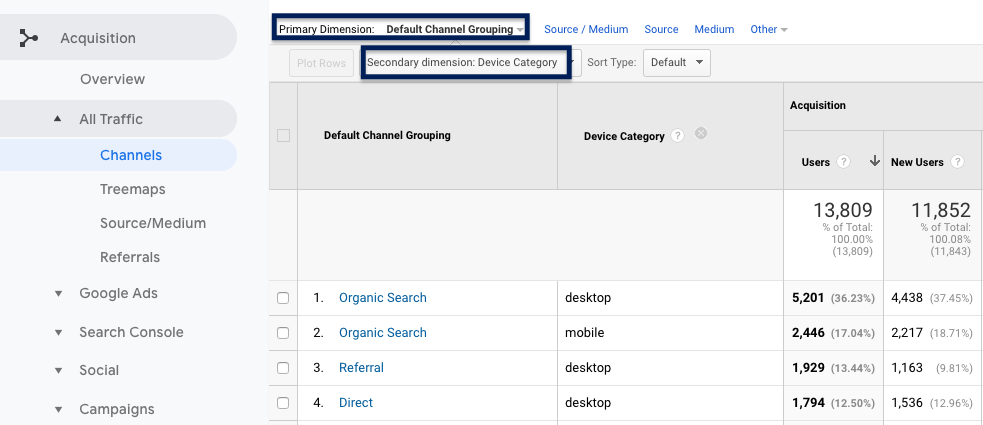
    • Primary dimension

      • A primary dimension in Google Analytics is the first displayed attribute of your data, which differs depending on the report you’re looking at. For example, if you’re looking at Channel under Acquisition, the channels by which people used to visit your website is the primary dimension.
    • Secondary dimension

      • A secondary dimension in Google Analytics allows you to add another layer to parse through your data. So, let’s say you wanted to know how many people visited your site through each channel and the device they used to get there, you can add “Device Category” as a secondary dimension to see the data sorted by the device.

    Screenshot of a Google Ads campaign managed by Search Influence in New Orleans, La

    Reviewing Acquisition Reports

    If you’re curious about how people found your website, acquisition reports will tell you which sources visitors used to get there. The acquisition report shows the origin of the visit (like a search engine, a Facebook ad, or email marketing campaign) and the specific medium.

    • Channels

      • Channels in Google Analytics provide a broad idea of where your website visitors came from. Analytics has a default channel grouping. This grouping consists of channels like Direct, Organic Search, Social, and Referral.
    • Organic Search Traffic

      • An organic search visit is a visit that came from a search engine. If someone typed in your business name or keywords related to your business in Google and clicked on your website in the Search Engine results page, this counts as an organic website visit.
    • Direct Traffic

      • Direct traffic is a result of a user typing in your exact web address in the address bar or clicking a bookmark in their browser.
    • Referral Traffic

      • Referral traffic visits are a result of visitors getting to your site from another site on the web. If I were on Yelp browsing restaurants for dinner and came across a place I’d like to check out and then clicked a link to their website from their Yelp listing, this would show up in their Analytics as a referral visit. Reviewing referral traffic can be helpful for deciding if certain off-site tactics are worth the time and effort. For example, if you’re doing a lot of posting and promotion on Facebook and you see that your referral traffic has not increased, you may decide to spend less time on that strategy and focus elsewhere.
    • Source/Medium

      • Source/medium provides a closer look at where your website visitors are coming from. Source identifies the referrer of a site visit. A source can be a search engine, an ad, a newsletter, etc. while the medium is the channel used. Examples of source/medium include the following:
            • Google/organic – Google is the source, organic the medium.
            • Google/CPC – Google again is the source, but the medium is a paid search ad.
            • Yelp/Referral – Yelp is the source and a referral is the medium.

    Search Influence employee working on Google Ads campaign in New Orleans, LA

    For Understanding User Behavior & Measuring Conversions

    • Landing Page/Exit Page

      • A landing page is the page a user first sees when they visit your website, and an exit page is last one they browse before leaving.
    • Events

      • Events are actions that a user takes on a website. Ideally, these should be created around your key performance indicators. For example, if you have a button on your website that allows users to check the rates of your B&B for a night’s stay, you can set up an event to know how many people clicked that button.
    • New vs. Returning Visitors

      • Google Analytics allows you to divide your site traffic into new and returning visitors. New visitors are people who had not previously visited your website during the time period you’ve selected. Returning visitors have viewed your website more than once during that time frame.
    • Goals

      • Goals are similar to events but are more focused on conversions. An example of a conversion is someone making a purchase or requesting a proposal from your company. Google Analytics provides 20 slots to track these.

    Navigating Google Analytics and all of its reports can be difficult. Properly utilizing the tools within Google Analytics to inform your business decisions can be even more challenging, but we can help with that. At Search Influence, we love analytics and lead tracking. Give us a call at 504-881-1597 to learn how we can help you know where your customers are coming from.

    Images

    Google Ads on Laptop

    Person Working on Laptop

  • Guide to Facebook’s Lead Generation Ads: What Can They Do for Your Business?

    You’ve probably heard this a million times by now, at least a couple thousand from us—if you aren’t on Facebook, then you’re doing your digital marketing all wrong. There are more than 2 billion people around the world who actively use Facebook monthly, and on average those people spend about 35 minutes a day swiping through their feeds and engaging with content from friends, family, and brands.

    Not only is Facebook’s audience large and engaged, Facebook offers an advertising tool that makes it easy for you to create advertising campaigns at a fraction of the price of traditional ad types. Our client Audubon Nature Institute generated $10,100 in total revenue while only investing $1,080 in ad spend on a Facebook Display campaign!

    What Are Facebook Lead Ads?

    Facebook Lead Ads are a type of Facebook ad that allows advertisers to collect information from prospective customers directly from the platform. Before Lead Ads, you would have to guide users to a landing page on your website to leave their contact information.

    Facebook has made it simple for you to create ad campaigns in a few taps and for potential customers to contact you with ease. Users simply tap your ad and their information is sent directly to you.

    Why Facebook Lead Generation Ads?

    • Facebook forms are made for mobile and allow users to submit their contact information in a flash
    • Because there is no need to click through to a landing page, there is potential for more conversions and less drop offs
    • You can reach your target customer where they are with Facebook’s countless targeting options
    • The Lead Generation forms are customizable, allowing you to build a form to ask the right questions
    • It’s easy to connect your CRM to Facebook to get your leads immediately and take action sooner
    • You can use Facebook Lead Generation Ads for quote and demo requests, sign-ups for your newsletter, event registration, access to gated content, and more
    • Many businesses and brands large and small have seen significant increases in lead generation and a reduction in cost per lead
    • Facebook advertising is cheaper than traditional ad types and can build more brand awareness
    • It saves you time

    Where Will My Leads Go?

    All of the leads you collect by way of your Facebook Lead Generation campaign will be stored on Facebook and can be downloaded to a CSV file. To download your leads, visit your Facebook page and click “Publishing Tools,” and you’ll see “Forms Library” under the “Leads Ads Forms” label.

    Pro Tip! Facebook also connects to popular CRMs like HubSpot and SugarCRM, enabling you to automate the process of pushing leads directly to your sales team. If you don’t take this step, you’ll have to download a CSV file regularly to see and take action on your new leads.

    Creating Your First Lead Generation Ad

    Before you begin building your campaign, you’ll need to make sure you have a Facebook Page for your business or brand. Building your campaign starts with visiting Facebook Ads Manager via business.facebook.com or accessing the drop-down menu on the top left of your screen. If you’ve never run ads before, you will need to create a Facebook Ads Manager account. You will be asked to link your business’s Facebook and Instagram page to your Facebook Ads Manager account.

    Building a campaign is simple and can be done in a few steps.

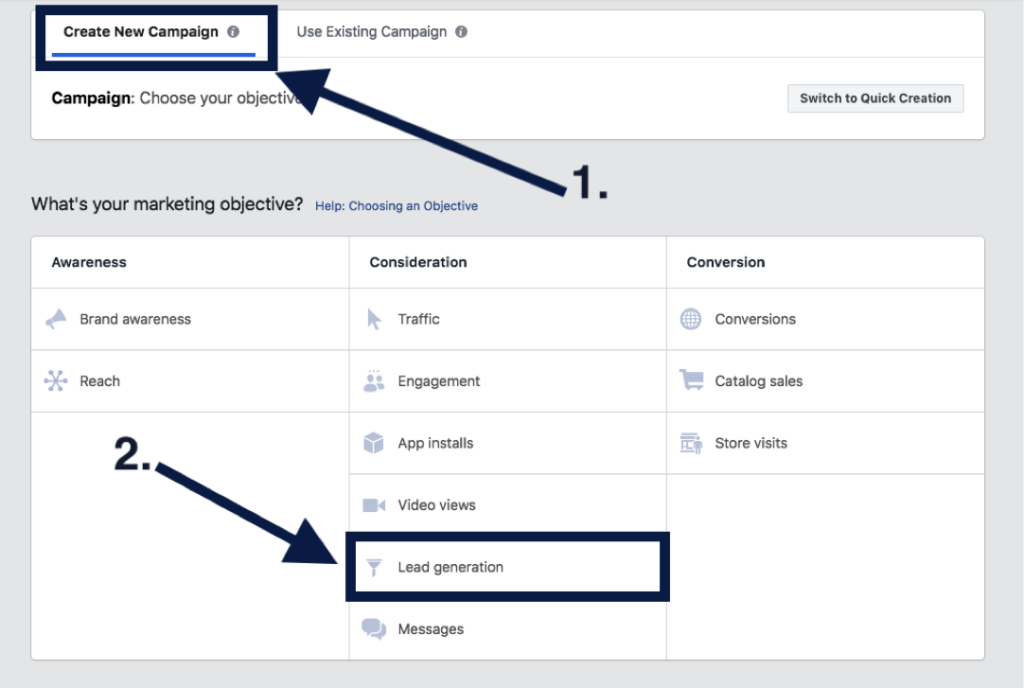
    1. Choosing Your Campaign Type

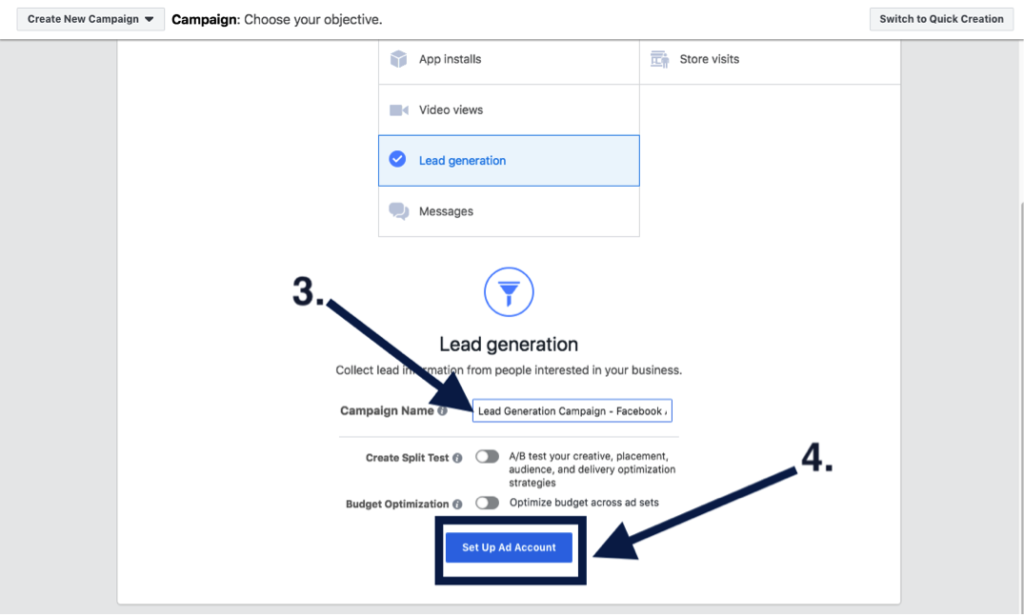
    Once you’re all set up and ready to go, you’ll want to create a new campaign and select “Lead generation” under the “Consideration” marketing objectives. You’ll want to give your campaign a relevant name and click “Continue.”

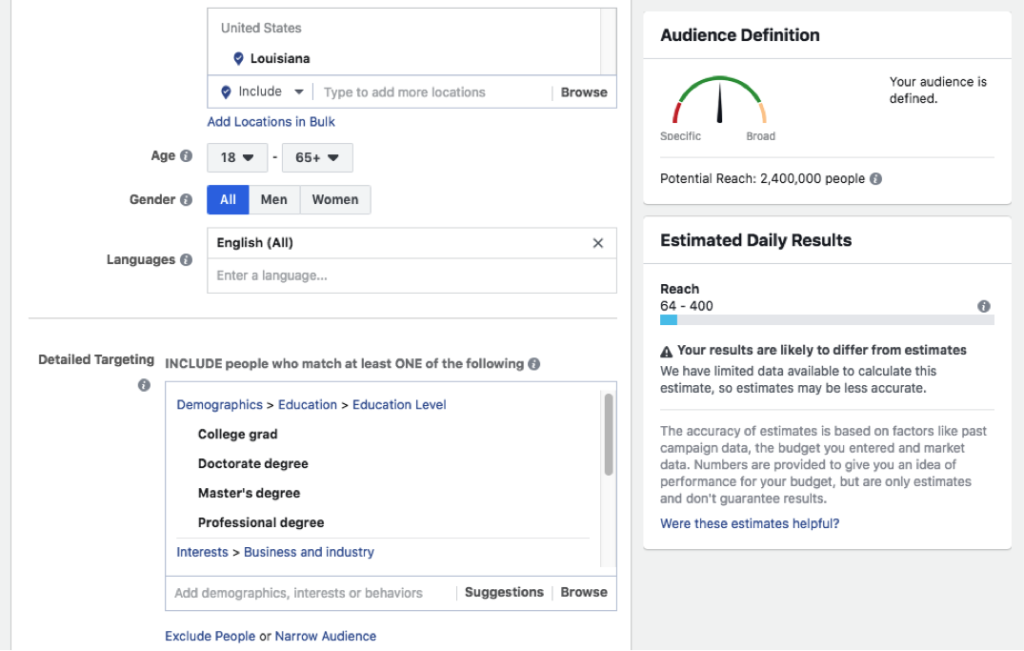
    2. Choosing Your Custom Audience & Budget

    Move forward with setting up your ad account, creating your custom audience, and setting your budgets. But don’t worry! Facebook offers optimization tools to help you adjust your budget and targeting after the campaign is launched, and they are always adjustable. Facebook offers several targeting options, including targeting by demographics like location, age, gender, and language. You can also target by other demographics, interests, and behaviors like education levels, if someone is interested in yoga, and behaviors like how they utilize Facebook. You also have the option to build an audience from a lookalike version of your current customers and website visitors.

    3. Creating Your Ad

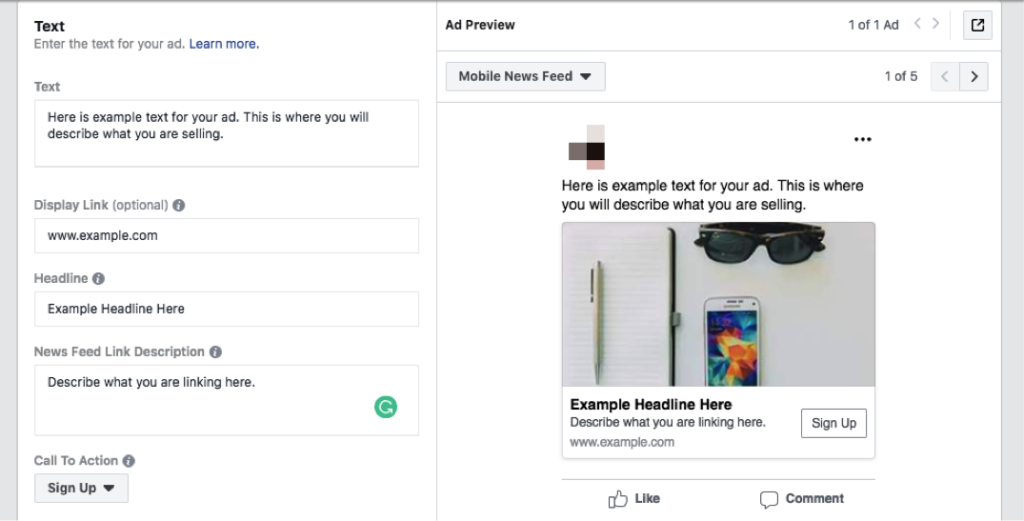
    After you have your custom audience and have set your budgets, you’re ready to create your ad. You’ll verify the pages you want your ads to be represented by and select your ad format. There are several ad formats to choose from. Carousel and video have been the most successful ad types in our experience. You’ll add in your ad text, display link, headline, news feed description, and a call to action.

    4. Creating Your Lead Generation Form

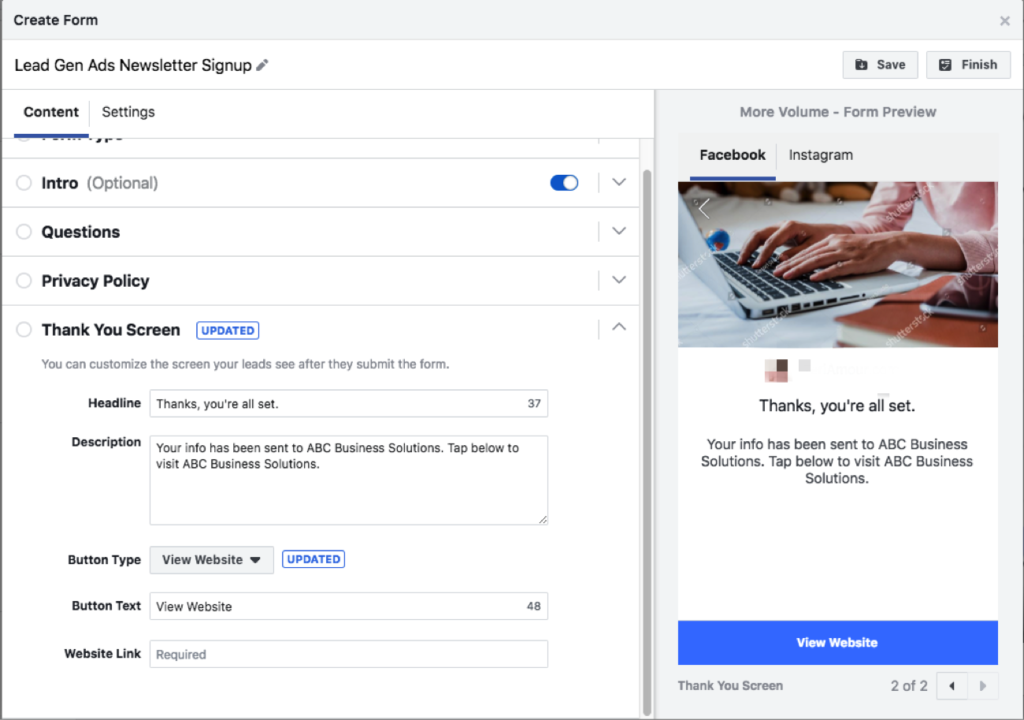
    Finally, the last step before you launch your campaign will be to create your lead generation form. Here you’ll introduce the product or service you’re promoting, add the questions you’d like to ask your audience, insert your privacy policy (it is mandatory to have one), and build your “Thank You” screen. Be sure to give your form a descriptive name so that you can identify it later when you need to download your leads.

    5. Publishing Your Campaign and Launching

    Congrats! You’ve launched your Lead Generation campaign. This is the part where you celebrate and wait for the leads to come pouring in.

    You’ll want to monitor your ad’s performance by testing and checking on it regularly! Try changing out your ad copy and graphics, or trying different targeting options—narrow your targeting if you find you’re reaching too broad of an audience and thus receiving unqualified leads. You could also update your form to ask more specific questions.

    Here at Search Influence, we’re invested in helping our clients grow their businesses through dynamic marketing strategies that drive qualified leads. If you’re interested in utilizing Facebook to bolster your lead acquisition efforts, request your marketing analysis today to get started.