Author: Shane Kretzmann

  • 7 Tips for SEO Web Developers

    Note:This post was updated by Shane Kretzmann on August 4, 2025 to reflect current best practices. It was originally published on August 13th, 2013.

    7 Tips for SEO Web Developers

    Key Insights

    • Web development and SEO are inseparable: A website’s technical architecture directly impacts its search visibility, from how search engines crawl content to how users experience load times and navigation.
    • AI-powered search raises the stakes: Clean code, semantic structure, and SEO-friendly web design are now essential for staying competitive in Google Search results and AI-generated summaries.
    • Core Web Vitals and mobile friendliness drive rankings: Prioritizing site speed, responsiveness, and accessibility (like screen reader compatibility) improves both user experience and SEO performance.
    • Schema markup and structured content help Google understand your site: Implementing JSON-LD and organizing content hierarchies make it easier for search engines to surface your pages in relevant search queries.
    • Collaboration between developers and SEO teams is critical: Embedding SEO best practices into the design process reduces last-minute launch issues and ensures important pages are optimized from day one.

    SEO for web developers is critical to ensuring websites are both high-performing and search-friendly.

    Web development has always been at the core of SEO success. But with AI-powered search engines rewriting how users discover content, developers are now more vital than ever to a site’s search visibility.

    Every decision, from site structure to semantic markup, affects how a website performs in search engine results pages and whether it earns a spot in today’s AI-generated summaries.

    Clean code? Essential.

    Scalable architecture? Non-negotiable.

    Fast-loading pages? A baseline for staying competitive.

    Together, these elements define modern SEO web design. Developers who embrace this intersection of technical precision and search strategy create truly SEO-friendly websites.

    In this blog, we’ll discuss seven actionable strategies for helping developers boost search visibility through smarter code, cleaner architecture, and AI-conscious design.

     Make every page AI search-ready

    Optimize for Core Web Vitals from the ground up

    Think of Core Web Vitals as your website’s fitness test for Google’s search algorithm.
    Pass it, and you’re on the path to better search engine rankings and more traffic.
    Fail, and even the best content won’t save you from sluggish performance.

    Prioritize metrics like Largest Contentful Paint (LCP), First Input Delay (FID), and Cumulative Layout Shift (CLS). These aren’t just developer jargon; they’re signals directly impacting how search engines understand your site’s usability.

    Use clean, efficient code. Lazy load images to reduce initial page weight. Compress media files, switch to modern formats like WebP, and preload key assets for critical rendering paths.

    Here’s the kicker: AI-generated answers often deprioritize slow-loading sites altogether. If your web page lags, you’re invisible to users before the game even begins.

    2. Build a semantic, crawlable site architecture

    A tangled site structure is like sending search engines on a wild goose chase through Westeros — confusing, inefficient, and doomed to fail.

    Instead, craft a logical hierarchy with clean, semantic HTML5 elements (header, nav, main, article, footer).

    Leverage semantic heading structures (H1–H3) to guide bots and humans. Avoid burying critical content in JavaScript. Google’s search algorithm may never find it.

    A structured DOM supports better passage-level indexing, allowing AI systems to retrieve precise answers from your site. This is a cornerstone of SEO for developers and a must for creating an SEO-friendly web design.

    3. Use Schema markup for clarity and context

    Search engines love clarity. Help them understand your site by implementing JSON-LD Schema for FAQs, breadcrumbs, organization, and product details.

    Schema markup makes it easier for Google, Bing, and AI search engines to grasp your page’s purpose, increasing your chances of appearing in rich snippets and generative search snapshots.

    For developers working on SEO website design, schema is no longer optional. It’s a baseline for visibility in voice assistants and AI-powered search queries.

    4. Make every page AI search-ready

    AI search doesn’t scan your whole blog post. It grabs self-contained chunks of content.

    That means your job is to make each section stand on its own like a mini guide.

    Use “chunking” strategies with clear H2s, keyword-rich summaries, and long-tail queries such as “What is SEO in web development?” or “How does web development impact SEO?”

    An SEO-optimized page designed this way is more likely to surface in passage indexing and AI retrieval, driving more traffic to your site.

    5. Reduce render-blocking elements & improve indexing signals

    Every second counts. Use asynchronous scripts and eliminate render-blocking resources where possible.

    Set up clean URLs, canonical tags, and optimized meta descriptions to give search engines clear signals.

    And don’t overlook crawlability. Keep your robots.txt and XML sitemaps updated so both traditional bots and AI crawlers like Common Crawl can navigate your site. These on-page elements may seem small, but together they’re the scaffolding of SEO-friendly web design.

    6. Incorporate AI SEO best practices into code and content strategy

    AI-powered search engines reward websites that blend technical precision with semantic clarity.

    Structure your pages for retrieval-augmented generation (RAG) systems and include citation-worthy content directly in the HTML, not just visual elements.

    Write natural language for page copy and alt tags. Descriptive class names and ARIA labels improve accessibility and help machines parse your content.

    This holistic approach aligns SEO for developers with modern search behaviors, ensuring your site performs for both humans and AI.

    7. Collaborate closely with SEOs during the Dev lifecycle

    In SEO, collaboration isn’t optional — it’s essential.

    Developers and SEOs must work together to prevent issues like broken redirects, missing meta tags, and duplicate content from undermining a site’s performance.

    Embed SEO best practices into your design process and sprint cycles. QA protocols should include checks for redirects, canonical tags, and on-page SEO elements before launch.

    Finally, build flexibility for A/B testing title tags, meta descriptions, and schema updates.

    An SEO team that works in tandem with developers doesn’t just create a site. It builds an SEO-optimized foundation capable of driving website traffic and sustaining long-term success.

    Use Schema markup for clarity and context

    Bonus: Use Search Influence’s SEO Workbook to Level Up Your Dev-SEO Strategy

    Great SEO isn’t just about writing clean code or optimizing web pages. It’s about having the right tools to guide your process.

    That’s where the Search Influence SEO Workbook comes in.

    This resource gives web developers practical tactics for improving site speed, refining schema markup, and aligning technical work with search engine expectations. From pinpointing accessibility updates to spotting opportunities for link-building, the workbook helps ensure your projects are set up for visibility and success.

    Although tailored for higher education, these insights apply across industries. Web developers can use it to streamline collaboration with marketing teams, audit existing sites, and eliminate last-minute SEO issues before launch.

    Don’t leave rankings to chance. Use our SEO Workbook to strengthen your SEO-friendly web design strategy and create high-performing, discoverable websites for users and search engines alike.

    FAQ: What Web Developers Need to Know About SEO

    What is SEO in web development?

    SEO in web development is the integration of search engine optimization best practices into the site’s technical architecture, ensuring visibility and performance from launch.

    This includes building a website that’s mobile-friendly, accessible to screen readers, and structured in a way that helps Google understand its purpose. Developers play a critical role in setting up clean URLs, organizing content hierarchy, and ensuring that important pages are easy for both users and search engines to navigate.

    What does an SEO developer do?

    An SEO developer bridges web dev and SEO by writing optimized code, improving crawlability, implementing structured data, and enhancing page speed.

    They focus on technical elements like schema markup and responsive design to ensure mobile devices can display content seamlessly. Beyond technical tasks, they also collaborate with SEO teams to make sure the site supports creating content that aligns with user intent and drives traffic from other websites through backlinks.

    Is SEO included in the website development process?

    It should be. SEO impacts everything from site structure and loading speed to how search engines interpret content.

    Without SEO baked into the design process, websites risk missing critical optimizations like mobile friendliness, proper use of alt attributes, and strategic linking between important pages. Integrating SEO early helps Google crawl and index the site efficiently and lays the groundwork for long-term success on your SEO journey.

    How do custom web designs improve SEO performance?

    Custom designs allow developers to optimize layout, hierarchy, and speed, resulting in better UX and higher rankings.

    They give you the flexibility to tailor on-page elements and navigation so users and search engines alike can find what they need. This approach is particularly important for mobile devices, where a responsive and SEO-friendly web design can mean the difference between high bounce rates and engaged visitors.

    What is the impact of web development on SEO services?

    A developer’s choices directly affect SEO outcomes. Poorly built sites limit what even the best content can achieve.

    From mobile friendliness to the way internal links connect important pages, web development shapes how well SEO strategies perform. Clean code, logical content hierarchy, and accessibility features like screen reader compatibility all contribute to a site that supports both users and the broader SEO needs of marketing teams.

    Learn More About SEO Web Development With Search Influence

    Modern SEO starts in the codebase.

    As AI-driven search continues to reshape how content is discovered, developers must go beyond clean code and UX into the realm of semantic markup, structured data, and AI-readiness.

    By following these seven tips, developers can build websites that aren’t just functional. They’re findable.

    Ready to optimize your website for both users and search engines?

    Contact Search Influence to learn more about technical SEO tactics that matter.

    Images:
    Unsplash
    Unsplash

  • Yes, Your Higher Ed Marketing Agency Needs Developers

    Key Insights

    • Higher education marketers need web developers that understand marketing and can think out of the box to solve problems
    • To optimize your higher education marketing strategy, you need visibility in each step of the funnel
    • With so many disconnected systems, you need a skilled development team to track the student journey and prove your marketing ROI

    Yes your higher ed marketing agency needs developers

    Your Higher Education Marketing Agency and The Student Journey

    It’s not enough to simply create and understand your marketing funnel in today’s world of digital advertising and marketing. You need to plan, track, and earn buy-in through each phase of the prospect’s student journey and react quickly to changes in the market.

    An even bigger challenge is that the vast majority of higher ed CRM software is antiquated and lacks the ability to track prospects as they move through the funnel.

    Whether in search, display advertising, or social media it’s critical that your CRM software can connect the dots.

    With higher education CRMs so lacking, institutions have considerable gaps in their ability to effectively market degree programs to the right prospect at the right time. And it’s especially hard to react quickly to unforeseen changes to the education market.

    This is why it’s so important for you to have a development team—either internal or at your higher ed marketing agency—that understands your unique website and the prospect’s student journey. Although some universities rely on their IT staff, this is usually not enough.

    To ensure you support your prospect’s student journey, you need a skilled development team behind you that understands the technology and the higher ed marketing funnel. With the help of a higher education marketing agency and a skilled development team, you can track your prospective students through the funnel, assuring they’re getting the content they need at every phase until they’re enrolled.

    In this blog post, we will go over why it’s important to track students at every step in the recruitment journey. Your marketing team needs to understand where students get stuck. Then they can create content (case studies, blog posts, videos, and more) so you can optimize your strategy to move them through.

    Inbound Marketing Strategy and Your In-house Dev Team

    Right about now, you are probably thinking, “I’ve got that covered! We’ve got a brand strategy, we get lots of organic traffic, and at my university, I’ve got a built-in development team that manages our university website, including the pages for the program I’m responsible for.”

    And to be fair, your developers are probably amazing at maintaining the university website and keeping your degree pages online and running smoothly.

    But this is not about design and development. It’s about an effective higher education digital marketing strategy. To make your prospective student journey most effective, your development team should:

    • Understand higher education inbound marketing
    • Understand the marketing funnel
    • Know the details of your specifically defined marketing funnel
    • Have experience tracking prospects through the entire student journey
    • Have the skills to help you track the data that informs you if your online marketing efforts provide positive ROI and bring you prospects

    Search Influence is a higher education marketing agency whose development team does all the above on the daily, and it’s exciting!

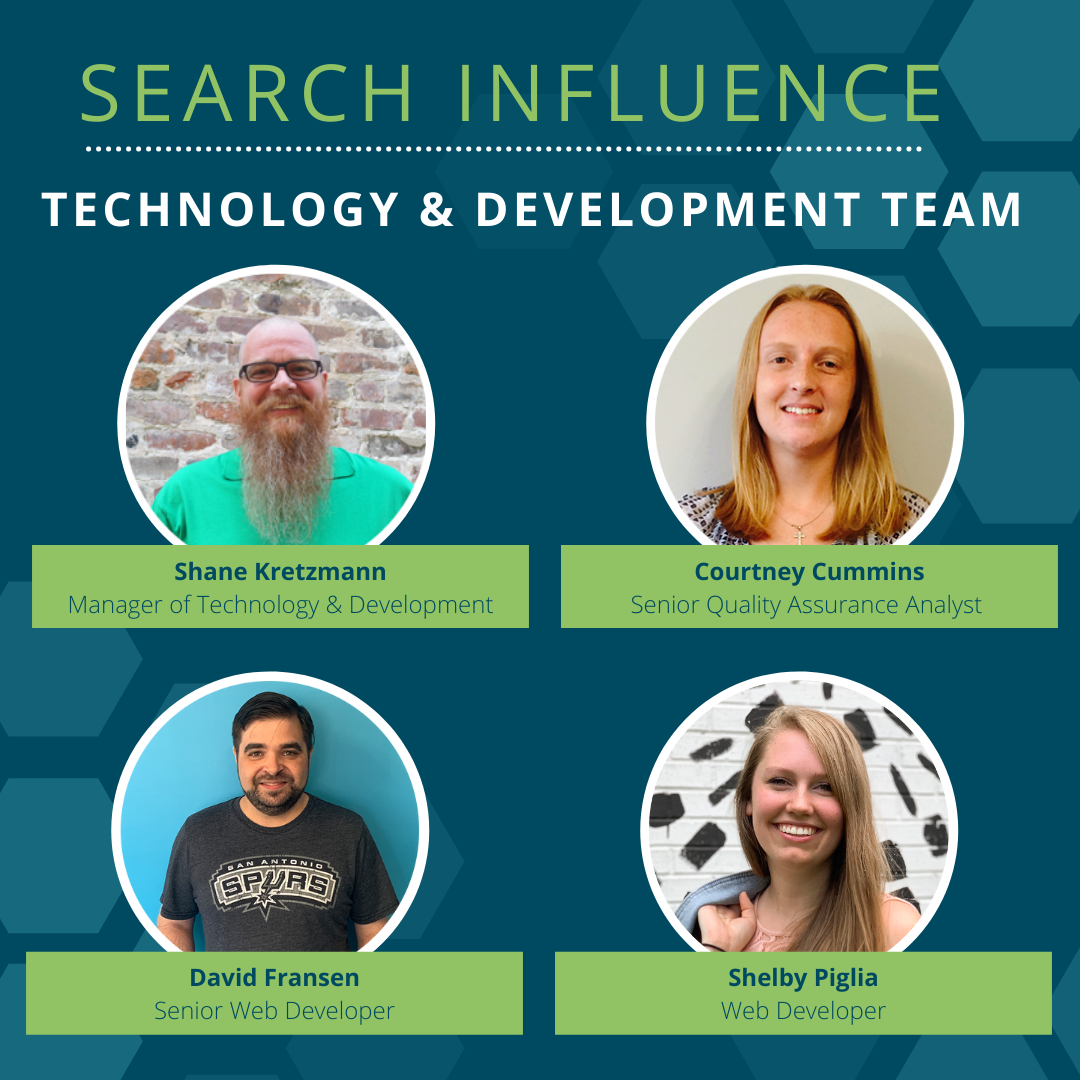
    Headshot photos of the Search Influence technology and development team

    Our development team specializes in marketing, implementing, and troubleshooting tracking and analytics. We also provide the information needed to ensure you invest your budget wisely.

    We do the things you might typically associate with web development, such as content implementation, updating your website’s look, and adding functionality. As a higher ed marketing agency, we excel at thinking outside the box to get the results colleges and universities need.

    With deep knowledge in tracking and analytics, we can do this in search engines, digital ads, or even [gasp] offline.

    A Real-World Example: How Automating Your CRM Data Entry Can Help You Market Your Degree Program

    Goal & Situation

    One of our higher ed institution clients wanted to target prospects on Facebook (aka Meta), but their CRM had no integration options for social media outlets. This meant the data collected in Facebook wouldn’t seamlessly integrate with their CRM.

    Their internal team would have to do a lot of manual data entry work to track the effectiveness of the Facebook campaign and to connect the data obtained to their university CRM software.

    As you can imagine, this type of manual work is time-consuming, prone to errors, and frustrates everyone involved.

    No built-in connection existed between Facebook and the university’s CRM but we knew we could figure out a way to automate this process and give time back to the university’s marketing team.

    Search Influence’s Approach

    At this point, many development teams would simply tell their clients that it would not be possible to automate this process. They are focused on your website, keeping it looking modern, and keeping that CRM running smoothly.

    As a higher education marketing agency, Search Influence has worked on many similar projects to connect data from one source to another. With this experience in mind, we gathered the facts and knew we could solve the problem.

    First thing first, we had to determine if the CRM offered any sort of API that you could push data into. Without a way to push data in, this whole project would be dead in the water.

    In this case, we confirmed that this CRM did, in fact, accept lead information via an API endpoint. But it could only receive the information in a very strict XML format.

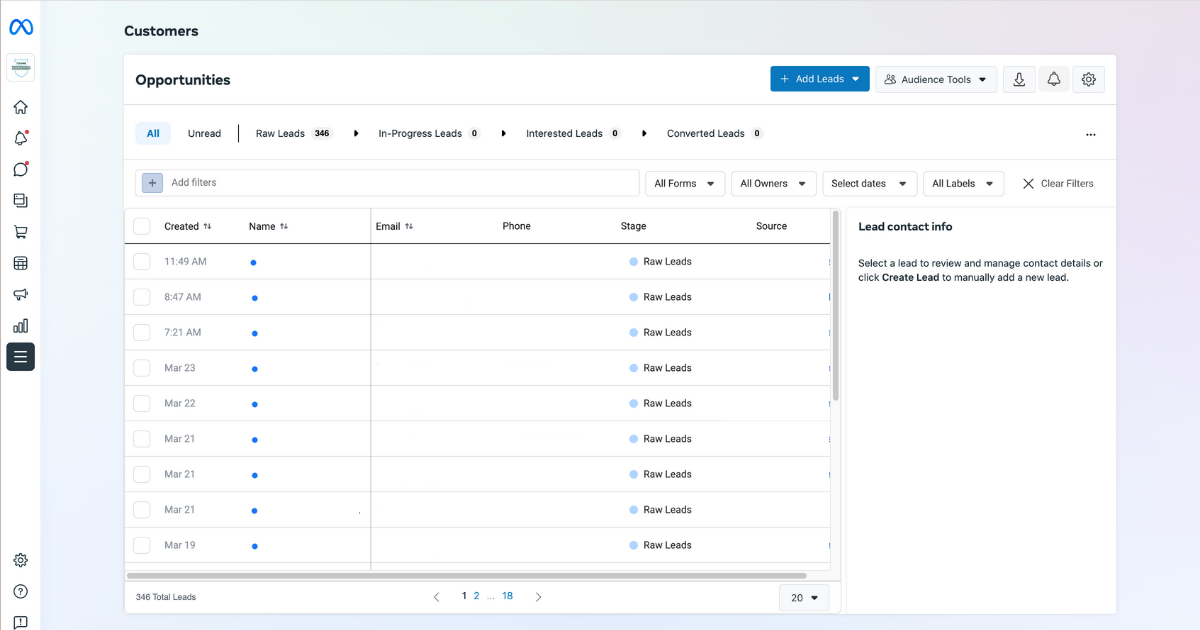
    Facebook provides a way to export lead data from Facebook Business Manager.

    Screenshot of Facebook lead center

    Unfortunately, it’s manual and the export is provided in CSV or XLS format. Plus, the data collected on Facebook differed from how the university CRM accepted it in their API.

    For this project, we ended up using the integration tools available at Zapier.com.

    We knew Zapier already had a connector to get data out of Ads Manager, and if you feed it a form id, it can listen for lead submissions. Once the lead is “zapped” into Zapier, we manipulated the data and remapped it to match the expected inputs the university CRM required via the XML API endpoint.

    Once everything matched the university CRMs XML rules, we automatically sent the data. The Facebook lead data became instantly available to the university CRM.

    Result

    We eliminated manual copying and pasting from Facebook to the university CRM, and now the university uses the data collected from Facebook for other efforts.

    We took advantage of their Facebook marketing efforts to set up email drip campaigns to ensure prospects coming from Facebook get the right information they need at the right point in the student journey.

    This is the real benefit of working with an experienced higher education marketing agency with equally experienced development staff. If there’s a solution, we’ll find it.

    The Higher Ed Marketing Experts at Search Influence Can Help!

    This is just one example of how out of the box thinking can help your educational institution’s marketing and communications get the data you need to be effective. If you don’t have confidence your current higher ed marketing agency has the technical chops to manage the challenging world of digital marketing, it’s time for an upgrade! Contact the Higher Education Marketing experts at Search Influence to help you meet your enrollment goals.

  • Chatbots – Are They Right for You?

    On the internet, there are two kinds of bots, those designed to deliver content or promote a cause and others designed to be a virtual sales assistant or customer service representative. The latter is commonly called a chatbot, and they are popping up all over the web. Facebook added chatbots to their business pages a couple of years ago to help businesses automatically respond to inquiries even if they couldn’t have a human watching their page 24/7. Google also has a bot for their business page managers that works similarly.

    While chatbots aren’t new, the last few years have seen a lot of hype about chatbots being the next big thing in online conversions, and we have seen an increase in the use of chatbots all over the web. But is using these autonomous bots helping or hurting when it comes to online conversions? Are they really right for your business? To find out, let’s dig into the pros and cons of chatbots:

    The Value Chatbots Add

    • Reduced labor costs: Having a chatbot working on your website 24/7 to receive customer service requests or sales inquiries means you don’t have to pay one (or more) human employee to do this work all day and night. This can be a huge labor cost reduction even after you factor in the cost for the bot to be developed and implemented.
    • Faster customer service: The response time of a chatbot is virtually instant, and they never get sick or take time off for holidays! Giving customers the answers to their questions quickly will help move them further down your conversion funnel.
    • Customer satisfaction: They can be programmed to give answers to common customer questions, which can lead to higher customer satisfaction on your website. This can help improve your bounce rate as well.
    • Serve multiple customers simultaneously: A human can only serve a few customer inquiries at a time. This problem does not exist with chatbots as they can manage many customer questions at the same time with no issues.

    A robot teacher surrounded by robot students

    The Cons of Chatbots

    • Chatbots are “dumb”: Customers often expect these chatbots to act similarly to their Google Home or Siri, which are packed full of advanced AI that has been developed over several years. That isn’t the case with the chatbots that the average business is using. These bots can get stuck, and complex queries from a customer may be answered incorrectly or not at all. Sometimes, even simple questions may not have been thought of during the development of the chatbot. These issues can lead to customer dissatisfaction and a reduction in brand loyalty.
    • High setup cost: While these chatbots can save you a lot in labor costs over time, the initial cost to implement them is typically very high. To be truly useful to your customers, each chatbot needs to be programmed to answer dozens of questions correctly, as well as variations of the same question, which increases development costs. And for the chatbot to continue to be useful, it will need to be updated as questions and answers change for your business, which can lead to hidden ongoing maintenance costs that you haven’t budgeted for.
    • Chatbots have no memory: This means repeat customers that have a different question are often forced to write the same thing over and over to get to the point at which their new question can be answered. Much like automated telephone systems, this can be very frustrating for your customers and can ultimately lead them to look elsewhere for the answers they seek.
    • Chatbots aren’t always the right fit: Many businesses are just too complex for chatbots to be a viable customer service solution. In some cases, using a chatbot will add unnecessary complications. Some businesses are better off adding a frequently asked questions (FAQ) page on their site, which will draw in additional traffic to their website.

    As you can see, there are some good reasons to use a chatbot on your business’s website, but using a chatbot can also backfire and hurt your conversion funnel. If you decide that a chatbot is appropriate for your company, it should be designed, developed, and implemented by professionals with your specific needs in mind.

    Before you build and install a chatbot on your website, take a step back and really think about whether the information the chatbot would provide could also be presented on your website on an FAQ page. At Search Influence, our digital strategists can provide you with consulting about decisions like adding a chatbot to your site and social media accounts. For insightful digital marketing advice, request a proposal today.

    Images: Robot teacher

  • Is Your Website Running Slowly? Image Optimization Could Help Speed Things Up

    Image optimization is a process of manipulating an image’s size, dimensions, and format to reduce it to the smallest possible size while still ensuring the highest possible quality is delivered to the browser. It sounds like a dark art, I know, but it really isn’t, and if your business relies on being able to show your products or the results of your services, image optimization must be a regular part of your ongoing website maintenance. Every single time you upload that new photograph highlighting your most prestigious project, image optimization should be considered and acted upon. It not only helps keep your website fast for your visitors, it also helps with your SEO!

    Mobile loading gif

    So My Website Is a Little Slow, What’s the Problem?

    In today’s world of instant gratification, website speed is extremely important. If your website takes longer than 2 seconds to load, you are losing potential customers. Websites that load within 2 seconds see an average of a 9.6% bounce rate. That figure jumps to 32.3% for websites that take 7 seconds to load, and it only gets worse from there. This ultimately can hurt your brand as people come to know your website as “too slow to be worth the time.”

    As more and more website surfers are using their mobile devices instead of their desktop devices, page speed has only become more and more important. Google announced back in January of 2018 site page speed would become a ranking factor for mobile searches—and they meant it, forcing SEO experts to respond by finding ways to speed up their clients’ websites. And it worked! As Search Engine Land noted, Google’s data shows this speed enforcement resulted in a 15-20% increase in page load times amongst the slowest sites on the web.

    How do images come into play? You may have noticed that a site with a large gallery takes a long time to load. That’s because large images can add weight to your website, slowing downloading time.

    I See Site Speed Is Important, but How Do I Optimize My Images?

    To address image weight, you can use image processing software such as Photoshop, (or the free alternative GIMP) to set the height and width to be exactly what you need it to be. Set your dpi (dots per inch) to 72, considered the web standard. You can also use this software to change the file format and compress the image even further, but be careful not to compress the image so much you lose quality. Remember, the goal is to have the highest quality image with the smallest weight. The most common image formats used on the web are:

    • PNG—good for screenshots and images with graphics or text
    • JPEG—best for photographs
    • GIF—if you really need an animated element on your site

    If you use a content management system, there are likely add-ons to the CMS that can help automate this for you. For WordPress websites, I recommend the reSmush.it plugin. You can dial in your optimization level and configure it to automatically optimize the image when you upload it. The plugin is absolutely free with the only restriction being the original images must already be below 5 MB.

    Woman working at her computer with mobile device and tablet

    Image Weight Isn’t the Only Important Image Optimization

    While reducing your image weight is an important practice to keep your website running fast and avoid negative rankings from Google, there is more you must do to truly be able to say your website images are optimized and SEO friendly. You should name your images descriptively; the name should indicate what you see in the image. In addition, make full use of the ALT and TITLE tags offered in HTML to further describe in more detail the key things that are visible in the photo. Google uses the name, ALT, and TITLE tags to help them return the best results possible in their image search. You can’t go wrong if you are following the image best practices Google has laid out, and please, please, only use images that are actually relevant to your website.

    Image search can be a major source of organic traffic to your website and you should be taking full advantage of it. Keeping your images and decorative elements of your website with an optimized quality-to-weight ratio, as well as using the other best practices mentioned here, will help ensure you are using the image search results to drive organic traffic at its full potential.

    If you’ve noticed that your website runs slowly, or you’re trying to increase your SEO rankings, the experts at Search Influence can help make your site more accessible to both Google and site visitors. Contact one of our digital marketing specialists today to start taking your site to the next level.

    Images

    Loading

  • Should You be Using Google’s URL Shortener in Your Social Media Campaigns?

    The other day I was visiting my normal news sites, Mashable, Coding Horror, and news.google.com among others. While getting my information download I came across a few postings I thought had true value, and I wanted to share them with my social media friends and family. I immediately went to my handy dandy Google URL Shortener which I had added to my Chrome browser toolbar and – click – presto, I have a short url ready to paste to any social media platform, in my clipboard, cocked and loaded. And so I shared, and then shared some more.

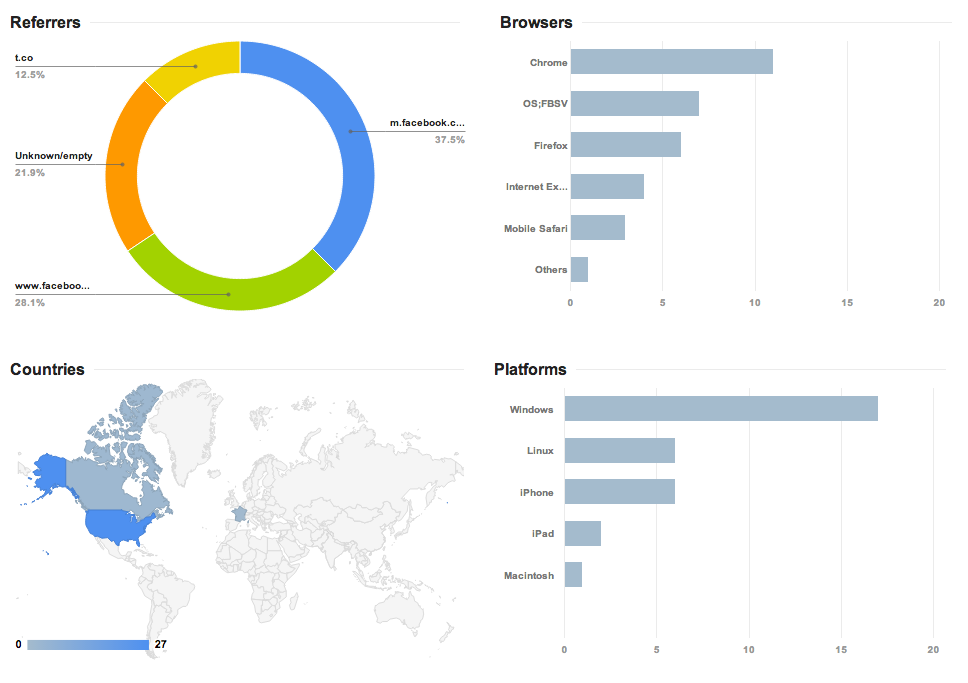
    The nice thing about Google’s service is you can track anyone’s goo.gl URL analytics by adding .info, or simply +, to the end of it. For instance, the analytics to the URL http://goo.gl/zlzlYv, which points to townsend.bunksite.com/, can be seen at http://goo.gl/zlzlYv.info. I occasionally went back to my .info page to see which of the links I shared actually had any value (received clicks on their respective pages) to my friends, family and followers.

    google diagram

    Google gives some good basic analytics data about URL click throughs, although I’ve seen more in depth analytics from URL shortening service competitors. But I digress, it was about this time when I started wondering, with being the obvious search leader and giant, does using the Google URL shortener give an SEO advantage in search results? It might make sense for Google to use URL shortener data(like number of clicks for a shortened URL) in order determine rank worthy content. Also, it seems logical that since this is another metric to look at how users share content, they would want to encourage the use of their shortener, perhaps by giving some advantage to companies using goo.gl for their social media campaigns, much like the seo benefits of using Google Plus Maggie told us about earlier this month.

    The obvious benefits of using Google as your URL shortening service include proper redirects. You know if you are using their URL shortener you will never run into problems with shorteners that don’t properly treat the redirect conversion as a 301 redirect or don’t properly transfer PageRank or any future possible negative impact. Most popular shorteners conform to the standards set by Google, but still, it’s better to be safe.

    Another important issue for short url providers is trust. You must trust the service uptime (availability) is as close to 100% as possible. You have to trust that the redirect process will happen at a speed measured in milliseconds, not seconds.  You also need to trust the provider isn’t going to just disappear one day. With an average of 5,922,000,000 (nearly 6 trillion) Google searches every single day, I think they can handle the job of keeping up with this level of service. Besides, you are probably already trusting them to handle your site analytics, search results, pay-per-click advertising and storing documents, among other services. Why not keep all your data in one place?

    It is worth noting that Google has pulled the plug on some beloved services in the past, but they generally provide users with a lot of advanced warning before the twilight date. Also, they always provide a way to migrate user data from the shuttered service.

    So, we know the Google URL shortening service is worthy of using and helps keep our data in one place, but is there actually a positive weight given to these URLS  that translates into higher rankings on the SERPs? For that, I spoke with our Google and Local SEO expert here at Search Influence, Mary Silva.  Here is what she had to say on the subject:

    “There’s not necessarily any kind of weight given to using the Google URL shortener for linking. Also, Matt Cutts has explicitly said that “goo.gl isn’t an effort to kill anything,” and isn’t some sort of attempt to kill other “product X” URL shorteners.

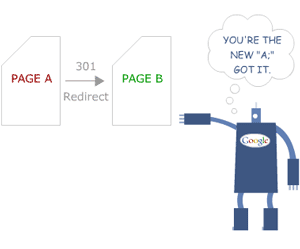
    redirect-google-301
    http://moz.com/learn/seo/redirection

    In terms of SEO effects of the shortener, it’s important to recognize that there have been reports that once in a while the Google URL shortener has created broken links, so that would obviously not be beneficial in terms of back-linking and other similar efforts. Always double check that the short url actually works, regardless of the provider you use.  Another thing to note is that the Google URL shortener creates a 301 redirect which passes 90-99% of link juice to the redirected page, and is the most ideal for redirects for SEO practices, which isn’t the case for all URL shorteners.”

    So, is Google going to rank your linked content higher just because you used their URL shortener?  Nope. Content is king and there is no exception to that just because you use Google’s products. Should you use Google’s URL shortener? While no url shortening service is perfect, using this one is certainly no worse than others. Knowing that the service provider is fairly reliable may bring some peace of mind.

  • The Search Influence Life: A Six-Month Update

    I’m coming up on the six-month mark here at Search Influence, and in these last six months, I’ve come to really enjoy this company.  I’ve always been rather picky about where I work, as I like an atmosphere that encourages learning and team work.  I believe in positive reinforcement for a job well done and recognize the need for constructive criticism to ensure your work is up to the high standards clients deserve.  I prefer to dress casual, as I believe working comfortably and being yourself produces higher quality work consistently.  I’m a single father, and on occasion I have to leave work in order to make appointments with my son’s school or doctor. Because of that, I need an employer that can understand this and allow me some flexibility to ensure both my work and home responsibilities are taken care of.

    shane blogDuring my job hunting several months ago, I turned down several employment offers from companies that still believe in stuffy uptight office environments with little to no personality.  I accepted the offer to work here at Search Influence, because it seemed to have all of the qualities I look for.  I’m so happy to report Search Influence has delivered on all of my personal requirements in a job — and even gone above and beyond my expectations!

    My fellow employees are amazing, and they aren’t afraid to show you how much they appreciate it when you provide quality work.  This place is FULL of highly competent experts in the field — all more than willing to help another co-worker at a moment’s notice.  The management here comes through on its promises, encourages personal growth and seems to understand that happy employees are productive employees!  The internal team building committee provides paid time for co-workers to enjoy each other’s company outside of the office as well. I’m looking forward to kicking butt in the upcoming laser tag game!

    So thanks to Search Influence and to my fellow co-workers for making this the perfect job for me!

    high-5-300x278