Author: Matthew Bains

  • Applying Stephen King’s Writing Tips to Create Web Content That Converts

    All great ideas start with words—maybe even just an utterance. “What if… let’s try…” There’s the excitement about the idea, talking about it over scribbled notes and endless cups of coffee, and then putting those words down on the page and getting your business plan running. Years ago, once you conceived of your brand and wanted to advertise and market your company, traditional media was the only option. And there was often a great rift between short and cheap advertising options like yellow pages listings and extensive and expensive options like TV commercials, billboards, and local print or magazine ads.

    Now, with the exception of niche industries where images alone can represent a business, website content is the dominating force for 1) convincing a visitor to your site that you can help them solve their problems, and 2) reassuring Google that you’re an authoritative source in your industry. However, not all writing is transferable across different mediums. Sprawling lines from Faulkner would be lost on visitors to websites, and similarly, website content would make a horrible novel. But, we can still take some inspiration and writing advice from one of the most prolific and spooky writers of our time, Stephen King. Here’s an essential checklist for writing website content, alongside some quotes from the horror bard’s technical writing opus, On Writing.

    Know Your Audience

    “The scariest moment is always just before you start. After that, things can only get better.”

    Shawshank redemption gif

    It’s daunting to start a website from scratch, but that’s the perfect time to draft buyer personas before writing any copy. Buyer personas serve as a representation of a business’ ideal customer. They should be based on existing and prospective customer data, such as demographics and psychographics. Explore your ideal customer’s pain points, preferences, shopping habits, demographic information, etc. Once you’ve figured out who your ideal buyer is, you’ll be closer to understanding your brand’s tone. Is it more professional and reassuring, or playful and creative? Whatever you land on, the objective will be the same—welcome the reader with inviting copy, earn their trust by assuring them of your expertise and authority, and move them toward a sale with focused language that’s action-oriented.

    All the best copy in the world won’t help if your audience can’t find your website. Think about how your audience might be searching for you on Google. What questions do you hear from clients or patients? Gather these common questions before even starting to draft your copy, and think about how you can answer them. You should also do keyword research on how users are searching for your company and similar competitors. If you’ve never performed keyword research, Moz has a great breakdown with strategies and online tool suggestions. Once you’ve recognized trends in search terms, try to fit those terms into your copy naturally (bonus points if you can work them into your H1s and H2s).

    • Understand your customers’ worries
    • Establish buyer personas
    • Find your appropriate tone
    • Do your research

    Keep It Simple

    “One of the really bad things you can do to your writing is to dress up the vocabulary, looking for long words because you’re maybe a little bit ashamed of your short ones.”

    Gif from the movie "Misery"

    There’s a time and place for long, drawn-out sentences. For websites, follow King’s advice and keep it simple. Think short sentences (below 20 words) and short paragraphs (around five lines). Research suggests “the new norm is skimming.” One great way to help out the skimmers of the world? Bullet points and lots of H2s. Put some of your unique selling propositions (USPs) as bullet points. That way, if someone is skimming, they’ll catch your most marketable features. Large H2s with USPs also help deliver valuable info in a short amount of time and space. Considering the average user’s attention span is now eight seconds, the more skimmable, the better.

    Also, a quick note about jargon—it’s best to avoid it. While you might think it shows off your expertise, it will more than likely come off as exclusive and confusing. Odds are, someone visiting your site doesn’t know as much about your business or industry as you do; don’t constantly remind them of that by throwing around obtuse industry phrases and abbreviations. It’s all about connecting and building trust. The best way to achieve this is by sticking with the brand voice that you established from your target research.

    • Short sentences. Short paragraphs.
    • Use bullets when possible
    • Avoid jargon
    • Make it accessible

    Avoid Filler and Fluff

    “I believe the road to hell is paved with adverbs, and I will shout it from the rooftops. To put it another way, they’re like dandelions. If you have one on your lawn, it looks pretty and unique. If you fail to root it out, however, you find five the next day… fifty the day after that… and then, my brothers and sisters, your lawn is totally, completely, and profligately covered with dandelions. By then you see them for the weeds they really are, but by then it’s—GASP!!—too late.”

    Mouse pushing spool in the film The Green Mile

    King does an interesting job here of showing how not to use filler and fluff language by… using filler and fluff. “Totally, completely, and profligately.” We get it. It’s a bit much. So what exactly are filler and fluff?

    Filler language uses too many words to describe something when fewer will do. It can also be generic terms that don’t add value to your sentences. Think, I need to finish this term paper so I’ll keep adding some sentences that don’t really say much and hope the professor doesn’t notice, kind of sentences.

    Fluff language comes down to vocabulary, or, often, a writer’s love for a thesaurus. The goal is genuine, but the result is copy that ends up wasting the reader’s time. When going over first drafts of your website copy, comb through every sentence and ask yourself, “Is this adding value?”

    • When in doubt, cut, cut, cut
    • Watch out for unnecessary adverbs and adjectives

    Develop a Brand Lexicon

    “Amateurs sit and wait for inspiration, the rest of us just get up and go to work.”

    Typewriter scrolling from the movie The Shining

    So you’ve done keyword research to understand what people are searching and to what degree. You’ve created buyer personas. The next step should be to develop a brand lexicon with your team. How will you refer to your customers? As clients, patients, buyers? How do you refer to your team? Staff, crew, talent, personnel, employees? How do you talk about your services or products? Finalize your choices and make it consistent throughout your entire website. Once you’ve got a list going, make it accessible for your writers and editors, either in a digital or print format.

    This isn’t to say you shouldn’t have a variety of language in your writing. Mix up the way you write about your company and services. We don’t talk to each other in narrow language scopes. When we talk about a wedding, we don’t just mention repetitions of basic services that could be common keywords (weddings, wedding services, wedding DJ). We bring up the flower arrangements, lighting, cake, bridesmaid dresses, centerpieces, dance floor, photo booth, signature cocktails, first dance, flower girl, ring bearer. It’s this variety of language that sends positive SEO signals to Google. You’re not writing to a keyword (something Google hates). You’re writing to the experience.

    • Draft a lexicon that pairs with your brand’s tone, and stick to it
    • Use varying language, not just keywords

    Trust Your Editing Team

    “Write with the door closed, rewrite with the door open.”

    You're going to be a writer someday, Gordie from Stand By Me

    There’s almost always a team of support to make sure your website content is just right. For the first draft, don’t worry too much about hitting every mark. Get the important information down first, and then go back and revise. While writing is for exploring, editing should be for fine-tuning. When editing, get collaborative and make sure multiple team members oversee the drafts. There are often subtle details that even the keenest eye will overlook when editing alone.

    You may also find that there are just too many words at first. You wanted to make sure every.single.awesome.detail. about your company was included and, as a result, went a little overboard. That’s okay. It’s always easier to cut down than to try to beef up your sentences with additional information. The latter often leads to filler and fluff anyways, and you should know that’s a no-no at this point.

    • Set up a team dedicated to editing
    • Don’t be afraid to revise, revise, revise

    Finish Strong

    “Description begins in the writer’s imagination, but should finish in the reader’s.”

    Its the most important part of the story, the ending from Secret Window

    Hopefully, at this point you’ve started to write some copy. Hurray! But, are you making sure you’re giving your readers an actionable “next step” in their buyer’s journey? Focus on getting closer to a natural call to action at the end of your copy. You can start off more broad by talking about what you offer customers, but by the time you’re reaching the bottom of your copy, the focus should be heavily on the reader.

    One quick trick you can use while editing—search for how many times you’re referencing your business in the collective first person, e.g., we can better help… our team is skilled… we, we, we. If there’s a lot of them, then get the hypothetical red pen out and start marking. Make it more about who you’re talking to. What do they get from working with you? How will their frustrations be solved? Start with your capabilities and expertise, but end with the reader taking action into their own hands.

    • End with a natural call to action
    • Focus on the user

    Above all, good website content comes from authors that know their brand inside and out. You’ve got your elevator pitch down, and you can talk comfortably at networking events about what puts your business above the competition. This authenticity and confidence in your brand will shine in your writing. It’s about making a connection in a short amount of time, recognizing the worries of your readers, and assuring them their goals can be met by working with you. So don’t rush it—get to know your brand, do some research, plan accordingly, keep it simple, and focus on the end-user.

    Feel like you could use some assistance with your website content? The content marketing team at Search Influence can develop a content strategy that helps get the right visitors to your site at the right time. Reach out to our team at any time to get started.

    Images

    Misery

    The Shining

    Stand By Me

  • How to Optimize YouTube Videos for SEO

    Man watching optimized Youtube videos on his phone at Search Influence in New Orleans, LA

    What’s your first thought when you think of YouTube videos? Funny pet compilations or cooking tutorials? Well, if so, then it might surprise you that YouTube is more than just a resource for entertaining clips or personal vlogs (video blogs); it’s actually the second-most visited website in the world, behind Google. More than 1.5 billion users log into YouTube per month. It’s even crept into the television market, and the time that people spend watching YouTube on their TV has doubled in the past year.

    Still, only 9% of small businesses utilize YouTube. And, because YouTube is owned by Google, it pays to ensure that your videos are optimized for SEO just like your website. That might be the difference between a few views and a few thousand.

    Gif of Youtube logo

    A Beginner’s Checklist to YouTube SEO

    1. Title

    Just as your company’s web pages need metadata that contains clear and concise title tags with researched keywords, your video’s title needs to clearly list the topic while also using keywords. It’s one of the few places where you can put keywords, so it’s important to do some preliminary keyword research to see how people are searching for your product or service. A word of caution though—don’t put keywords in your video’s title just for the sake of inserting keywords. As with Google, this practice will not help your position in the YouTube search results page (YSRP). The key is to make it relevant while describing what the video is about.

    Example title of an optimized Youtube video from Search Influence in New Orleans, LA

    1. Description

    A video’s description should be just that—a description of the video. You don’t need to transcribe the entire video or write a short story about it; you just need to give a relevant but brief description. In addition to your title, descriptions are a place where you can utilize keywords. Again, don’t go throwing keywords into your description hoping that it will make your video rank highly in the YSRP. YouTube is smarter than that. Use choice, relevant keywords.

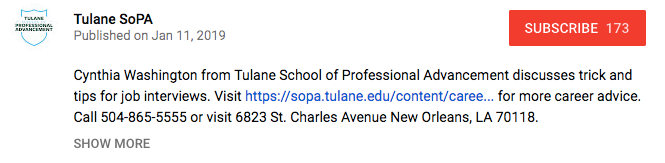
    For length, it’s best to aim for under 250 characters, or roughly 30 words. After this character limit, YouTube uses the “show more” prompt to hide the rest of your description. It’s also important to fit your keywords, a valuable resource link, and a call to action before this threshold. What’s a valuable link? Your company’s homepage can work just fine. But, you’ll get even better value if you can use a page deep in your site—think service pages, product pages, testimonials, limited offer pages, etc. Also, make sure to use “http://” or “https://” before the URL, or it won’t hyperlink in the description!

    After the “show more” fold, you can add more useful links and information, including prompts to follow you on Twitter, subscribe to your YouTube channel, or like you on Facebook.

    Example Youtube video description from Search Influence in New Orleans, LA

    1. Tags

    You’ve got your title; you’ve optimized a concise description; now it’s time to add tags. This is where you don’t want to be stingy. Add any keywords you’ve already used as well as other related keywords, as long as they make sense and are relevant to the content of your video. Also, YouTube recently starting using hashtags as another way to improve searchability.  

    Stephen Colbert saying

    1. Transcript

    This is one that not everyone may know about. YouTube will automatically create subtitles for your video, but their automated transcription process can be unreliable. By uploading a transcript (captions) of your video, you’ll know that someone who watches silently on mobile (which, if Facebook video is a point of reference, a lot of people do) will see an accurate transcription of what’s being said.

    Anna Kendrick saying

    1. Interaction on your part!

    YouTube is similar to social media in that you shouldn’t use the tactic of “set it and forget it.” Just like if someone is interacting with your business’s Facebook page or Instagram post, you should respond in a timely, professional manner. YouTube is also susceptible to, how should I put it, lively discussions in the comment thread. If there are any negative comments or reviews, respond to the ones where you feel you can actually help remedy a situation, and ignore the ones that are simply trolling.

    1. Promotion

    So you’ve uploaded your video and interacted with users in the comments. Great job! But, you’re still seeing pretty low views. Paradoxically, one of the ways to get your video higher up in YSRP is through views, but it’s hard to get views if it’s not being found. Now is the time to promote it. Share it on your blog, social media channels, email marketing campaigns, and even tell your friends, family, or network associates. This can help bring in those valuable views. You can track viewer data through YouTube Analytics. To learn more about using YouTube Analytics, Hootsuite has a detailed guide here.

    It’s Never Been Easier to Create Quality Video Content

    Since the launch of YouTube in 2005, not only has traffic within the platform drastically increased, but the quality of the content being produced has jumped leaps and bounds when compared to the very first video, a 19-second clip of YouTube co-owner Jawed Karim at the zoo talking about elephants.

    But one of the limitations that used to exist, whether or not you had a nice camera or a crew to shoot your video, doesn’t exist anymore. With the capabilities of smartphones, it’s very easy to point and shoot a tutorial, video blog, company profile, or any other type of video content you want to share with the world. By utilizing these tips, you can be on your way to adding some bingeable video content to the YouTube community. At Search Influence, our digital marketing experts can help your business build and grow your brand online. Check out some of the many clients we’ve worked with. Want to chat? Fill out the form in the sidebar today.

    Images:

    Man With iPhone on Head

    Youtube Logo 

    Stephen Colbert

    Anna Kendrick

  • Repurpose, Recycle, Reuse: How to Extend the Life of Your Content

    Just as nothing on the internet ever truly dies, how a tweet can survive long past its creation and subsequent deletion, or how a web domain created twenty years ago can still exist, albeit in an updated version of its once pixelated visage, your content should never fade into obscurity.

    Sure, you could let your content sit for months or years unchanged, be it a blog or testimonials page on your main site, but you would be missing out on opportunities to take advantage of the dynamic nature of the internet. The internet is not a rigid landscape—far from it. It’s malleable, adjustable, and constantly changing. Your content should align with this adaptability, too. But, how exactly can you do that? By recycling and repurposing your content, that’s how.

    Image Recycling Paper Bin - Search Influence

    What Is Repurposed Content?

    Once you’ve finished that final line of copy and then published your content to your site or blog, there are many different ways that you can keep going from there. Repurposing content is a way in which you can take existing content that you’ve previously published, and transform it into a different type of format.

    For instance, if you notice that an eBook or long form blog post is either receiving a high number of downloads or page views, then an option exists for repurposing that piece of content into any of the following options:

    • SlideShare
    • Podcast
    • Infographic
    • Webinar
    • How to Guide
    • Q&A
    • White Paper

    The choices are nearly limitless since everyone consumes content in so many different ways. Where someone may love to sit down with a 90-page eBook, others may prefer that information read aloud to them through a video webinar. Stagnant organic traffic is a stat that no marketer likes to see. But sometimes, all your content needs is a little refreshing through the lens of another format, a new spin, or a different light.

    Girl Walking Upside Down - Search Influence

    Chances are you already have some well-performing content on your site. Instead of going through the painstaking process of looking at each one and trying to determine if it merits repurposing, look at your specific metrics. Aaron Agius from LouderOnline recommends page views, time on site, and social engagement. One of the nice things about repurposing your content is that it shouldn’t take you an enormous amount of time to achieve. Blogs can be quickly turned into eBooks or white papers, with minimal re-writing, giving you an entirely new form of content that can draw more views. And as we should all know, by the rule of seven, it can take some time before a buyer is willing to make a firm commitment.

    What Are Some Examples of Repurposed Content?

    Blog → SlideShare
    The team at Copyblogger is known for producing quality content that focuses on writing marketing copy for small and large business alike. They took one blog post by Pamela Wilson, “The 3-Step Journey of a Remarkable Piece of Content,” and transformed it into a SlideShare. As of today, that SlideShare has garnered 42k views. While the original blog post is around 750 words, the SlideShare takes about 30 seconds to consume. It pulls the most pertinent information from that blog and gives it to us in an easy-to-digest format.

    Video → Blog
    The team at Moz is well known for their Whiteboard Friday videos spearheaded by Rand Fishkin. Not only do these videos dive into often-complex SEO strategies in a more easily digestible format, but they’re also distributed as blog posts with transcriptions.

    Repurposing your content can also help to alleviate some of your content scheduling stresses, because most of the work has already been done!

    Recycling Boxes Hanging - Search Influence

    Everybody Loves Recycling

    Recycling content is a great way to make sure your content reaches its fullest potential and greatest audience. Not everyone may have seen that blog you shared a few months ago. If you noticed a large spike in organic traffic after the initial posting and are frustrated with a subsequent drop-off then recycle it. Whereas repurposing involved changing your content into a new format, recycling is fairly straightforward.

    ICYMI: In Case You Missed It
    One way to recycle your content may just be the simplest—share it again through your social channels. This is especially true for evergreen content that will always be useful for your viewership. That being said, it’s not quite that simple. You should never be sharing the exact same social post about a blog as you did a few months ago. Ideally, you’ve made an update or change to the blog, as well as the social post itself. Otherwise, you run the risk of looking like you’re trying to package your old post as something new. When posting, consider including an “in case you missed it” (ICYMI) notifier.

    Update Your Content With New Information

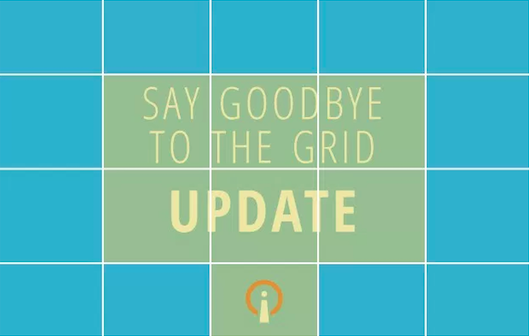
    An example of an updated post that was recycled comes from Search Influence Internet Marketing Team Lead Michelle Neuhoff Boyd. Her blog, “What Happened to Facebook’s 20% Grid Tool?” received an update about three months later with new information.

    Say Goodbye To The Grid Update - Search Influence

    This is a great example of a chance to remind your readers of the value of your content. A week before this update went live, the blog received 74 unique page views. The week following the update, it received 139 page views. Throughout the month of the update, it received 366 page views.

    It also capitalized an important aspect of choosing when to recycle content—trending topics. When this is the case, don’t worry about waiting too long to get your content out there. This ensures that it reaches your viewership when they’re most actively talking about a current trend.

    How’s the Traffic Looking?

    Another way to determine what content you should recycle is by looking at what pages are getting traffic. For example, if you have an old blog that is continuing to get a ton of traffic, consider taking a look at it again to see if it can be updated with relevant industry news or updates. This can take an already well-performing piece of content and extend its life even further.

    These are just a few of the many ways that you can repurpose and recycle your content. With so many different formats for content these days, there are scores of opportunities abound. By paying close attention to the metrics of your content and recycling those that once performed well or repurposing them in fresh, novel ways, you can keep your brand’s voice relevant in the ongoing but ephemeral dialogue that is the internet. Have you experimented with repurposing or recycling your content? We’d love to hear about it in the comments below. We’re also happy to give guidance on directing your content so that it reaches more eyes.


    Image Source:

    Recycling Container

    Girl Upside Down – Photo by Tanja Heffner on Unsplash

    Recyclable Paper Boxes – Photo by Jon Moore on Unsplash

  • How to Preserve Your Online Reputation as a Plastic Surgeon

    We’ve all had it happen. Your small business or practice is reaching customers, connecting with them on social media or through chat on your site, and giving them helpful answers to their questions. It’s natural and supportive, just how it should be. And then, after all that work to build your reputation, someone posts a negative or snide review of your work. This one post, while frustrating to see, could put a damper on your reputation as a skilled, trustworthy plastic surgeon. But let’s face it—there will always be vocal customers. Here’s some advice on how to handle these moments of crises.

    Doctor holding tablet PC talking to patient - Search Influence

    Be Proactive, Not Reactive

    The first step in monitoring how your practice is perceived online is by listening to social channels. An analysis of Facebook, Twitter, and LinkedIn will help you notice what patients are saying about you. This way, you can catch small concerns before they become major headaches. When patients comment on your page, engage with them in a genuine way (even when it’s positive!).

    Also, you and your partners should evaluate some of the top physician-review websites, like yelp.com, vitals.com, and healthgrades.com. While you’re at it, claim your online listings. Managing your online reputation starts by claiming your listings on key online directories and social networks. These directories and networks allow you to share information that presents your practice in the best light.

    Doctor holding out stethoscope - Search Influence

    Make Sure Your Website’s Content Doesn’t Make False Promises

    Even the slightest exaggeration about what a product can do for your patients can be a red flag for Google and a false promise for your patients. Examine your existing content on your site, keeping a keen editing eye for any hard promises for products or treatments, i.e., “Our facelift procedure will turn back years on the clock” or “you will get the results you want.” Promises like these cannot be broadly made for every patient. By being upfront with your patients about expected results, you can limit any confusion, outrage, or dissatisfaction with outcomes.

    Respond Quickly and Politely to Negative Reviews

    Nearly 70% of patients who post negative feedback tend to respond positively if their concerns get noticed and responded to. Be prompt and be professional. If you or your staff make a mistake, it’s best to own up to it and make a genuine apology instead of trying to defend your position. A sincere apology can work wonders in diffusing a delicate situation. Instead of responding with your initial emotional response, remain calm and genuine—remember, everything on the internet never truly goes away, so don’t use a canned response. By staying professional, polite, and personal, you’ll not only help that one patient, but you’ll also show your community that you’re a physician who cares. You’ll also possibly grow your practice by garnering an influx of potential patients. And, when you can, try to take the conversation offline. More often than not, your answer to their complaint won’t be so simple that it can be summed up in one or two sentences. Also, there will likely be patient-specific information that should not be shared online.

    Consider Patient Confidentiality

    If you’re going to be talking about a specific patient on your website or through your social media channels, make sure to get their permission first. This includes instances where you are just uploading their image and not using their words. Facebook posts with pictures receive 53% more likes than those without, but these could put your practice in danger if you never get permission from the client to begin with. Patients should be notified if their image will be used, details of what the image will be used for, its expiration date, and a note detailing the patient’s right to revoke consent before it is signed off by the patient.

    By practicing due diligence on the front end, you’ll save yourself from a mountain of legal trouble and paperwork down the road. For more detailed information about your online presence and patient confidentiality considerations, check out our blog here.

    Use Facebook to Tout Your Expertise and Build Trust

    According to a report done by Search Engine Watch, 33% of people use social media for healthcare information. Also, nearly 90% of respondents aged 18–24 said they would trust medical information shared by others on their social media networks. That’s putting a lot of trust into others for a very integral part of our lives—our health. By making sure you have a strong presence on social media, you add valuable, trusted medical advice in a channel where, far too often, people are given either misleading or false information about how to diagnose and treat medical symptoms.

    Ideally, by continuing to connect with and respond to your patients on platforms like Facebook, you can start to turn them into promoters of your practice, not just patients that visit once or twice a year and then go about their normal routines. You’ll be top of mind when their friends ask about a local clinic to get an injectable filler or a breast augmentation procedure.

    If you’re interested in learning more about how to manage your practice’s online reputation, reach out to Search Influence. One of our experts will be happy to help you develop and keep a healthy online presence in your local community.

  • Rookie Website Mistakes, Part 4: You Have a Single Page Website

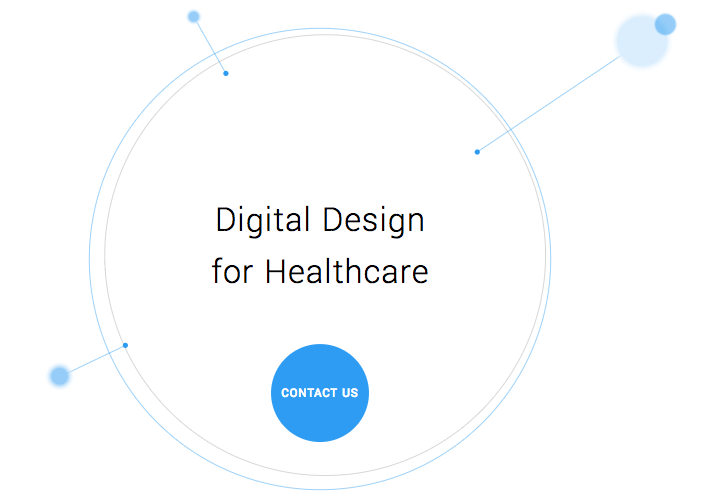
    Single page websites are very popular right now with web designers. With so many new ways to develop websites, they’ve become a unique and scroll-friendly way for users to interact with a company in a way that they’re used to (cue the token image of people scrolling through phones). And, to be fair, they can be quite beautiful. For example, take this design from 415-Agency, a San Francisco-based design firm that works with healthcare companies to make their digital products user-friendly, seamless, and as they put it, “awesomely good looking.”

    Image Of Screenshot of Digital Design for Healthcare One-Pager - Search Influence

    It’s an understatement to say that ton of work went into this site—it won them an honorable mention award from Awwwards, an organization that gives awards for the best designs, talent, and web dev agencies across the world. I’m a huge fan of exciting visual content, interactive graphics, and designs that enthrall. But, where some entrepreneurs get into trouble is when they try to manage a killer single page website while also optimizing it for SEO. They may come to discover that, for all its glitz and beauty, they’re the only ones actually finding it online.

    Photo Of Stock Of Boxes - Search Influence

    Form Must Follow Function

    Just as the customer is always the top priority, your website should follow that same line of logic. When thinking of how to design your website, think of not just how users will react to the visuals, but also how they will eventually interact with the site’s navigation. Give them clear avenues for finding more information, ordering products, or exploring your blog or testimonials. While a single-pager may seem simpler, it can often be easier to get lost and frustrated with trying to find a relevant page of content. To quote marketing guru Neil Patel, “website usefulness is more important than website beauty.”

    If a user comes to your site and thinks, “wow,” then give your web designer a bonus or yourself a pat on the back. But, the more important thing you should worry about is if their next word they is, “how?” Users should know how to interact with your site pretty easily. If they don’t know what to do or how to do it, then your site is harming you, not helping you. This can also lead to high bounce rates—users will eventually get frustrated and leave your site for one with better navigation.

    Another thing that can contribute to high bounce rates from your one-page design? Slow load times. I wrote about this in a previous blog in this series, but it’s worth mentioning here as well. Whether you’re using Flash (which, please don’t) or not, data-heavy load times due to unoptimized, large images that occupy your page’s whole screen can strangle your page load times.

    Single Page Websites Lack the Opportunity for Detail Laden Content

    Single page websites don’t have the space to allow for specific, rich content. From a user perspective, this limits the opportunity to provide a visitor with detailed, relevant content on topics they want to learn more about. Instead, they’re likely only able to view around a paragraph on specific topics. From an SEO perspective, this also gives search engines fewer opportunities to crawl your site for content that can help you move up in rankings while asserting yourself as an authority on your subject. It puts a great amount of pressure on a small amount of words. And, if you do manage to get a lot of content onto a single page, it ends up looking like it’s fighting for space.

    Image Of Post-It Notes - Search Influence

    Google likes to see that you’re updating your site with relevant content. If you have a single page site, you could make the argument that new content could be added to the bottom, creating an endless scroll of text and images. But, that method still doesn’t address the problem of not allowing search engines to crawl multiple pages of relevant content, and it also creates a headache of a user experience for visitors.

    By building out pages for your content to live, you give visitors designated, clean spaces with which they can explore your services, products, or ideas (blog posts) to their heart’s content. They don’t have to scroll for a minute or two to find your latest blog post, and search crawlers can find it easier, too.

    Forget About Performing Wide Keyword Targeting

    Since single page sites are generally designed around one main concept, the opportunity for using multiple keywords is very limited. With a multi-page site, every page has a chance to introduce a new topic or genre that can include different types of keywords that target different users and open up multiple avenues for ranking.

    With a single page site, it becomes extremely difficult to rank for varying keywords. For example, say you’re an owner of an HVAC company. You provide installations and repairs for furnaces, A/C systems, ductless A/C, water heaters, as well as air quality testing. By building separate pages for each of those services, you have an opportunity to move them each up in Google’s rankings, all while showing an increase in your authority. Putting all of your content in one page is like putting all of your keyword goals in one basket and hoping Google magically picks them up.

    Missed Opportunities for Quality Tracking

    Having multiple pages means multiple opportunities to track user behavior. You can track if someone spends 5 seconds or 5 minutes on a page about one of your services. With that valuable data, you can then focus your goals on what pages need work to bring in more visitors and convert them into customers. Obviously, this would be a difficult task for a single page site. The data showing time spent by your users will be very general, leaving you unable to tell what they love and what they dislike.

    Are There Examples of Single Page Designs That Work?

    There should and will always be design diversity on the internet. And sometimes, a single page site may work for you. For instance, take this site made by firm Gin Lane for GE that explores everything about the inside of volcanoes. Not only is the site visually satisfying, filled with video and interactive graphics, but the scroll feature of a single page makes sense because you’re literally venturing down into a volcano. Educational sites like this can have the luxury of not worrying about how SEO-friendly their content is because their main goal is to inform, not sell a product or service. Also, it doesn’t hurt that GE has the budget to build a site like this.

    Image of Screenshot of Volcanoes Single Page Website for GE - Search Influence

    Another example of a single page site working to your advantage can be when you’re utilizing it as a promotion. FBC Creative Tech Design created a site for FOX’s upcoming show, “The Gifted,” a show based on the X-men series of comics. The site, using the fictional “Sentinel Services” organization from the show, details the reasons why people should get tested for the “x-gene.” There have been numerous pre-launch sites built to create a buzz around upcoming movies or shows, and this is a fantastic way to build awareness. They’re almost like temporary landing pages. It’s worth noting again that it’s no coincidence that some of the better single-pagers are tied to large organizations—they simply have the budget to pull it off.

    Combining the Storytelling Approach of Single-Pagers Into Traditional Navigation Sites

    There’s no denying that some single page websites create curiosity. They can encourage the user to explore by simply scrolling instead of clicking, and they (ideally) tell a story about their company along the way. Businesses looking to wow users with a cool site while also being optimized for SEO should try to incorporate this same type of organic curiosity into a multiple-page, traditional navigation website. It’s completely possible. Take this blueprint of a popular WordPress design scheme from Undsgn—Uncode.
    Make each page a rewarding experience for users, where they can sit and really get comfortable with your content. If you design your multi-page site with the same goal of clean content without a lot of clutter and clear calls to action, then you’ll achieve a lot of the same aesthetic ideals of a single-pager, and with better SEO capabilities! Also, consider using visual content on your pages, like animation headers and background video. Just make sure they’re optimized so that they don’t slow down your load times.

    The ultimate decision on whether or not you choose a single page website for your business will be up to you. Every website is different; it may work for you. But, it will also be that much trickier to see your site move up in Google’s eyes and, inevitably, in rankings. If you decide that more than one page fits your business, you should learn more about SEO services which are imperative to the health of your website.

    Stay tuned for our next blog in the series, Rookie Website Mistakes, Part 5: The Content Is Weak.


    Images:

    Digital Design for Healthcare

    Volcanoes

    Blog Masonry

  • How to Write Clear CTAs That Convert

    According to Small Business Trends, “70% of most B2B websites lack a call to action.”

    With millions of websites in existence, the odds are slim that a user will visit your site and miraculously remember your URL or bookmark it for later viewing. Without a continued, personal connection through an email newsletter, a white paper download, a podcast subscription, a special offer, or another form, it may be the last time that person connects with your business online.

    A call to action, or CTA, attempts to establish that connection with your potential customers once they click on your PPC ad and head to your landing page. Even if you’ve got a CTA on your site, it may be deterring visitors rather than inviting them to explore your business. Here are some tips to make your CTA convert visitors into customers.

    Start Strong With Action Verbs

    There’s not a lot of space to get your point across, so it’s important to get straight to the point. Use an action verb to start your call to action. If you’re in the eCommerce world, consider using words like “shop” to start your CTA, possibly followed by “and save 50%.” The goal is to be direct and informative, highlighting the exact action you want your potential customer to take.

    Image of CTA Get Your Guide - Search Influence

    Focus on Value and Benefits

    As a general rule, think of how you might be able to finish your potential customer’s thoughts for their desires/pain points/expectations, and then use that action verb at the end of the following sentence: “I want to _______.” What was the first thing that came to mind that your clients might choose? Grow more leads? Find shoes that slay? Get My Custom Ad Analysis? Start My Free Software Trial? The answers to this hypothetical question are completely dependent upon your business, but one thing remains true—they need to focus on how you can delight your customer by providing them relevant solutions and unique selling points that make their life or job easier. Instead of phrases like “Buy Now,” which focus on an action a user has to do, get more creative by emphasizing what he or she will get out of clicking that CTA.

    In a case study from Unbounce, a B2B website owner reported a 38.26% increase in conversions after replacing just one action verb—Order Information vs. Get Information. With the former, “order” puts the customer in a difficult position—there’s either purchasing the service or not. But with “get,” the potential customer gets to see advantages or rewards. He or she is potentially awarded valuable, relevant information for choosing to continue the buyer’s journey. It’s this combination of value and relevance that can make or break a click.

    Another tip about delivering benefits: Don’t make claims or offers you can’t deliver on. This is going to be the start of a potential relationship with a new customer. The last thing you want to do is promise something you can’t afford.

    Image Of Girl Writing On A Blank Card At Her Desk - Search Influence

    Keep It Short and Be Specific

    According to research performed by Dan Zarrella at Hubspot, the most engaging Press Release headlines are between 90–150 characters. The same holds true for crafting landing page headlines and their corresponding CTAs. Be concise, focused, and goal-oriented. Going back to emphasizing value for the customer, consider these more focused and value-driven options.

    Generate Leads ⇒ Generate {higher quality} leads by {unique qualifier}

    Drive Sales ⇒ Drive {higher value or more} sales by {unique feature}

    Measure ROI ⇒ Measure ROI {across all channels} with our {unique product}

    Sure, the first versions were about as short as you could get, but the amended CTAs remain concise while giving a more in-depth and accurate portrayal of what the customer will get. Clear copy should help reduce any anxiety or confusion that someone may have about exploring your company. And let’s face it; people have a limited amount of time to explore your content. Make the time they spend on your site valuable, not wasted.

    Use Natural Language—Submit or Click Now? No Thanks.

    These antiquated terms used to be exciting when it really was a novel concept to be able to click on something and get immediate results. After all, most CTAs before the internet involved a number that you had to call. Now, though, that novelty isn’t the selling point; what you can provide your customer is. When thinking about writing your CTA, think about how you can connect with them. One way to use this in your writing is to use the words “you” and “my/our.” For example, “Drew Brees Can’t Stop Talking About Our Training Program. Learn Why and Get Fit.”

    Steer clear of using ornate language by cutting unnecessary adverbs and adjectives. These words may seem like they add value to your copy, but they’re hiding the value that you can provide your customer.

    Also, avoid using industry jargon in your copy. This can include words like, “franchise,” “utilize,” “virtualization,” “capitalize,” and especially acronyms that only a limited number of potential customers would even understand, like these marketing big ones: KPI, RSS, CAC, CSS, CRM. Doesn’t look too inviting does it?

    Does the Size and Layout of the CTA Matter On a Landing Page?

    Just like your copy, your page layout should be neat and clean. Kissmetrics recommends: “The size of your CTA buttons is also important. A too-small version won’t command attention, while a supersized one will make you seem desperate.”

    Think about how your landing pages look from a visual standpoint. Avoid the color red for your CTA. There are too many associations with danger, stop signs, stoplights, aggression, etc. You’ll likely see more positive results from calm colors like blue or green.

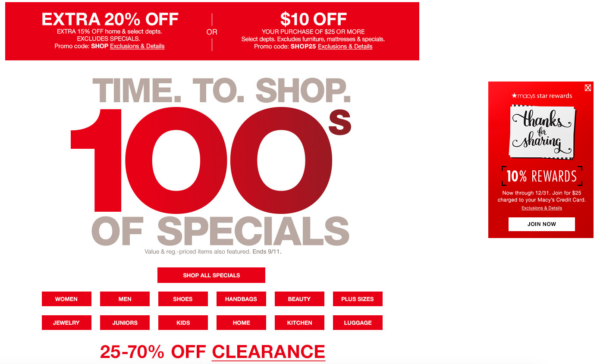
    Also, consider the size and spacing of your text on the page. It should be scannable so that a visitor can instantly pick out the information they’re interested in. Cut out the clutter. For instance, here’s an example from Macy’s current main landing page. Aside from the mixed messaging of the different values, can you spot the call to action?

    Image Of Macy's Landing Page Sale - Search Influence

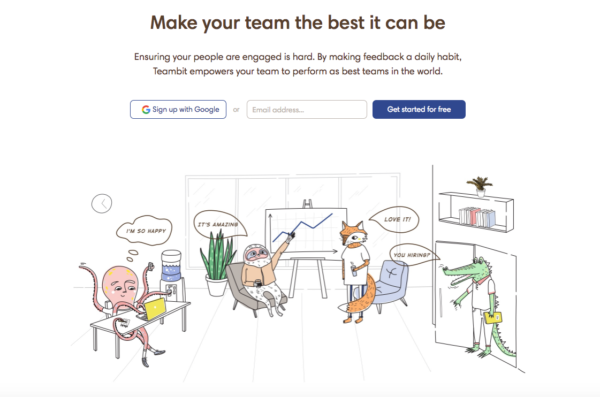
    Their “star rewards” offer is shifted to the right of the page. The goal for a button’s CTA is to predict where the user will look next. This one missed that mark. Also, it’s hard to tell what “JOIN NOW” means until you read the tiny print at the top indicating this CTA is for their rewards program. And finally, they’re asking a lot of their visitors to read the fine print on all of these different offers. A cleaner example of a landing page with less clutter and more clarity would be like this one from Teambit, an employee feedback, recognition, and survey startup.

    Image of Teambit Landing Page - Search Influence

    The value? Your team could be the best it can be. Sounds great. How do I go about doing that? Oh, I’ll get started for free. They have detailed information if you scroll through their page about just how they help people. But the reason why it succeeds is because it doesn’t worry about that up front. It focuses on the why with a compelling headline followed by clean copy and a simple CTA. Sometimes, it really is that simple.

    A Few Final Ideas for Crafting Great CTAs

    In addition to the previously mentioned points, here are a few examples of how you can make your CTAs stand out and drive conversions.

    1. Make sure to always display the benefits. If you’re offering a free guide, then say so right away (e.g. “Get the Knowledge You Crave – Download Our Free Guide.”).
    2. Try using a pain point that your potential customers may be hitting. For example, “Tired of Not Seeing Results In Your Ad Campaign? Watch Our Free Webinar to Find Out…”
    3. Also, you can try using an Influencer who supports and promotes your brand. This adds authority and intrigue to your CTA. Viewers who see that “Mark Zuckerberg Is Crazy About Our Team’s Marketing Ideas” will likely want to click on the corresponding, “Discover Why” button.
    4. Lastly, utilize testimonials from your current clients. This is a source that people often overlook. Your customers should be the biggest proponents of your brand. If a client has said that you’re the best company they’ve ever worked with, then take that and condense into copy to go along with a short, action-oriented CTA. Of course, always make sure to attribute ownership of the testimonial, and it goes without saying that creating a fake testimonial is a horrible idea for your brand. You’ve got to earn them.
    5. Numbers are great. If you have some success metrics, consider including them on your landing page. Are 100% of your employees certified in the service you’re promoting? Visitors should know that.

    Have any great examples of CTAs in landing pages or other types of content that you’ve seen? Share them with us! A great CTA can have your business seeing more conversions and fewer bounces. Need some more guidance on building a landing page that has strong calls to action that focus on your company’s brand and values? Reach out to us at any time.


    Images:

    Macy’s

    Teambit

  • Rookie Website Mistakes, Part 1: Slow Loading Speed

    74 percent of customers will leave a website if it fails to load within 5 seconds. And the numbers don’t look too great even if your site is noticeably faster—according to Google engineers, anything slower than the blink of an eye, 400 milliseconds, can cause users to leave a page and search elsewhere. Google released their Caffeine update in 2010, placing importance on site speed for search ranking factors. With such a demand on site performance, it’s more important than ever that business owners and their partners understand not only why page speed is important but also what affects it and how to remedy a sluggish site.

    Snail crossing an asphalt road - Search Influence

    Why Is Speed Important for Search Factors?

    Overall site speed is based on a sample of different pages from the site. “Page speed” can be broken down either as “time to first byte” or “page load time.” The first of these, the time it takes for a browser to receive the first byte of information from the server, has been shown to correlate to search rankings. “Page load time” more noticeably affects the user experience, but it can also impact SEO.

    All of that hard work you’ve put into developing and designing your new site, implementing beautiful images, creating an intuitive navigation, and writing and implementing pages of content for users to scour—it can all mean nothing if your pages take longer to load than what has come to be expected. The longer someone waits for a page to load, the sooner he or she begins to look for other avenues to find a product, purchase a ticket, or make a reservation. And with the magnitude of resources available today, it’s only a matter of time until they leave your slow-loading site (bounce) and seek their information elsewhere via a new search.

    The average user doesn’t have time for your slow page to load, and rightly so. We shouldn’t be subjecting potential customers to a dull experience. We wait in traffic. We wait on elevators. We wait on our bread in the toaster. But when it comes to our web experience, we aren’t stuck in the ‘90s with pages that can’t possibly load any faster than 10 seconds. There are tools and practices at our fingerprints that can make your flashy new website lightning fast and more easily crawlable by search engines.

    Open exposure capture of cars driving on a road at night - Search Influence

    Page Performance Impacts User Experience

    Now, a slow loading page isn’t the be-all-end-all factor for search rankings. In fact, there are over 200 factors that go into search rankings. However, it can impact conversions and sales due to a poor user experience.

    When’s the last time you sat and waited for a page to load? How long until you gave up and tried a competitor that sells the same type of product or service? It’s worth repeating that users expect speed. Whether they’re searching on desktop or mobile (and most have been on mobile for close to two years), an inefficient website can frustrate users and result in lost business. So, what are some easy ways to make the user experience more friendly and eliminate high bounce rates that result from slow load times? Our developers can help diagnose more specific problems, but here are a few tips to get started:

    • Eliminate multiple pop-ups or spammy widgets used for sales on your site
    • Create smart site navigation to give users a clear path to a purchase
    • Implement direct calls to action with forms or buttons throughout your site

    There are other steps that can be made on the backend of your site that can help with load time, like limiting redirects, organizing your HTML, and compressing your images, but the above-mentioned tips are a step in right direction toward enhancing the way users will interact with your site.

    Co-workers sitting around a wooden table with electronic devices in hand - Search Influence

    Regain Potential Lost Conversions and Sales

    While load time might not be the biggest contributing factor to a poor search ranking, it can certainly contribute to a lower conversion rate. According to surveys done by Akamai and Gomez.com, 79 percent of web shoppers who have trouble with website performance say they won’t return to the site to buy again, and around 44 percent of them would tell a friend if they had a poor experience shopping online.

    In the same survey, they found that a 1-second delay in page response can result in a 7 percent reduction in conversions. To put that in a sales perspective, if an e-commerce site is making $100,000 per day, a 1-second page delay could potentially cost $2.5 million in lost sales every year. That’s a huge number for a 1-second delay. To give another example of a direct ROI, for every 1 second of speed improvement to Amazon’s website, their conversion rate went up 2 percent.

    For your landing pages to convert visitors into customers, you need to give them an enjoyable experience. The nice thing about doing technical work to decrease page load time is that it simultaneously benefits your bottom line. A faster, cleaner site means a higher likelihood that visitors will stay, peruse your content, fill out a form, and eventually convert into a customer.

    A Faster Site Helps You Serve Your Customers Better

    While there are many mistakes that rookies make when building a website, starting a marketing campaign, and attempting to grow their brand, not recognizing key SEO factors that slow down their pages’ load times is one of the more frequent culprits.

    Stay tuned for our next entry in our blog series: Rookie Mistakes, Part 2: Not Allowing Your Site to Be Found by Search Engines.

    Contact an expert from our team if page load time has been an issue for your business’s or institution’s website.

    Images:

    Snail

  • Google Attribution Allows Clear, Seamless Campaign Analysis for Marketers

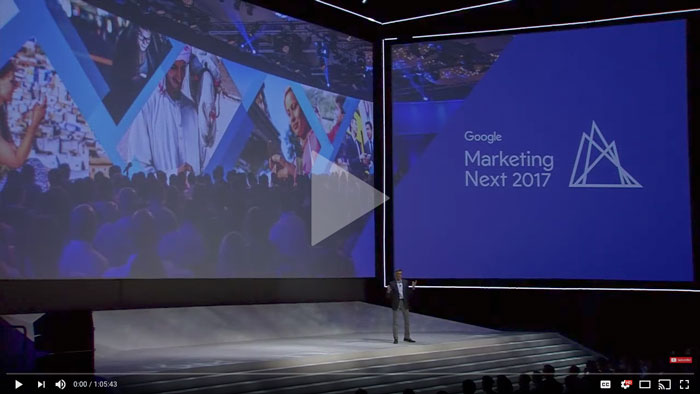
    How do you know which of your interactions with a customer mattered the most? How do you measure an organic search that someone performed for a product on one device compared to an ad clicked right before the point of purchase on another? Well, Google set out to solve some of these and other problems that marketers face daily with their newest rollout from their Marketing Next event—Google Attribution. Now, marketers can finally begin to answer the age-old question that is typically at the forefront of their minds—is my marketing working?

    How Google Attribution Streamlines Data

    Google Attribution uses machine learning and data to help marketers measure the impact of each of their marketing touch points, across multiple channels, and across multiple devices. It uses data that’s already there from Adwords and Google Analytics; it just takes that data and shows you how each customer moved through their buyer’s journey and attributes those conversions respectively. It provides a single view of the path to purchase to help marketers learn what is actually working compared to what seems to be working.

    “The aim of Google Attribution is to simplify the complex problem of multichannel, multi-device attribution by leveraging data advertisers already have in Google Analytics, AdWords, or DoubleClick Search,” said Kishore Kanakamedela, director of product management at Google.

    To give an example of how a richer lens of an entire campaign was able to better benefit a business, Virgin Holidays utilized store sales measurement to look at store sales after users clicked on a search ad:

    “Virgin Holidays discovered that when it factors in store sales, its search campaigns generate double the profit compared to looking at online KPIs alone. A customer purchasing in-store after clicking on a search ad is also three times more profitable than an online conversion.”

    Google already rolled out a store visits measurement in 2014. They’ll be rolling out store sales measurements as yet another touch point that marketers can analyze through Google Attribution.

    And possibly the best part? Attribution is free for anyone to use. It’s in its beta version right now and will be more readily available this fall.

    A Shift Away From Last Click

    Until now, many marketers were left to use last-click attribution to measure the value of their efforts. With last click, the reward for the conversion often went to the last touch point that the user made, often with a sale after a click on an ad. This could lead to false impressions about the effectiveness of an ad campaign versus display ads, organic search, social, email affiliates, and many other interactions that a customer made with a business along the buyer’s journey. Maybe organic search is actually more important display ads or vice versa.

    With Attribution, users can see how effective each step of a campaign is instead of just pointing to the last click of an ad before purchase. There are so many micro-moments that happen on the path to purchase. Now, marketers can have a more accurate view of business, and in turn, can then update bids or move budgets between channels based on such results.

    Image Of Woman Typing On A Computer With Media App Logos Flying Around - Search Influence

    This move to a more holistic view of a campaign makes sense. Video ads, banner ads, carousel ads, emails, social campaigns, and all other types of digital materials work together to drive solid leads to become conversions, so why would it make sense for only the final ad to get all of the credit and influence a business’ campaign and budgeting decisions?

    There is already a slew of companies that have seen the benefit of implementing the data-driven results of Attribution. Check out the success stories that Google has touted so far.

    Eliminating Waste and Annoyance With Unique Reach

    Most people use multiple devices to access their multimedia channels, whether that be a phone, a tablet, a smart TV, or a computer. For example, let’s say you’re shopping for a new laptop. You may first see a search ad when searching on your phone and then find a display ad while on your tablet. Then, you’ll come across a shopping ad by the time you decide to purchase the laptop on your current computer that needs replacing. According to Bill Kee, Google’s Group Product Manager for Attribution presenting at Marketing Next, “30% of people use 5 or more devices today. If you reach each of those devices three times, you’ll reach that person 15 times.” It’s safe to say that’s a bit of an overkill.

    With Unique Reach reporting in AdWords and DoubleClick, marketers will be able to measure how many people were shown display and video ads. It will show unique users and their average impressions. This helps marketers better understand how many people they reached in their target audience and how many times they reached them. This will allow businesses to find any wasted budget in over-saturated placements and, more importantly, better please their potential customers by not wasting their time with endless ads.

    People are expecting a simple, frictionless user experience on their path to purchase. Unique Reach is, well, unique in that it puts the customer right at the heart of the journey. Unique Reach is available in AdWords now and will be available in DoubleClick in the coming months.

    Image Of Person Sitting Out By The Water At Sunset - Search Influence

    The Customer Is the New Channel

    Instead of the mindset of measuring your reports within online or offline channels, Google has highlighted the importance of recognizing the customer or user as the new channel. The line between being online and offline has disappeared.

    Consumer expectations are higher than ever. So, the best way to meet those expectations is to try our best to understand consumers’ intent. Google also shared their Surveys 360 product connected to AdWords and Google Optimize. It helps marketers deliver more relevant ads with targeted surveys that seek to understand a customer’s intent along with their buyer’s journey.

    Marketers are already working hard to develop a strategy that brings conversions for their potential and current clients; Google Attribution helps them work smarter with data. By using their machine learning to put context into the consumer journeys, this new tool should help marketers create a simple, more streamlined campaign that their users will love and respond to. To quote Sridhar Ramaswamy, Senior Vice President of Ads and Commerce at Google and opening speaker at the Marketing Next event: “To really assist people, we need to become smart in how we use data to assist them.”

    Interested in learning how we can better market your business? Reach out to us at any time.


    Image Sources:

    Google Marketing Next

    Woman Checking Her Phone At Sunset

  • AI and How It’s Affecting, and Enhancing, Voice Search

    If 2016 was the year of the Internet of Things, 2017 has become the year of AI, and, in particular, voice search. The way people search on their phone, tablet, or computer is changing thanks to devices like Amazon Echo, Siri, Cortana, and Google Home—as of May 2016, 20% of mobile queries are through voice. You can now search for a business, order pizza, turn on your home’s lights, ask for movie reviews, and more just by asking a question or stating an instruction. According to the 2016 Internet Trends Report, by 2020, at least 50% of searches are going to be through images or voice, whereas in 2015, only 1 in 10 search queries came through voice. Understanding how your content is optimized for voice search can help your business succeed in the near future.

    AI, RankBrain, Machine Learning, Deep Learning…What’s the Difference?

    With all of the talk about AI these days, it’s best to separate different terms that get tossed around, like RankBrain, Machine Learning, and Deep Learning. The easiest way to understand their relationship is to think of them as smaller parts of a larger whole. AI has been around since Alan Turing first started trying to decode the Nazi’s Enigma in WWII. In the 1980s, we started to see more advancement with machine learning, which provided computers with the ability to learn predictions and statistics without being explicitly programmed. In the current decade, we have begun to see large advancements in deep learning.

    Image Of A Formula - Search Influence

    Deep Learning

    Also known as deep structured learning or hierarchical learning, deep learning uses neural networks with many hidden layers of processing and information. It mirrors the way the human brain works, learning from mistakes to come up with the best, new solution to an input, not one that it was given with code. For instance, Marie Dollé from SocialMediaToday explains how it recognizes your face in a Facebook photo.

    “For a face, it will first correlate pixels on a photo, then group them and conceptualize its features (eyes, nose, mouth). Finally, it’ll group all these concepts to recognize the unique collection of features as a single face.”

    It’s also how the world’s best Go player, Lee Sedol, got beat by Google’s DeepMind AI dubbed AlphaGo. Go is an ancient game of immense complexity—there are more possible positions on the game board than there are atoms in the universe. This is precisely why we never thought a machine could master a human in this game; it’s more about intuition and instinct. Wired Magazine said that the pivotal play in the game was also the moment that “machines and humanity finally began to evolve together. While the move that set up the machine to win was puzzling to humans, it opened Lee Sedol’s eyes to strategies he hadn’t considered before.” We’ve come a long way since the first game mastered by AI in 1952—Tic Tac Toe.

    Image Of An Artificial Intelligence Brain Versus A Human's - Search Influence

    What About RankBrain?

    It’s best to think of RankBrain as a facilitator for deep learning. Unveiled by Google in 2015, RankBrain converts words and phrases into mathematical vectors that can then be used by deep learning. One of the more interesting things about RankBrain is that it searches for phrases that have never been used before on Google and then attempts to find similar words or phrases that may relate, i.e. your rich content that may not match up perfectly with a user’s search but is close. To put it simply, Greg Corrado, a senior research scientist at Google involved with RankBrain states, “If RankBrain sees a word or phrase it isn’t familiar with, the machine can make a guess as to what words or phrases might have a similar meaning and filter the result accordingly, making it more effective at handling never-before-seen search queries.”

    So, why are we getting these never-before-seen queries? Well, in some way or another, this will always happen. New products will be released, and people will want to find them. However, the introduction and evolution of voice search as a viable tool has transformed the way we talk to search engines.

    The Importance of Semantic Content Marketing in the Age of Voice Search

    Gone are the days of planning your content marketing strategy based on one or two keywords. Sherry Bonelli from SearchEngineLand posits, “Now keywords are no longer just keywords. Keywords in the voice search world are long-tail+. The ‘plus’ refers to the conversational phrases that you need to add when optimizing for conversational voice search.” Because people speak things differently than typing, we have to start adjusting marketing strategies accordingly. In comes long-tail+ keywords and semantic SEO.

    Long-tail+ keywords should mimic the way people actually talk. Think about what types of questions people ask when they call your business, and then think about any follow-up Q&A you have with them. Also, in addition to thinking about what people might be asking or searching, it’s time to start thinking about all of the synonymous and relative topics to that search. The age of the “best digital camera” keyword could likely fall away. Instead, consider the question, “Google, where can I find a digital camera that is waterproof and can also sync w/ and stream Facebook Live?” Look at everything that’s in that question. It mentions streaming and Facebook Live capabilities, it specifies waterproof, and the whole thing is rooted in a local question: the “where.”

    So, if you were to then take a hard look at your content, does it mention syncing devices with live streaming, have you written a blog about waterproof devices that you offer, are all of your physical location pages up to date, and have you claimed your Google My Business listing? Or, have you made the mistake of optimizing for “best digital camera” and called it a day? We’re starting to get to the point wherein Google’s AI technology is becoming as quick thinking, on-the-fly, and complex as us. So, we need to optimize accordingly.

    Image Of OK Google Icon - Search Influence

    Optimizing for Voice and Conversational Searches

    Using long+tail keywords is a good first step to optimizing your content for voice search. Try to understand and predict the user’s next intent or action after finding the answer to their first query. For alternate words or keywords, instead of trying to go for the “be all end all” keyword, think, “tell me how to get to the store,” alongside, “directions to the store.” Experiment with different versions of the same idea.

    Local is going to continue to be a big part of success for a business. Research what interests customers in a targeted area and optimize all of your physical location pages by making sure they’re marked up with schema. Structured data markup from schema.org is crucial because it makes it easier for search engines to parse your site and understand your content within context. Here’s a helpful list of additional best practices that can help with showing up in voice search:

    • Claim Your Google My Business Listing: A large part of voice search is based around local. By claiming your Google My Business Listing, you provide Google with more rich information about your business, giving its AI more tools to serve your potential customers with rich, accurate answers to their questions.
    • Use Conversational Keywords: This goes without saying, but if people are searching more naturally, then you should be writing more naturally in your content.
    • Make Sure Your Content Is Trustworthy: Just as AI can evolve to find us the best possible answers to our queries, it also has the ability to learn from and reject black hat SEO practices. Steer clear of link spamming, keyword stuffing, and untrue statements in your content.
    • Set Up a FAQ Page: This may seem like a minor addition to a website, but it’s a simple way to get a lot of good answers to questions, providing content for a vast amount of subjects about your business that could then make it easier for Google to find you.

    Because RankBrain plays a big part of voice search, finding never-before-used phrases and pairing them with trustworthy, on-topic content, it’s worth remembering some advice from a former Influencer: “If your content is written in accord with Panda and Hummingbird, meaning it is rich text, educational, and really on topic, RankBrain should not be a problem for you.”

    How Google’s Cloud Video Intelligence Is Changing Video Search

    Ever wish you could search for a video online or in your cloud library just by asking certain words? Like, “Hey, Google, show me videos with fun cartoon animals,” and getting a result of Zootopia from your library. With Google’s Video Analysis, we’re getting to do just that. This can have a large impact on more than just personal queries. Pretend you’re a Realtor in your local area. By using this tool, you can make your videos more discoverable for potential clients. It’s just another way AI is changing the way we search.

    Image Of Google Adwords Icon - Search Influence

    The Future of Google AdWords

    Google recently held their Google Marketing Next event. One of the features that they mentioned talks about Life Event Targeting. In the past, Google’s AI had been able to run basic “if, then” scenarios for target buyers. Now, they’re able to parse through multiple languages to predict a similar response for the same event. For instance, they gave the example of those recently engaged. They were able to recognize the different but similar terms and phrases that cultures use when people are in a wedding life stage and then provide them with solutions to queries.

    Also, Google is learning to adjust ads and tailor them to each user’s preference. Instead of three people doing the same search getting the same ad display, there will be advertising that suits each person’s preferences for style, graphics, tone, or display. They may have alternate text that is highlighted, one focusing on price and another on the value of a product or service.

    Where Have We Seen This Before?

    Whenever I used to think about artificial intelligence, I would typically conjure images of a Terminator landscape, or a young Haley Joel Osment sentient robot in A.I., or the philosophical complexities that Harrison Ford faces as a replicant (or not?!) in Blade Runner. There have always been predictions about future technology that we can find in pop culture, from space invaders to complete AI domination. However, I think one that best represents where we’re currently exploring and where we may end up being is seen in Spike Jonze’s film, Her.

    Photo From The Movie Her - Search Influence

    There’s no dominating technology that overtakes our lives, no artificial intelligence that turns evil. Instead, it’s a future in which technology is doing what we’re trying to teach it to do now. An operating system’s AI is learning from conversations and adapting and adjusting accordingly. The OS can also see people and judge their facial reactions, something we can already do with facial recognition. Mark Zuckerberg even implemented it in his home.

    To quote the film’s production designer, K.K. Barrett, “This is not a future of harshness, but of bespoke details.”

    What Does the Future Hold for Search and SEO in Its Relation to AI?

    Voice should continue to rise in use; there’s nothing to suggest otherwise. And while this is a bit of a“Wild Wild West” time of development, there’s one nice thing that should placate marketers’ worries—the relationship between the marketer and the client isn’t going to change in some cosmic or complicated way. In fact, it’s the opposite. It gets more personal. Ideally, we’re headed for a future in which our old anxieties about technology are gone—a future in which we no longer worry about technology ruling or destroying us.

    Instead, it may be like what we’ve seen in the movie Her. It’s getting more intuitive. More seamless. More subtle. More adaptive. More inseparable from who we are. It may not be too much longer before voice commands aren’t even necessary—Deep Learning may evolve to where simply walking into a room turns on the lights, and those lights then adjust to a brightness or dimness reflecting your facial features and mood…maybe.

    Instead of a future of wild advancements of technology, of jetpacks and holograms (well, kind of not those), it’s more a future of subtlety. One where we’ll hopefully be able to teach a program to learn from us so well and so naturally that it doesn’t even feel like teaching. To quote a reaction from those watching Google’s AlphaGo win its matches of Go over Lee Sedol, “The machine did a very human thing even better than a human. But in the process, it made those humans better at what they do.” So, instead of tech moving to the forefront of our lives, in front of our faces on the ride home from work, disrupting family dinners with scrolls and feeds, it could dissolve to be part of the background, one that not only knows when to talk to us but also when we can be left alone to be better at what we do.

    Images:

    Math

    Brain

    Ok, Google

    Google AdWords

    Her

  • Growing Your Practice on Facebook, Part 1: Why Facebook Matters

    It’s no secret that Facebook isn’t going away anytime soon. Even with predictions a couple of years ago that the social media giant would lose a significant portion of its users to other contenders like Instagram, Twitter, WhatsApp, and Snapchat, they’ve managed to see steady growth. Since that prediction in 2015, they’ve gone from 1.2 billion monthly users to nearly 2 billion.

    So, let’s address the elephant in the digital room here. Is your practice on Facebook?

    In this series, we’ll break down the ins and outs of the best ways to reach your patients through Facebook, going over everything from advertising and shareable content to privacy rights and how to find the right images.

    Before we get into details of using Facebook to bring in more patients, let’s break down a broader question: Why is Facebook so important for your practice?

    Social Media Humanizes Medical Practices

    When’s the last time you talked with your patients outside of the office? In a report from the Health Research Institute, Ed Bennett, who oversees social media efforts at the University of Maryland Medical Center, notes, “If you want to connect with people and be part of their community, you need to go where the community is.”

    By using Facebook to interact with patients, physicians can create a dialogue that builds trust. Some patients may feel uncomfortable scheduling an appointment when all they wanted was to ask a personal medical question. Sometimes questions are just easier to ask through a direct message or comment rather than over the phone or in person.

    Medical Patient Sitting On Treatment Couch - Search Influence

    By commenting on, responding to, and answering questions directly through Facebook, unforeseen walls begin to break down. The best part? That starts to become what your practice is known for. Your medical office gets a reputation for being the place to go where people won’t feel afraid to ask about a diagnosis or procedure, how it affects them, or what their options are. It becomes the ideal venue for open communication. You’re no longer just a resource for patients when they come to your practice; you’re there for them at any time.

    Think about it this way. The average user checks their Facebook account daily. Will your practice be there to start a conversation when they log on?

    Expertise, Industry Experience, Specializations—Go Ahead and Tout It

    To go along the philosophical questioning of whether the falling tree in the forest makes any sound, are a physician’s best certifications and qualifications of value to patients if nobody knows about them?

    According to Search Engine Watch, nearly 90% of respondents aged 18–24 said they would trust medical information shared by others on their social media networks. This is also coming from a demographic that is more likely to share this information. Facebook gives physicians the tools to share their specific knowledge and expertise. Got a recent press release or blog post about a new technique offered exclusively at your practice? Put it on Facebook. It will demonstrate your expertise in your field while providing a great avenue for your patients to engage with and share this information.

    Also, in a time where anyone can share information and claim it as fact or scientifically true, physicians have the capability and responsibility to make sure accurate, helpful information is reaching their current and potential patients.

    Medical Patients Waiting In The Physician's Office On Facebook - Search Influence

    It’s All About Relevance

    Just as you shouldn’t make updating your Myspace page or LiveJournal your top priority anymore, you should be posting and staying up-to-date on Facebook to make your medical practice more relevant to what’s going on in your patients’ lives. It shows you’re a part of the online community, and ideally, it garners more traffic to your website and office.

    Ultimately, Facebook is more than just a place to share family pictures, an exciting recipe, or an awkward political conversation with an uncle. It’s a powerful resource for medical practices to reach their patients on a more personal level. Your patients are already there. We can show you how to utilize social media to find them and make them advocates for your practice. Reach out to us to learn how to implement a social media plan for your practice.

    For more information, stay tuned for our next blog post, which will teach you how to create and share content that moves your audience.