Author: Kaitlyn Johnson

  • What Does An SEO Agency Actually Do For My Business?

    Key Insights

    • Good SEO agencies focus on your website with the same vigor and attention-to-detail that you have with your brick and mortar.
    • Expertise, authority and trust (E-A-T) is the foundation of a good long-term SEO plan. If your website doesn’t have these factors, it is impossible to rank well in search engine results.
    • SEO agencies help their clients develop a long-term plan by auditing their site, pinpointing keywords and building E-A-T, which comes with a unique set of challenges because it cannot be directly measured.

    Any good SEO agency knows that owners and executives are protective and calculated when it comes to businesses and their bottom line. Because of this, agencies know they must instill trust and deliver results. However, as a business owner/leader, that doesn’t mean you will know exactly what those results should be and how they improve your business results.

    SEO agencies may vary in their approach, but their overall goal for your business website is to present it as a resource search engines will want to show searchers.

    An SEO Agency Should Help You Understand Your Website’s Strengths and Opportunities

    A good SEO agency will first familiarize itself with your website, typically done by conducting a website audit. With an audit—which generates performance metrics surrounding your site’s visibility, speed, and traffic—an SEO agency can pinpoint opportunities and highlight success areas!

    Once your agency knows where you are thriving and where you can grow, they can begin forming your long-term SEO plan. This plan will align with the business goals you’ve set and can be a major tool in helping you reach them.

    An SEO Agency Should Identify Relevant and Authoritative Keywords

    Even those unfamiliar with SEO may have heard the terms “keywords” or “long-tail keywords” tossed around in conversations or articles. In simple terms, keywords and long-tail keywords are the phrases found on your website that match a person’s search query. Without optimizing your content with relevant keywords, Google (let alone searchers) will not be able to find it. This fact alone makes it a key priority for your SEO agency.

    While defining the term “keyword” is simple, deciding which keywords to focus on in your SEO plan is not as cut and dry. An SEO agency familiar with your industry and business will be able to successfully conduct keyword research to pinpoint phrases that your customers and potential leads will use to find your content. More than that, they will know how to strategically implement those keywords across the pages of your website for the best impact.

    An SEO Agency Should Enhance Local Relevance

    Local relevance measures how well your content matches a search query that includes or intends a location. This refers to searches like “urgent care near me” or “restaurants open now.”

    A huge chunk of daily searches look for you using locally relevant search results. Recent research done by Russ Jones, the Principal Search Scientist at Moz, found that “58% of people search for a local business on their smartphone daily.” The more your business website is locally relevant, the higher you will rank in those search results.

    Jones’ study additionally found that “50% of local searches on mobile lead visitors to a store within one day.” This means more foot traffic to your brick and mortar, not just your website.

    An SEO team that knows this will complete tactics customized to your business/industry specifically geared to building local relevance. These tactics should include:

    • Maintaining your Google My Business profile
    • Creating local listings by promoting NAP (name, address, phone number) consistency across multiple websites—sites that may show up in search results before your business’s actual website. Creating local listings also ensures that Google doesn’t generate and automatic listing for you, which could show potential customers the wrong information.

    An SEO Agency Should Establish Expertise, Authority, and Trustworthiness

    An agency looking out for your business’s best interests will prioritize your website content’s expertise, authority, and trustworthiness, otherwise known as E-A-T.

    What makes E-A-T challenging is that it is not something you can directly measure and it’s not a direct ranking factor that you can pinpoint. However, a good SEO agency will have the knowledge and experience to establish and influence your E-A-T through various channels.

    These tactics include:

    • Regularly updating your site with rich content
    • Organizing your site’s structure to make the most sense for your customers and industry
    • Ensuring that your site is secure

    Your site’s show of expertise, authoritativeness, and trustworthiness are essential factors for your existing customers, potential leads, and Google. In fact, it is heavily referenced in Google’s Search Quality Rater Guidelines because it is the sites with the best apparent E-A-T that Google awards the most visibility to (i.e., those on the first page of Google’s search results).

    A person on a laptop and smartphone

    An SEO Agency Should Improve Expertise

    Showing expertise is all about showing what you know and how you know it. It is crucial for SEO because it communicates to searchers and Google that you know what you’re talking about. Not establishing expertise leaves you at risk of being left out of search results.

    How do SEO agencies improve website expertise for clients? Through the content on your website. But it is not enough to simply post any ol’ content. Experienced SEO agencies know that the content on your site should do two things:

    • Answer the questions your customers ask. You know your industry and customers, and your SEO agency does too. They will have learned both your industry and target market so well that they know exactly what your potential leads need to know from you. This may be done in blog posts or a frequently asked questions page.
    • Showcase your qualifications. This will look different depending on your industry. For example, a doctor will add where they went to medical school or completed residencies. This might be done on your About page with a written biography or videoed introduction.

    An SEO Agency Should Build Authority

    Authority refers to your brand’s reputation within your field.

    The list of reputable, authoritative brands on the internet goes on and on. And despite these websites aligning with different industries, they all have one thing in common: Searchers seek them out for specific things. Google notices this and rewards those sites with top rankings because of it. Because those websites have proven to be knowledgeable and reliable resources, their authority is strong and hard to compete within search engine results pages.

    An SEO agency will map out exactly how to build your authority in topics you already show expertise in. You can accomplish this by aligning yourself with authoritative experts in your industry with guest blog posts or building up your backlink profile by developing content authoritative experts will want to link to.

    Above all, an SEO agency will ensure that all of your content can be fact-checked. The fastest way to damage authority is to share false information.

    You may also hear the term “domain authority” thrown around in talks about website authority. The term refers to a score of how likely your site is to rank over competitor sites.

    This score, created by Moz, is “based on data from [their] Link Explorer web index and uses dozens of factors in its calculations.” While it is different from E-A-T website authoritativeness, pointing your SEO plan towards E-A-T will help you increase your domain authority.

    An SEO Agency Should Increase Trustworthiness

    At the base of relationships—personal or business—is trust. If your website and its content can’t be trusted, Google will likely shield searchers from it.

    Your SEO agency will show trustworthiness through on-site optimizations that include:

    • limiting the number of ads that display at once.
    • installing an SSL certificate (the lock icon that shows next to your URL on most browsers).
    • ensuring you have a user-friendly, attractive-looking website.

    They will also show trust through your site’s content. This means completing tactics like clearly displaying your contact information, reviews or testimonials, and privacy policies.

    An SEO Agency Should Make Sure Your Customers Can Find You

    Your customers are on the internet and they are looking for you! Your SEO agency’s job is to make sure that they can find you. Contact Search Influence today to learn more about what an SEO agency can do for your business, your customers, and your bottom line.

    Images:
    Smart phone and computer

     

  • The Top Five Ways to Optimize Instagram Accounts for SEO

    Nowadays, it isn’t enough to simply have great content, because to be honest… a ton of people have great content. Businesses have to be smarter and more competitive to get their content in front of the right people. With the ever-growing popularity of social media, accomplishing this has become easier but harder.

    On one hand, businesses have more platforms to share their content and reach potential buyers. Gone are the days where a website is stuffed with all of a company’s information and events. On the other hand, businesses have more platforms to manage and keep optimized. Your website has to be in tip top shape for search engines, but so do your social profiles.

    Take Instagram for example. According to research done by Hootsuite, one billion people use Instagram every single month, with 500 million people on Instagram every day. More importantly, “200 million Instagram users visit at least one business profile daily.”

    That’s 200 million reasons you can’t slack on Instagram.

    There is a silver lining though. Optimizing an Instagram account for search engines is very similar to optimizing a website for search engines. Here are five ways to get your bangin’ IG optimized for SEO.

    Have Your Top Keyword in Your Handle

    You may not be able to change your domain name or business name at this point, but your Instagram handle is just itching to be optimized. If your username doesn’t include your main keyword, you should reevaluate it.

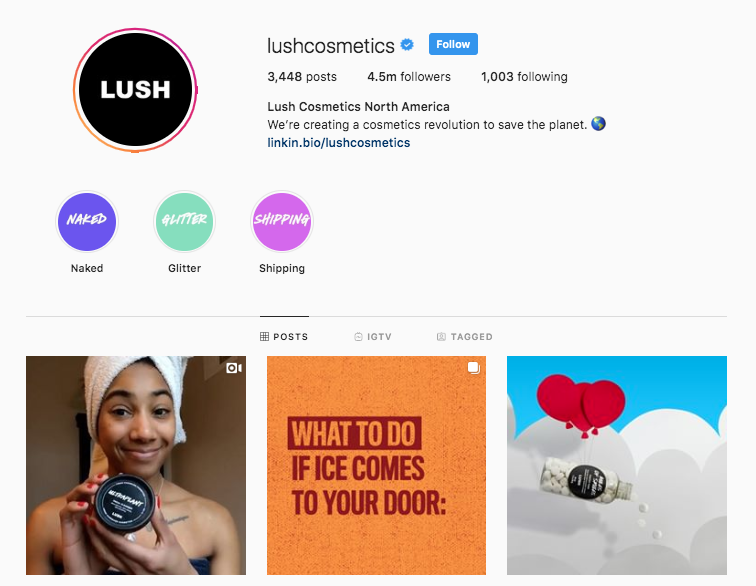
    Take Lush, a cosmetic company headquartered in the United Kingdom, for example. While the company’s name is simply Lush, it’s Instagram handle includes a very important keyword.

    Screenshot of Lush Cosmetics Instagram landing page

    “Cosmetics” is sitting pretty in their Instagram handle. Also notice that their business name isn’t the only part of their profile that has a keyword shining bright… which brings us to tip number two.

    Load Your Bio With Keywords… Naturally

    Why should your Instagram handle get all the keyword love? Well, it shouldn’t. Your business name and bio are great opportunities to get some more keywords on your profile. However, don’t be sloppy about it.

    Loading your bio with keywords should be done in a natural and clever way. After all, your potential buyers are watching.

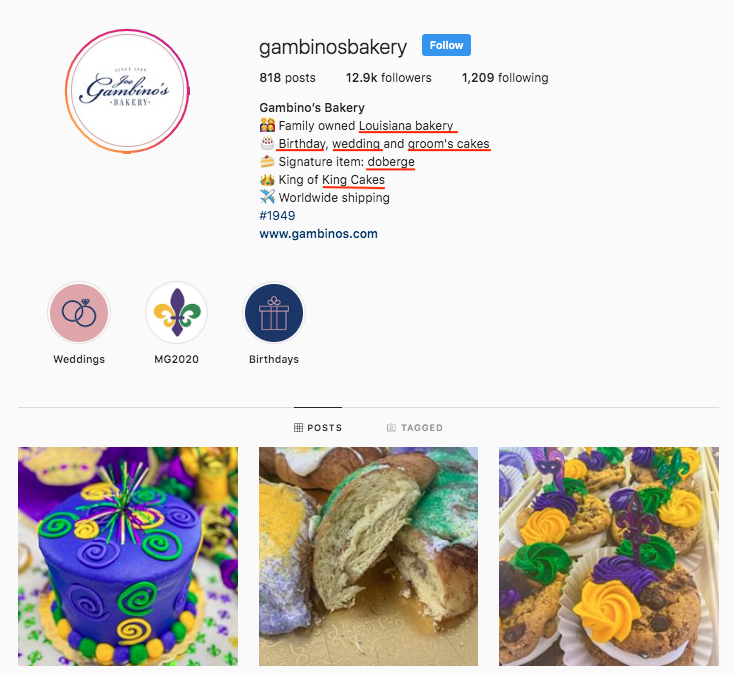
    Gambino’s Bakery does an excellent job of sneaking rich, top tier keywords into their bio.

    Screenshot of Gambino's Instagram landing page

    Utilize Instagram’s ALT Text Feature

    In late 2018, Instagram rolled out the ability to add ALT text to images in an effort to make the platform more enjoyable for visually impaired users. Don’t say Instagram has never done anything for companies, because this feature made business profiles accessible to more potential buyers and created another space to include keywords.

    When gearing up to share some great content on Instagram, keep your eyes peeled for the advanced settings option. The Advanced Settings are on the same screen as the caption, tagging, and location options way at the bottom in small print. After you press that, the accessibility section will be at the bottom.

    Load Your Captions and Hashtags With Keywords

    If it seems like optimizing your Instagram for search engines is all about keywords… then you’ve been paying attention. Congrats!

    Other perfect opportunities to get some nice, juicy, top-tier keywords on your profile are in the captions and hashtags. But again… this should be done naturally. Potential buyers don’t love several keywords thrown together.

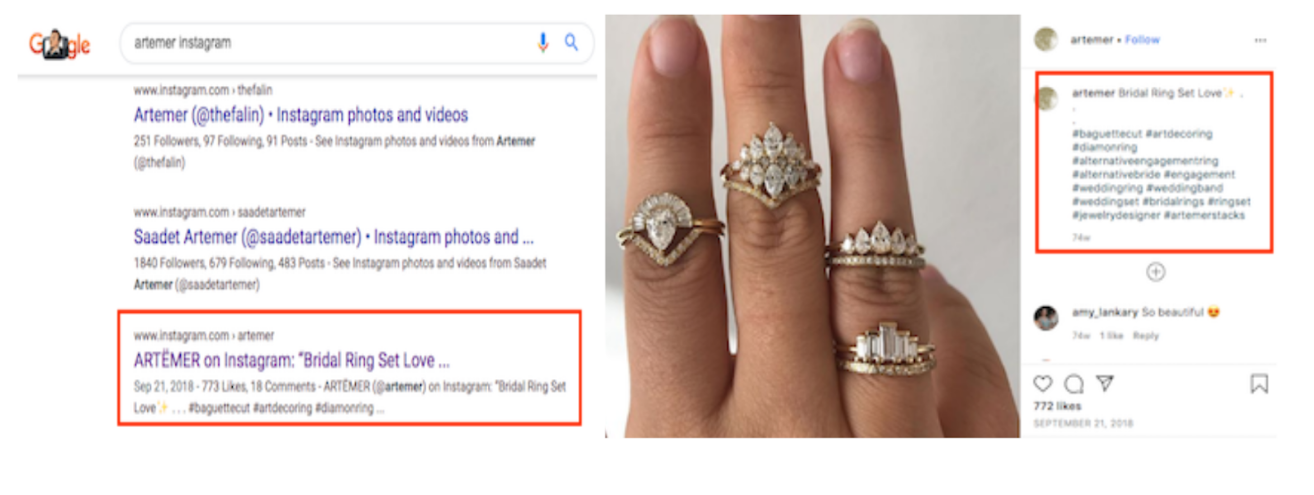
    Example of an ARTËMER Instagram post using keywords

    ARTËMER, a nine-year-old jewelry brand, does a great job of integrating keywords with a natural caption. Sitting in this post are two keywords in the caption and a slew of keywords in the hashtags. If writing the perfect caption gives you anxiety, think about them as title tags because they act the exact same way.

    Example of an ARTËMER Instagram post ranking

    Add Your Instagram to Your Google My Business Profile

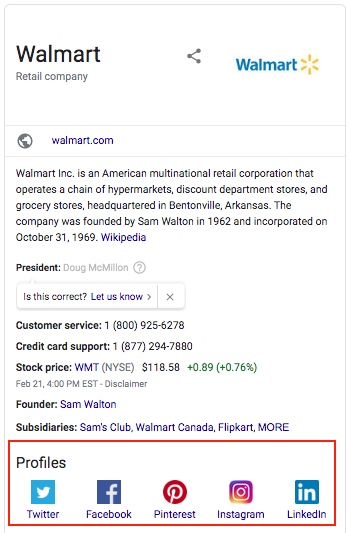
    This optimization tactic has nothing to do with keywords, but it is highly important. Having your Instagram profile linked on your Google My Business page will allow it to pop up on Google along with other pivotal need-to-knows, like your business address and phone number.

    Screenshot of Wal-Mart's Google knowledge panel

    While you cannot physically log in to GMB, link the profiles and watch them magically appear, Google will “automatically discover social profiles to include in Google knowledge panels.” To hurry the process along, Google recommends that the change is suggested by a verified representative.

    The last and final tip is sometimes easier said than done, but it is the most important: create great content. SEO will drive potential buyers to your social profiles, but great content will make the right buyers stay. If you need help, don’t sweat it! Our team is experienced in all things SEO. Contact us today!

    Images

    Instagram logo

    Phone on desk

  • Disavowing a Backlink: When Is It Okay to Say Bye Bye Bye to a Backlink?

    If the internet was high school, websites would be the students and Google would be a top of the line, elite institution. Think of Google’s search engine algorithm as their admission’s department because it decides which students (websites) are worthy of being apart of their academy (The Top Search Results).

    Keeping with this analogy, one of the ways The Top Search Results’ admissions department decides which students to let in is letters of recommendation, aka backlinks. Letters of recommendation from prominent, trust-worthy people put a nice polish on any application, right? On that same note, letters from sketchy people or from yourself can have a negative effect. No letters at all… Well, you get the point.

    Thinking of backlinks as letters of recommendation is an excellent way to simplify a multifaceted part of SEO because that’s how search engines treat them when deciding which websites are most authoritative. Backlinks from reputable, popular sites (e.g. CNN.com, Forbes.com, Rollingstone.com) can do wonders for your domain authority and keyword rankings.

    A backlink from a spammy site can have the opposite effect.

    Although you can’t control who/what links to your site, you can disavow an unwanted link. Disavowing a link lets Google and other search engines know that even though a site is linking to yours, you have no association with it.

    Disclaiming a backlink can do wonders for your SEO because it pulls out associations that could be hurting your rankings, and it makes backlinks from authoritative sites stand out even more. If you let link-building-professional Liam Cook tell it, “Link disavowing is almost as important as link-building for SEO.”

    The trick (because there’s always a trick) comes in deciding which backlinks are harmful enough to your domain authority that they need to be disavowed. To help you out, here are a few good reasons to think about disavowing a backlink.

    Gif from the film The Hangover

    1. The link is coming from a spammy site

    If you find that a link to your site has ended up on a spammy site, it is probably best to disavow the link right away. How can you tell that a site is spammy? According to Hamish Fitzhenry, three telltale signs are:

    • Having tons of links on one page
    • Taking a really long time to load
    • Having an abnormal amount of pages and links that 404

    Cameron Conaway, one of Klipfolio’s senior marketing managers, says that a red flag for him is if the anchor isn’t in English.

    However, if it is too hard to tell just by looking at a site, you can always check its Spam Score. As defined by Moz.com, a Spam Score is the portion of a site with attributes that are typically “penalized or banned by Google.” It is believed that a backlink from a site with a Spam Score that’s higher than 7 can raise the Spam Score of the receiving site.

    2. The Link Isn’t Relevant to Your Industry

    Let’s return to the analogy we started with.

    Imagine that your application to The Top Search Results is impeccable. And then… admissions goes to read your letters of recommendation. You have two superb letters from Barbara, who runs a flower shop in your hometown, and your cousin Joey, who you babysat one summer. But none from academic relationships like past teachers or principals.

    The two letters you have may be great, but they won’t be that helpful because they’re completely unrelated. The same thinking can be applied to a site’s backlink profile. If a website for used cars has a backlink from Foodnetwork.com, that could be a red flag that something isn’t right, so it’s worth checking out. Evaluate whether or not the backlink is organic and makes sense. It’s worthy to note, though, that an unrelated backlink probably won’t be from a recognizable website like Foodnetwork.com; it’ll likely be a domain that you’ve never heard of before.

    (On a similar note, you should also think about disavowing backlinks from sites that are linking to URLs that you’ve removed from your site.)

    3. The Link Isn’t Organic

    Google values authenticity. It likes to keep it real (in this case). If a link wasn’t honestly earned, you may want to think about disavowing it.

    Show us the real you gif

    If a large percentage of your backlink profile is comprised of inorganic links, tread carefully. You’d do well to remember these words by Justin Metros: “The long term gain for positive SEO isn’t the number of backlinks you have but the quality of backlinks. Get rid of anything questionable.”

    How Do You Keep a Handle on Your Backlink Profile?

    Once you clean up your backlink profile, implementing a plan that will keep it squeaky clean will save you time in the future. You can use one of these backlink monitoring tools.

    Majestic Bulk Backlink Checker

    Majestic.com’s Bulk Backlink Checker is a subscriber-only service that lets users check 400 to one million URLs (depending on how you upload them). The program offers metrics like “Trust flow,” “Citation Flow,” and the number of NoFollow links on a site.

    Ahrefs

    Ahrefs’ Backlink Checker “has the second most active web crawler after Google.” This platform offers URL metrics like the total number of backlinks, “Domain Rating” and “URL Rating.” It also offers a Backlinks report, which shows users every single site that links to theirs.

    SE Ranking

    SE Ranking uses Google Webmaster Tools data to show users their backlinks. You can use it to monitor your backlink profile and disavow links using a file the site will generate for you. This service comes with a small monthly fee, but the tool also allows you to track your site’s keyword rankings, do a website audit, and generate keywords.

    Deciding which backlinks to disavow is no easy feat. So, here’s one last piece of advice from Mike Kawula, the CEO of Social Quant who also was named as one of the Top 100 Marketing Influencers in 2017: “My biggest piece of advice on deciding whether to disavow a link pointing to your site is to be sure SEO is your area of expertise. If it isn’t, either hire someone to handle it for you or bring on a contractor who specializes in this area.”

    Luckily, Search Influence has a team of SEO experts who can help you develop a comprehensive backlink strategy. To learn more about our SEO services, call (504) 208-3900 or schedule a consultation.

    Images

    The Hangover

    The real you

    Workers

  • Top Tier Free and Paid Social Scheduling Tools for Businesses

    With social media as the major port for business-to-customer (and customer-to-business) interactions, it’s more important now than ever for businesses to ensure their social pages and profiles are relevant, engaging, and most importantly… constantly updated. Inconsistent posting may lead to dedicated customers and followers hopping behind a more active business.

    Real Housewives of New Jersey Teresa Giudice saying tweet tweet tweet

    However, with running a business and all the daily to-dos that come with it, remembering to constantly post on Instagram, Twitter, Facebook, and LinkedIn—the Big 4—can be daunting. This is where social media scheduling tools come into play.

    A social scheduling tool is a one-stop-shop for scheduling posts on an array of social media platforms. But a good scheduling tool does more than that; allowing users to manage their social media presence as a whole, schedule posts in advance, and engage with customers. An even better tool will offer users unique features that are hard to find anywhere else.

    These social media savvy tools help save time and keep users organized so they can focus on wowing their customers in other ways.

    The Top Paid Platforms

    Sprout Social

    Sprout Social offers users a comprehensive social media management platform, meaning it allows you to post to social media, monitor your profile, and analyze social data gathered from follower-behavior and post-engagement. This tool hits the major social media platforms—Facebook, Instagram, Twitter and LinkedIn—plus Pinterest and Facebook Messenger.

    Sprout Social’s unique offering: It has customer relationship management (CRM) capability. So you can message and respond to customers on their respective platforms without leaving Sprout Social through their Smart Inbox feature.

    This tool is great for businesses with a team dedicated to running their social media, as it features filters that can turn a Facebook, Instagram, or Twitter message into a task and offers real-time updates of which team member is working on any specific task.

    All of this comes at a pretty hefty starting price of $99, making it one of the more expensive social media scheduling tools.

    PromoRepublic

    PromoRepublic allows users to post to several social media accounts all at once. Post to one or all of the Big 4 and then use this tool’s post-performance capability to learn how your content is doing while it’s in front of your customers.

    Fresh out of new and creative post ideas? Que PromoRepublic’s special feature! This tool offers users an idea library with over 6000 post templates. It also boasts an entire calendar dedicated to current trends, unique holidays (i.e. National Cat Month), history facts, sports events, and celebrity birthdays.

    PromoRepublic’s packages start at $9 a month.


    Apple laptop next to a notebook and a camera on a wooden surface


    CoSchedule

    CoSchedule is great for businesses that value hyper-organization, as this tool allows users to map out an entire social campaign in a timeline view. With drag and drop capabilities, CoSchedule makes scheduling for Twitter, Facebook, Instagram, and LinkedIn simple and quick.

    Use this tool’s Best Time Scheduling to schedule posts during peak traffic times for individual social platforms and create custom content promotion templates to reuse whenever new content is on the horizon.

    CoSchedule’s unique gift? It is way more than a social media scheduling tool. It works as a content organizer as well; it even has a WordPress plugin.

    This software’s starting price is $100 per month.

    The Top Free Platforms

    Buffer

    Buffer has something for teams of all sizes—whether you’re a business, an agency, or an individual.
    Users can create custom post templates for Facebook, Instagram, and Twitter or create fresh, new posts every time. It also gives a calendar view of all scheduled content.

    This interface has collaborative features, like the ability to assign specific social conversations to a specific person and to leave notes on particular conversations for later review. It even empowers teams to stay super organized with folders, keyboard shortcuts, and saved replies for FAQs.

    Aside from the future-publishing and analytical capabilities, Buffer allows users to see everything in one dashboard. This tool’s unique feature is that users can view scheduled content from all platforms on one screen. It also allows users to view Facebook and Instagram analytics on one screen.

    One user can manage three social accounts absolutely free.

    Hootsuite

    Not only is Hootsuite posting on the Big 4, but it’s also allowing businesses to reach customers on YouTube, Pinterest, and many more. This tool’s wide range of social media compatibility may be connected with a wide range of users. Millions of people use Hootsuite, including a slew of Fortune 1000 companies.


    A woman looking at graphs on her desk top computer


    It has all the bells and whistles of other social media scheduling tools, but it really shines when it comes to analytics. Hootsuite pulls from over 200 factors to determine how well your content is performing.

    While Hootsuite offers paid plans, users can start slow with the free plan, which allows one user to manage three social media profiles.

    Later

    Much like the Internet, Later favors and focuses on visuals. While it’s geared towards Instagram, this tool allows post scheduling for other photo-loving platforms like Facebook, Twitter, and Pinterest as well.

    Users can schedule posts with photos or videos to compatible platforms while simultaneously altering each caption based on the platform it’s headed. Later also makes it easy to post during business-specific high engagement times by monitoring when a business’s followers are online.

    Later’s unique trick? It has a visual drag and drop feature to easily schedule image-posts.

    With so many tools to choose from, you may need some help deciding which platform is best for your business. Search Influence can get you started with a strategy consultation. Contact our team today.

    Images