Author: Emily Breaux

  • Skimmers, Swimmers, and Divers: Content Strategy for Higher Education Websites

    Key Insights

    • Higher education sites need to be accessible and navigable for visitors in all stages of the marketing funnel.
    • A website optimized for the ultimate user experience can positively impact SEO and search rankings.
    • Learn how to create web content that accommodates readers that are skimmers, swimmers, and divers—this can help create a positive user experience that’ll drive returning site visitors!

    Website content should accommodate a variety of visitors—you want to create the optimal user experience no matter if visitors are just skimming content and gathering a few key points, swimming around on a few pages, or diving deeply into multiple pages and reading as much information as they can. A positive user experience can increase site dwell time and help drive conversions.
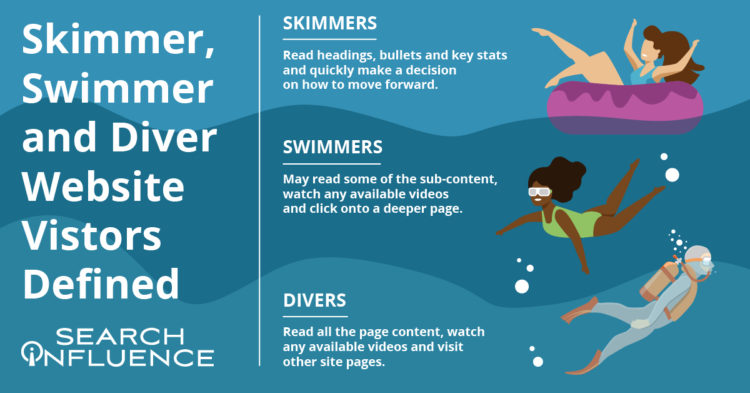
    skimmer swimmer and diver graphic

    By optimizing your site for skimmers, swimmers, and divers, you’ve established that it’s an informative, helpful resource for your prospect—no matter what stage of the marketing funnel they’re in. Increased site dwell time also sends a positive signal to search engines and can help your search engine optimization (SEO) efforts. A site developed with the user in mind can create a strong sense of trust with the university, making users more willing to convert, whether by submitting basic personal information, contacting the admissions department, or even filling out an application.

    According to a study by MeasuringU, the most common reasons for visiting a university’s site are to learn more about the school, browse its academic programs, and view course information. While those may be the top sources of traffic, we know there’s plenty of other valuable content higher education sites can leverage to delight users.

    Let’s review common content found on higher education websites and how it can be catered to each type of visitor—whether they’re a skimmer, swimmer, or diver.

    Defining Skimmer, Swimmer, and Diver Website Visitors

    While reading this blog, you’ll likely tackle the following content either as a skimmer, swimmer, or diver.

    Skimmers will read the headings, bullets, and key stats and quickly make a decision on how to move forward.

    Swimmers may read some of the sub-content, watch a video (if available), and click onto a deeper page.

    Divers will read all the content on the page, watch a video (if available), and will go to other pages on the site.

    My blog post is organized with clear headings, bullet points, and plenty of white space if you’re here to just skim the highlights or even swim a little. I also have in-depth content under each heading, clickable internal and external links, and a straightforward navigation bar if you’re ready to dive into this topic or even deeper to learn more about overall higher education marketing strategies.

    Just like a thoughtfully structured blog post that accommodates each type of reader, website content for any higher education institution should be curated to skimmers, swimmers, and divers.

    How User Experience (UX) Can Affect SEO

    Why are we even trying to accommodate different kinds of site visitors/readers? It all comes down to creating a positive and informative experience for your audience since they’re likely to spend more time on (and revisit) an accessible, easy-to-navigate site. Search Engine Journal points out that Google’s algorithm consistently takes user experience into account.

    A site optimized for UX is likely to be awarded in search engine result pages (SERPs). It makes sense that UX and SEO go hand-in-hand—the goal of both is to help readers find the information they’re looking for/complete their task with the most relevant information.

    In a previous blog post, we discussed seven actionable steps you can take to make your higher education website more engaging for prospects and students.

    Higher Education Website Content

    Because a higher education site is extensive and covers so many topics, optimizing content for skimmers, swimmers, and divers won’t look the same for every type of page. When building out content, keep your readers top-of-mind by asking what they want and what they’d like to accomplish from each page.

    Let’s focus on three categories of content. All examples and screenshots are from our higher education client, Tulane School of Professional Advancement (SoPA).

    Program and Degree Pages

    Your school’s academic program and degree pages can become quite information-heavy very quickly. These pages usually contain crucial information on in-depth topics such as:

    • Admission requirements
    • Required courses
    • Transfer credit eligibility
    • Tuition

    How can you make these topics accessible without overwhelming your readers? Structure them as accordions. Accordions are structured as a vertical menu with clear headers. Users can click these headers to reveal more information about the topic.

    Formatting sections of an information-dense page as accordions not only cleans up the entire page, it also minimizes scrolling and lets your readers control how much or how little they want to read on the page.

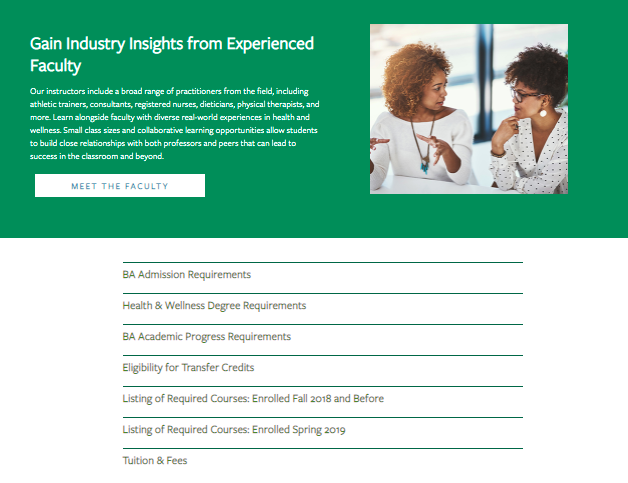
    An example of an information-dense page as open accordions

    An example of an information-dense page as closed accordions

    When visiting the above page for Tulane School of Professional Advancement’s health and wellness degree, swimmers and skimmers may review more general information about the degree before they’re ready to dive into logistics like admission requirements and transfer credits. Less content and less scrolling can help readers not bounce off the page because they feel overwhelmed by too much information.

    Site visitors who are further down the conversion funnel or even first-timers who prefer to get as much detail as possible can click on each topic to get more in-depth information in the drop-down. Accordion menus give readers control over how much content they can consume at a time—and everyone likes to feel in charge.

    Pro tip: Make sure to use clear, concise headers for each accordion section.

    You can also embed videos and other multimedia to enhance on-site text and give swimmers and divers other ways to explore your content during their research.

    An example of an embed videos to enhance on-site text

    Acceptance Criteria and Application Deadlines Content

    Any information pertaining to an institution’s acceptance and application deadlines should be limited to pages specific to admissions and applying. This content should only be on a few key pages within your school’s site since application and deadline info isn’t evergreen (content that is timeless and remains relevant) and needs to be updated every few months.

    When crafting evergreen content for an academic certificate or degree program page, we don’t want to mention the next application date within the content itself. Pop-ups or stick bars can be used to communicate urgency to prospective students browsing your website when deadlines are approaching.

    Course Requirement Pages

    Most potential students probably won’t dive deeply into course requirement pages unless they’re transfer students.

    Having a list of the course names within a program on its dedicated pages makes sense, but having detailed descriptions of each class is more information than potential students need at the moment. Detailed course descriptions are best displayed in a separate on-site course catalog or on an internal site for current students.
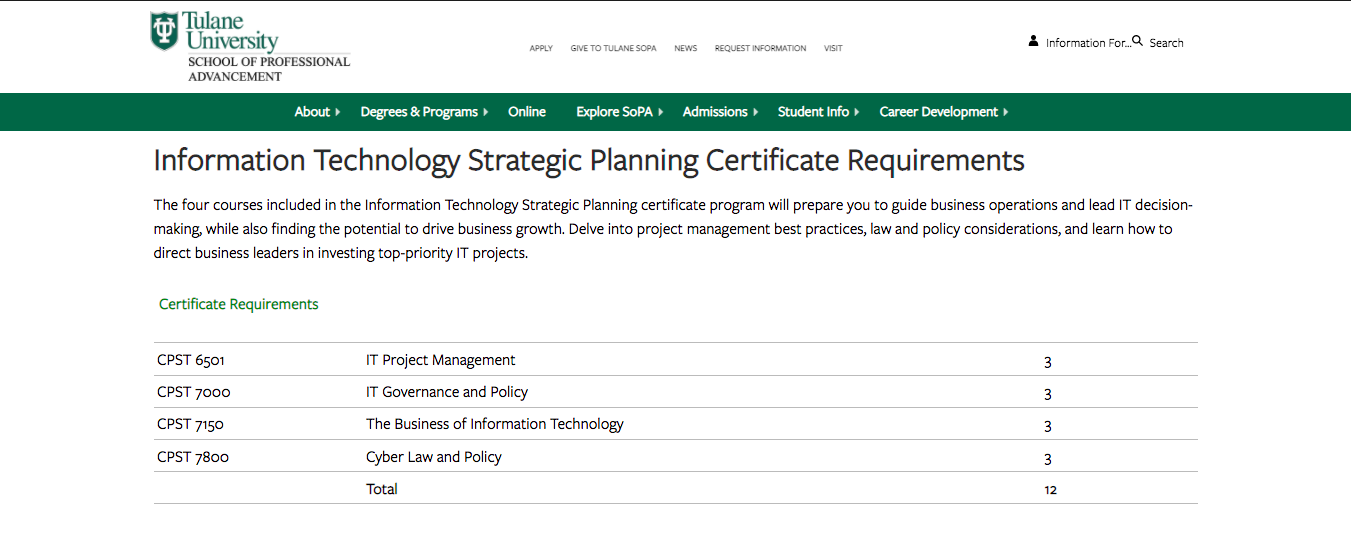
    SoPA Cert Page

    Tulane SoPA lists all the course requirements needed for an IT Strategic Planning Certificate without cluttering the table with course descriptions. The course reference number is listed, so deep divers can look up the course description in the on-site course catalog if absolutely necessary.

    Higher Education Blog Content

    Following a consistent blogging schedule not only provides useful, industry-relevant content to your current and prospective students, but also keeps your site updated and signals to search engines that it’s trustworthy.

    Most of the following guidelines can be applied across your site content, not just for blog posts.

    Break Up Content

    Structure blogs with subheaders so readers will know exactly what the post covers at first glance. Subheaders—H2s and H3s—visually organize your content and help make it more accessible and scrollable for readers, whether they’re skimming, swimming, or diving headfirst into your blog.

    Other ways to break up long lists and paragraphs include:

    • Bullet points
    • See what I did there?

    Images and Graphics

    Images are a powerful tool that can make your blog posts pop and entice visitors to read your content. They can also be used to break up content, making it more skimmable for readers intimidated by a wall of text. Try using more than one image. HubSpot reports that blogs with an image every 75 to 100 words get double the shares compared to other blogs.

    Pro tip: Use diverse photos and vector graphics to reflect different genders, races, body types, and abilities in your blog images; all prospective students should see themselves represented in your creative.

    Infographics can be repurposed as mini-infographics and featured alongside related blog content to add more visual appeal, break up the text, and to expand on information covered in the blog.
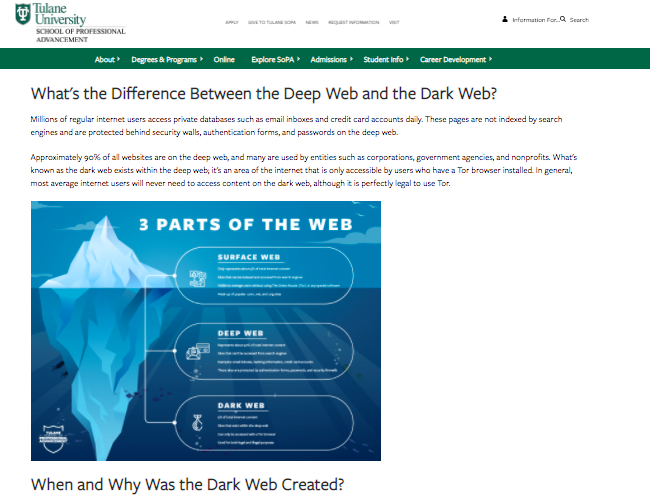
    Mini-infographic

    Mini-infographics are excellent ways to include statistics or facts in a more interesting, eye-catching manner.

    Links and Calls-to-Action

    Help your readers move along the marketing funnel with clear, specific internal links and call-to-action opportunities in all blog content. Internal links should send your readers to additional and helpful pages deeper into your site. Links unrelated to the hyperlinked text or blog content can create distrust with visitors, leading them to bounce off your page.

    When creating an internal link, always ask how the page can help your reader. If you can’t come up with a straightforward answer, then ditch that link.

    Every blog should end with a call-to-action, or, an opportunity for your reader to take the next step. Depending on where they are in their prospective student journey, this next step could be:

    • Visiting a program page to learn about a degree
    • Contacting an admissions counselor
    • Starting their application

    Blog Categories

    While this isn’t exactly content-related, sorting blogs by category helps users easily search blogs catered to their interest (enhancing UX!) and can help minimize bounce rate. Even if site skimmers and swimmers don’t do a deep dive into too many blogs, they’ll be able to see the depth of topics covered.
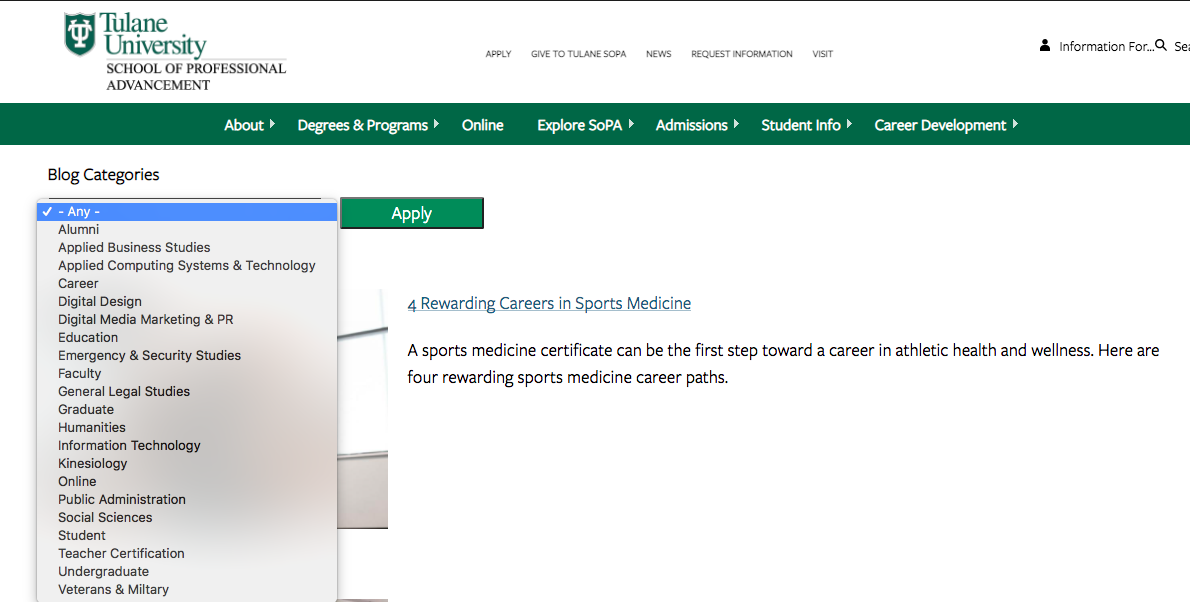
    SoPA blog list

    Content Download for Degree Programs

    Content downloads are one to two-page info sheets about a specific program or degree. They function as gated content (the user must provide basic info in exchange for access) to capture leads who are interested in this program or degree.
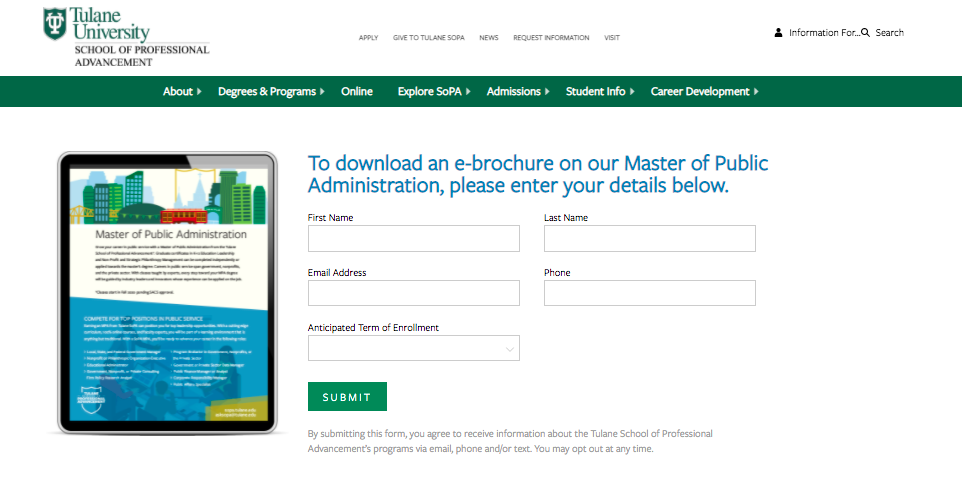
    SoPA 1-Pager Download

    Content downloads can be the ultimate deep-dive for visitors wanting to get as much information as possible. They’re also a measurable way to track site visitors that eventually turn into leads. Divers or visitors further down the marketing funnel are more likely to submit their email to download more in-depth information about a program.

    This submitted email can be used as a trigger to launch an email nurture campaign that helps guide potential students along every stage of the marketing funnel.

    Elevate Your Higher Ed Content Marketing Strategy With Search Influence

    Work with digital marketing experts who can help you lead an effective content marketing strategy that helps you move prospective students down the funnel. Contact one of our strategists today to discuss your lead nurturing tactics and digital marketing strategy.


  • Which Email Marketing Strategy Will Help Me Reach My Goals?

    Key Insights

    • Email marketing is still 100% relevant
    • Establish specific goals for your email marketing campaign
    • Determine the metrics you want to measure before executing your campaign
    • Think of conversion and retention campaigns as umbrella campaigns. Choose a more specific subset campaign once you decide which aligns best with your marketing goals

    You may have gotten a notification in your email inbox about this blog. Or, you started your morning organizing the daily or weekly emails in your inbox. Hello, email marketing!

    Yes, we’re still talking about email as an effective marketing strategy in the age of TikTok and Instagram. When done correctly, email campaigns can help businesses build brand loyalty and nurture potential leads into customers. Companies have the chance to get directly in front of their audience,—99% of consumers check their emails every day—while exhibiting the value of their products and services.

    Remember: if your audience chose to subscribe to your email list, they have some interest in your brand. Don’t waste their time with irrelevant content that has them reaching for the “Unsubscribe” button.

    In this post, we’ll define conversion and retention email campaigns, explore campaign types within those categories (campaign-ception!), and find the right email marketing strategy for your campaign.

    Determine Your Goal: Conversion or Retention?

    Before you decide on a strategy, you need to identify your main goal. Do you want your campaign to result in X% more subscribers buying a product or downloading an ebook? Perhaps you want only X% to Y% subscribers to hit “unsubscribe” in the next quarter or X% more engagement with your content.

    These are examples of conversion and retention goals—now, let’s find out which type of goal is for you! Think of conversion and retention campaigns as umbrella campaigns. Once you decide which aligns best with your marketing goals, you’ll choose a more specific subset campaign.

    Once you pick a goal that’s S.M.A.R.T. (specific, measurable, attainable, relevant, and time-bound) and your metrics to measure, you’ll know if your email marketing strategy should be a conversion or retention campaign.

    Conversion goals focus on your subscribers completing the desired action prompted by your email.
    Examples:

    • Download an ebook
    • Purchase a product
    • Fill out a form
    • Register for a service

    Retention goals focus on keeping your subscribers engaged and satisfied with your brand. You can measure their success by monitoring how subscribers interact with your emails.
    Examples:

    • Rate of subscribers vs. unsubscribers
    • Open rate
    • Click-through-rate
    • Content engagement

    An animated envelope with a notification symbol on the top

    Conversion Email Campaigns

    Conversion email campaigns focus on building brand loyalty and establishing trust with potential leads that have shown interest in a business’s product or service. They nurture leads through the buyer’s journey with the ultimate goal of, you guessed it, conversion.

    If your industry has a more extended buyer’s journey, conversion campaigns nurture prospects from the top of the marketing funnel and through the entirety of your buyer’s journey.

    The first email in a conversion campaign won’t end with “buy now.” You’ll have to build trust with your audience before we get there! (However, if your buyer’s journey is on the shorter side, you can always adjust your email campaign’s length).

    Drip Campaigns

    A drip email campaign is a multi-email strategy that targets your leads along every stage of the marketing funnel. Drip emails are relatively simple to set up and can be great tools for a quick-start campaign.

    Purpose: Drip emails are sent at regular intervals to potential leads. Each email is connected to an overarching goal or strategy.

    Recipients: Recipients are potential leads identified in real-time or when they take a specific action (e.g., fill out a landing page form) that serves as a catalyst to start the drip campaign.

    Content: Content will align with your marketing funnel. Campaigns typically start at the top of the funnel with more general content (introductory information, overview) and eventually lead readers to content encouraging decision-making. A specific call-to-action will be outlined in each email.

    Timing: These emails are sent automatically according to an established campaign timeline.

    Possible Metrics: Open rate, click rate, and the desired conversion.

    A typewriter spelling out the word goals

    Nurture Campaigns

    Nurture email campaigns are similar to drip campaigns, but they’re even more detailed and contain many moving parts.

    Purpose: Readers are nurtured through the marketing funnel by content sent over a period of time, ultimately leading them to the desired action.

    Recipients: Similar to drip campaigns, recipients are potential leads that are identified in real-time or when they take a certain action (e.g., fill out a landing page form) that serve as a catalyst to start the nurture campaign.

    Content: Content should be tailored to your marketing funnel and your lead’s behavior. They should receive specific content based on which action they took. Did they request general information? Have they downloaded your ebook? Content could include F.A.Q.’s, testimonials, additional information, benefit stories, and a call-to-action leading them to the next step in the funnel.

    Timing: Communication is automated with a customized timeline based on a set of defined actions (unlike drip campaigns that follow one general schedule). If your lead takes the desired action, they stop receiving one series of emails and move on to the next email series (or another step.)

    Possible Metrics: Open rate, click rate, desired conversion, and length of time in each email segment.

    Retention Email Campaigns

    While both conversion and retention email campaigns do build trust with readers, retention campaigns focus more on trust than promoting products or services. Customers receiving these emails fall into the “Delight” stage of the marketing funnel. Delight content focuses on maintaining the loyalty of established customers.

    You want to retain customers and build brand loyalty by delighting and engaging them with helpful updates, promotions, sales, news, and upcoming events—delivered right to their inbox.

    Here’s what that this looks like:

    One-Off Campaigns

    One-off email campaigns are short, sweet, and focused.

    Purpose: These email(s) offer specific promotions or timely events your business is running.

    Recipients: Those already familiar with your brand, such as subscribers who have already made a purchase or leads near the bottom of your marketing funnel.

    Content: Keep it short and visual! Content should be easily skimmable and focused around eye-popping graphics.

    Timing: Timing will vary with the offer and strategy. You can send out multiple emails leading up to the event or just send one the day of to create a sense of urgency.

    Possible Metrics: Open rate, click-through-rate, and visiting a specific site page.

    Newsletter Campaigns

    Newsletter email campaigns are non-promotional and sent out periodically to customers.

    Purpose: Update customers about your business and establish a sense of loyalty and trust—you’re not asking them to convert!

    Recipients: Broader audiences that have subscribed to your mailing list. Your audience can be at different levels in your marketing funnel, but they are usually familiar with your brand.

    Content: Newsletters contain topical company news, important updates, helpful tips, and other content that makes readers feel like an insider at your business.

    Timing: Campaigns are recurring and regularly occur monthly or quarterly.

    Metrics: Open rate, click-through-rate, and unsubscribe rate.

    Email campaigns can be an excellent marketing tool with a pretty impressive R.O.I.—it can generate $38 for every $1 spent! If you’re not sure where to start, contact our team at Search Influence. Together we can help craft, set up, and optimize an email marketing campaign that’s tailored to your goals.

    Images:

    Envelope

    Typewriter

  • Up Your Instagram Game With Effective (and Free) Hashtag Research Strategies

    #Winning. #Selfie. #Hashtag. While hashtags have crept into our vocabulary (whether sarcastically or not) and may seem like an afterthought, they’re actually effective marketing tools that need to be taken seriously when it comes to your Instagram strategy.

    I want you to walk away from this post with a newfound appreciation of hashtags and the confidence to perform hashtag research—trust me, it’s not as complicated as it sounds. And if you already have an Instagram account, you’ve got your most important tool!

    Let’s cover the basics before we get into the research steps.

    Why Are Hashtags Relevant to Instagram Posts?

    Remember, hashtags aren’t just for decoration—especially for business accounts looking to grow followers and create awareness about their brand and services. While you may have a little more fun with hashtags on your personal Instagram (#DoItForTheGram, anyone?), hashtags can help brands get in front of a wider audience and connect with potential customers.

    Animated photo of a hashtag and a heart in comment shapes

    So, how do these little hashtags work their magic?

    Even with the perfect combination of good lighting and an engaging caption, a large chunk of Instagram posts goes unseen. 70% of posts, to be exact. Let that sink in.

    There’s a big sea of content on Instagram; it’s easy to get lost—but using hashtags can boost your chances of engagement. Adding just one hashtag to a post can increase engagement by 12.6% (but don’t just slap on a hashtag to your post and call it a day)!

    Conduct Effective Hashtag Research On Your Own—No Tools Required!

    Hashtag research can be a little more fluid than other digital marketing research. Yes, there are steps to follow, but I enjoy this research because there’s room for creativity.

    As we walk through hashtag research basics, let’s pretend I’m a small, local catering company looking to expand my business and showcase my delicious work on Instagram. How would I begin my hashtag research?

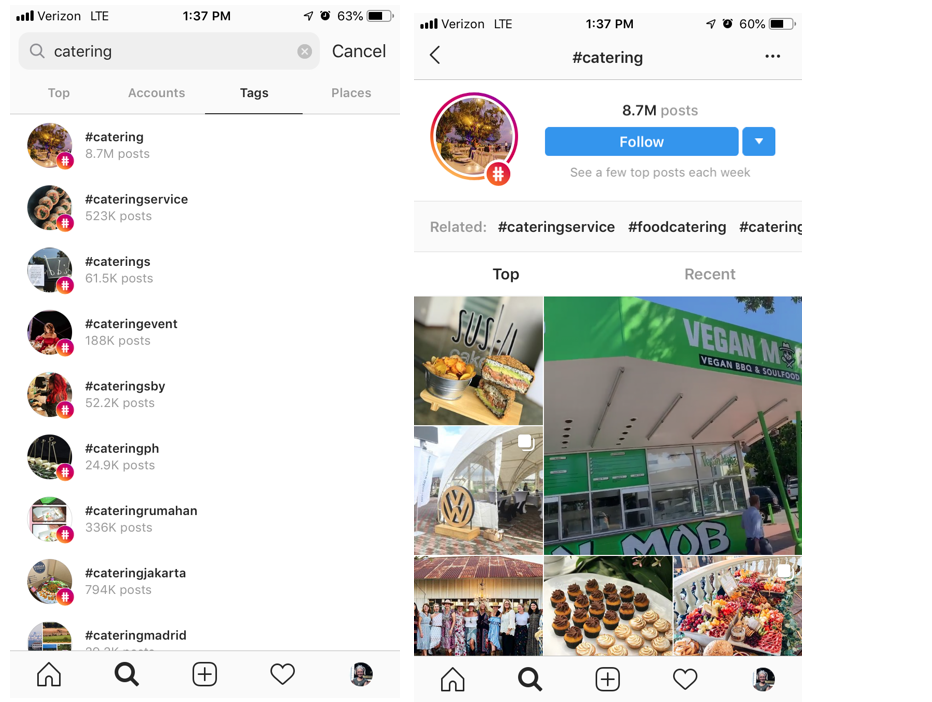
    Go to the search bar, press “Tags,” and type in a keyword related to your industry.

    Example of Instagram tag search and landing page from tag search

    “Catering” is a pretty general hashtag and probably won’t get my little catering company found in a sea of 8.5 million posts. But we’re not stopping there. To find more varied, interesting hashtags related to catering, I’m going to check out some of the top and recent posts that were pulled up in this search. Then I can dig deeper into their hashtags and engagement patterns.

    I can also click “Follow” if I want to keep up with the top posts using #Catering—they’ll appear in my Instagram feed.

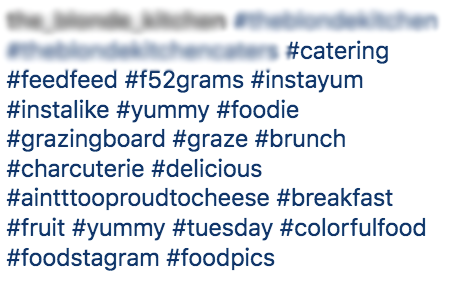
    Let’s dig into this post I found using #Catering and pull out some popular and not-so-popular hashtags that I can use in the future. Because when it comes to hashtag strategy, you want a mix of both!

    screenshot of hashtags relating to food

    High- and Low-Density Hashtags

    Some of the hashtags in this post are general and widely used on Instagram, such as #Foodie, #Catering, or #Yummy. These are known as “high-density hashtags,” meaning there are more than 500,000 posts on Instagram using that hashtag. While it’s good to use some high-density hashtags to gain new likes and follows, you want to mix them with more specific, targeted hashtags, known as low-density hashtags (used in less than 500,000 posts). There’s less competition for ranking in the top posts with low-density hashtags, helping your brand become more discoverable. Some examples of low-density hashtags in the above posts are #AintTooProudToCheese #GrazingBoard #ColorfulFood.

    Always use a mix of high- and low-density hashtags in your post to cast a wide net. To find out the number of posts that have used any given hashtag, simply click on the hashtag, and it’ll take you to a page like the #Catering example. You can also search hashtags if you want a quick number without going to the page.

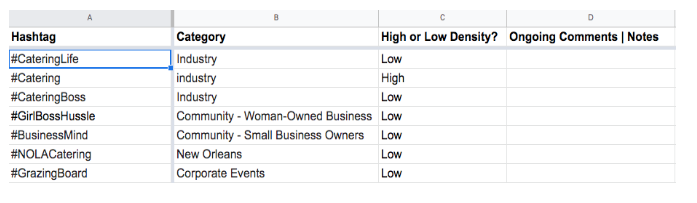
    When compiling your list of hashtags during your research, don’t forget to indicate if it’s high-density or low-density. Your future self will thank you when it’s time to organize them!

    Here’s where the fun comes in.

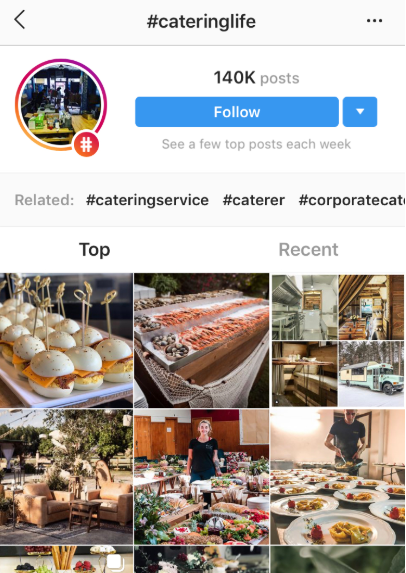
    Once you find a few posts from your own initial search, click on hashtags that stand out and see who else is using them. Add those hashtags to your list, and keep going down the rabbit hole!

    Screenshot of #cateringlife hashtag results page

    Here’s a post I found searching through #CateringLife:

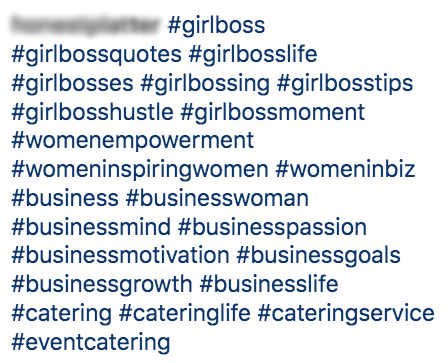
    Screenshot of #girlboss related hashtags

    Community Hashtags

    Notice the mix of hashtags here. We have some catering-related ones (#CateringLife, #EventCatering, #CateringService), and we also have low-density hashtags that speak to a more specific (smaller) audience or community: #GirlBossHustle and #BusinessMind. These are community hashtags that can be used to engage with specific users within a similar business or active community.

    It may take some time to find the right community hashtags for your business. Follow a few low-density themed hashtags and observe the other users and business accounts using them—do they align with your brand and goals? Are the accounts engaging with users or one another? Note the hashtags that seem like the best fit for your business. Once you begin experimenting with different community hashtags and engage with other accounts within that community, you may find your tribe and gain more visibility.

    Location Hashtags

    Location hashtags can help you target a very specific local audience and get in front of Instagram users already following that hashtag. Find location-specific hashtags that combine your targeted area, audience type, and industry. Try different variations of your location (e.g., “NOLAEats,” “NOLACatering,” “NewOrleansFoodie”).

    Follow a similar research process as outlined before; don’t be afraid to go down the rabbit hole of accounts by jumping from one hashtag to the next. You never know when hashtag gold will strike!

    As you research high-density, low-density, community, and location hashtags, observe (and record!) the number of hashtags, placement, and level of engagement in each post.

    Take the time to analyze the posts and accounts your hashtags are coming from:

    • Number of hashtags used?
    • Number of likes?
    • Engaging comments? Responses from the account? No comments?
    • Number of followers?
    • Hashtags in the comments or caption?

    The more you document hashtag use and patterns during your research, the more informed your strategy will be.

    Hashtag Categories

    I’ve pointed out different types of hashtags throughout the research process—low and high density, location, and community hashtags. While there are more out there, we’re just going to focus on these.

    By searching a variety of hashtags types, you can create subcategories for your hashtags.

    Now, back to my catering business.

    After my research, let’s say I organize my hashtags into four main groups: “Woman-Owned/Small Business,” “Weddings/Corporate Events,” “New Orleans,” and “Industry.” When I plan future posts, I’ll have my hashtags organized and ready to be used according to my post topic.

    Remember: you can use multiple categories of hashtags for each post. Focus on hashtags relevant to your industry and post topic—the more relevant hashtags, the more likely your target audience will like, comment, or follow.

    Organize Your Research & Create an Ongoing Strategy

    No need to purchase special software to organize your research—a simple spreadsheet will do.

    An example speed sheet of hashtags and categories

    Make sure it’s thorough and organizes hashtags in a way that anyone using it will understand. This is especially helpful if more than one person is working on your Instagram posts and overall strategy.

    Even if you’re the only one using the spreadsheet, having it clean and organized will be handy when sharing research with others and helping them understand there’s a method to your Instagram-posting madness.

    Experiment With, Change Up, and Monitor Your Hashtags!

    So, you have your hashtags neatly organized in a spreadsheet. The hard part is over—now it’s time to copy and paste a few of them into your posts and call it a day, right? WRONG! Your hashtag strategy is not a one-and-done ordeal; it’s a strategy, after all.

    Strategies need to be ongoing. You need to experiment, observe, and readjust when using hashtags on Instagram. What do I mean by that?

    Experiment

    • Don’t use the same 5-10 hashtags in every post. I repeat: do not use the same 5-10 hashtags in every post.
    • Switch out your hashtags in each post to reach new audience members. You have the chance to cast a net that has the potential to get wider and wider with every post.

    Observe

    • Consider using an Instagram business account to help monitor post performance. You’ll be able to gain engagement insights for each post, including the number of impressions you received from hashtags alone!
    • Even with an Instagram business profile, record notes about your hashtag performance in your spreadsheet since Instagram limits how far back into your insights you can see.

    Readjust

    • Which hashtags seem to be attracting new followers and encouraging engagement? Any hashtags not performing well (or at all)? Readjust your hashtag use according to your observations.
    • Try pairing different hashtags together to see if that improves post performance.
    • Think of this step as more informed experimentation. You’re still trying out different hashtag groups and categories, but now you have some observations and notes to back it up.

    Repeat

    • Surprise! The process doesn’t ever truly end (unless you want less than impressive results). Hashtag use is ongoing for a reason.
    • Keep repeating this process with each post. Before you know it, you’ll have an arsenal of hashtags and hefty notes and insights to inform your hashtag strategy.

    Ready to Build Your Social Strategy?

    While hashtag research can be an easy DIY project, don’t try to balance social media management for your business on top of content creation and marketing. Focus on your business, and Search Influence can do the rest! To learn more about our digital marketing services, speak with a strategist today.

    Images:
    Hashtag and Heart

  • What Are Good Backlinks Vs. Bad Backlinks?

    Backlinks are one of the many components of behind-the-scenes SEO strategy. A backlink is essentially a link on a site that leads users to a different site. Think of backlinks as a continuous chain that links websites to one another; some chains are firm, strong, and reliable (good backlinks) and others are rusty, neglected, and not doing their job (bad backlinks).

    The Role of Backlinks in an SEO Strategy

    Before diving into the nitty-gritty of backlinks, let’s differentiate between backlinks and internal links. While both sound similar and have substantial SEO value, they play different roles. An internal link is clickable text (a.k.a. a hyperlink) on your site that leads to another page within your site. We go into more detail about internal links and their juicy SEO power in our past blog post. (See? I just made an internal link!)

    A backlink is a hyperlink that lives on another site and links back to yours. WPBeginner points out that backlinks are one of the many tools used by search engines to calculate search result rankings. (And just like that, I gave a backlink to WPBeginner’s site!). Think of backlinks as an approving nod from one site to another. When used correctly, backlinks acknowledge the authority of another site.

    Dr. McCoy and Captan Kirk nodding in agreement about backlinks

    Google has used backlinks as a ranking signal for keyword searches for almost two decades. Google didn’t really differentiate between the quality and quantity of backlinks until their Penguin algorithm update rolled out in 2012 to closely monitor backlinks and prevent spammy “black hat” SEO backlink tactics. This update gave the SEO world a clearer picture of what Google considers legitimate backlinks that actually add to sites’ authority. Now, the strongest backlinks come from authentic, well-known sources, such as newsworthy press releases, trusted editorials, news articles, or webinars.

    For the sake of consistency, we’re going to focus on Google’s backlink policy and how sites are affected in Google search results in the remainder of this post. Because backlinks can have a significant impact on search rankings, we’re going to explore what separates strong backlinks from rusty ones.

    What Is a Good Backlink?

    A good backlink is a relevant outbound link to a trusted, authoritative site. Generally, a site is viewed as trustworthy if it has lots of strong backlinks pointing to it. Google views these backlinks as one way to confirm that your site contains helpful, quality content.
    New call-to-action
    Now, let’s break down some key factors of a good backlink.

    It Comes From an Authoritative Site

    Earlier we mentioned that a backlink should link to an authoritative site, but what exactly does this mean? An authoritative site provides trustworthy, well-sourced content that is updated regularly. It’s considered an expert in its field. For example, readers interested in sustainable building requirements may read multiple online blogs or articles on the topic, but they would likely consult the Environmental Protection Agency’s site, epa.gov, to reaffirm this information and treat it as the most authoritative source on the topic.

    Not all quality backlinks have to come from a source as renowned as the EPA, but keep in mind similar characteristics when searching authoritative sites.

    The Anchor Text Is Specific

    Hyperlinking to a page with clear, specific anchor text is a big win for both the user and search engines. Concise anchor text will give users an idea of where this link will bring them if they choose to click on it, while search engines will use the keywords in said anchor text to figure out the topic of the page it lives on.

    Let’s put this advice into action—which anchor text would you feel more comfortable clicking?

    1. Click here!
    2. Dive even deeper into why anchor text matters in backlink strategies.

    I hope you went with number two.

    Barack Obama gif related to importance of anchor text in backlinks

    It’s Relevant to On-page Content

    Backlinks aren’t just there to take up space and serve as an SEO metric—they should enhance the reader’s experience. Backlinks need to be relevant to the content they’re in and actually provide supplemental information. Think of it from the reader’s perspective—backlinks won’t add any value if they’re bringing readers to completely unrelated sites.

    Google aims to provide users with helpful, rich content that answers queries. Unrelated, distracting backlinks just get in the way of that. Google considers relevant backlinks to be much more valuable than a backlink from a random, unrelated site. A dermatology clinic site that links to a used car Q&A forum would probably send a red flag to Google (and also confuse readers browsing the site).

    What Is a Bad Backlink?

    Don’t let anyone tell you any backlink is a good backlink; it’s simply not true. Since Google focuses mostly on quality over quantity, they track and evaluate backlinks to flag potentially spammy practices.

    Here are a few clues that a backlink may be rusty and untrustworthy.

    They Come From One Site

    The well-known saying “variety is the spice of life,” may not be referring to backlinks, but it’s a mantra we can use here. If a site has a plethora of backlinks, but almost all of them come from one site, this will look spammy to Google. You should actively strategize to build strong backlinks from a range of relevant sites.  

    It’s Hidden or Paid

    Yes, a hidden backlink is basically what it sounds like—it is invisible to a user and Google. Sounds sketchy, right? It is. A backlink that is hidden—whether by manipulating text and background colors or hiding the link in a punctuation mark—is a “black hat” SEO strategy that clearly defies Google’s best practices.

    Gif of Homer sliding into bushes after violating Google's linking policy

    Paid backlinks are a grey area because some methods of paid links are viewed as legitimate. Just because a link has been paid for doesn’t automatically mean it’s bad. Since this a gray area, you should be highly selective with paid methods. If the site’s content is related to your industry, you won’t be penalized for paying for ad space. Paid directory business listings are also fine, as long as they’re reputable.

    It’s Sourced in Spammy Forum Comments

    New call-to-actionThis relates back to the importance of backlinks being relevant and actually helpful to readers. Linking back to your site from off-topic discussion forums just for the sake of a backlink will look suspicious. Like most things in SEO, the intent of posting links to forums may have originally been authentic, but this strategy can too easily turn from trustworthy to spammy.

    Acquiring Good Backlinks and Ditching the Bad

    Congratulations, you’re now armed and ready to differentiate good backlinks from the not-so-good! Because strategic link building is so effective for search rankings, it can be one of the most challenging SEO strategies. But great news—you don’t have to do it alone! Search Influence can help increase your website’s authority by building a strong backlink strategy that’s relevant to your business. Our range of SEO services can also help increase your online presence and ability to reach customers. Let’s start a conversation about how we can help you.

    Images

    Lock and chain

    Star Trek

    Barack Obama

    Homer