Author: Devin Olsen

  • Does SEO Success Require Development Knowledge?

    The short and simple answer to this question is no. You won’t need to delve deep into writing code or earn a degree in computer science to improve your website’s search results. There are some more complex aspects to SEO, but a large number of important and impactful SEO tactics can be performed by any computer-savvy individual. A funny thing I’ve learned from years of working in digital marketing is that many people with advanced technical knowledge of programming and code are not informed on SEO best practices. Many of the insights and standards of search engine optimization have been devised by tenacious marketers and website owners without any technical training or coding ability.

    Getting Started With a CMS

    To effectively improve your website, you will need to know what type of website you’re working with. The available tools and accessibility to a website’s features can vary widely. A lot of sites are built using Content Management Systems (CMS) like WordPress, Squarespace, and Wix (along with many others) that are designed to give users without coding experience the ability to log into a dashboard and update a website. These CMSs also have features that support SEO updates as well, but they can differ and may require using add-ons that weren’t originally built into the CMS. If you don’t know if you’re using a CMS or which one it is, there are online tools available that can figure that out for you. Here’s one I’ve used that is fairly accurate.

    You can also investigate the CMS type with a simple search query. Something along the lines of “What CMS is this” or “web cms detector” will bring up a number of online tools that will analyze the code from your site to determine what CMS is in use. The answers you find may not be 100% reliable, so you may need to contact whoever set up or sold you your website if you still aren’t sure.

    A paper man sitting in front of HTML code reading 'Hello World'

    Optimization for Beginners

    Once you’ve established which CMS or code your website is built on, search engines are your best friend when it comes to learning how to edit and optimize your website. You can start searching for your website’s documentation and specific tasks you want to complete within your system. If you’re new to the game, you’ll be pleasantly surprised at the vast number of beginner-friendly articles written about specific implementations of technical SEO available on the web.

    As a starting point, you should research how to update title tags and meta descriptions. These components of a website impact the information displayed in search results. If you’re using Squarespace or Wix, you can access this via the page editor features and can look up how to do so in the site’s documentation. If you’re using WordPress and you want to implement these changes, your WordPress theme may or may not already have this feature. If not, it’s likely you’d need to download a plugin, which is a program that adds functionality to WordPress and installs it on your site. Pretty much any open source website (WordPress, Drupal, Joomla) will have their own version of a plugin. These programs are usually designed by developers, some of which are free!

    If you aren’t using a CMS, you will probably need to access site files and edit some code. There’s plenty of online resources that can walk you through the process. Be cautious, however. You should always back up your site before making any changes to code or adding plugins. Maintaining a backup or version control system is the safety net that allows you to switch things back to how they were if anything goes wrong.

    A Little Code Goes a Long Way

    I know many people describe code as gibberish or absurdly unapproachable; at first glance, code can look like an alien language. However, the most commonly used code to structure websites, HTML, is pretty simple and useful. HTML is pretty much the label system of the internet. You label paragraphs, headings and sidebar content, horizontal lines, bulleted lists, blocks of content, images, pretty much everything on the page. These labels, with a little help from style sheets, tell your browser how to treat content and images and present them on the screen. There are also labels built into HTML that give search engines other important information, like headings.

    Headings are implemented in HTML with H-tags. They range from h1 to h6 and are intended to organize your headings based on their importance. Search engines use these to determine keywords and the core concepts of the page’s content. To improve your SEO, use these to label your main content heading on the page with an h1, subheadings with h2s, and so on. You can start learning HTML by using online learning tools.

    The Mighty Pen

    Even if you absolutely hate technical stuff like code, you can still ramp up your site’s SEO. Ultimately, the content on your site is your main money maker. Even if you use a bunch of high-level SEO techniques to get into the top results for a search on a major search engine, if you can’t engage your audience by delivering topical and engaging written content, you won’t last long. A talented writer can be more impactful than a senior developer. In the world of digital marketing, you absolutely need both. We are the Yin and Yang of website creation.

    Make Information Easy to Find

    Here are some basic concepts for writing with SEO in mind. Make it easy to read. Easy to find key information. Title things effectively. Does your content answer a question? Then include the question most people are asking as a heading or title. Does a paragraph have details about something specific? Give it a subheading lets someone who’s skimming the page know, “Here it is! This is what you’ve been looking for.” Use lists and bullet points. Highlight key terms with links to more detailed information and bolded text. Link product names to pages where people can purchase them. Provide business hours, important addresses, and contact information on every page and make it easy to find. Make everything as easy as you can for your audience.

    SEO is all about delivering what people want. Google would quickly lose its status as the top search engine if the results people got for searches weren’t helpful. Search Influence helps businesses follow SEO best practices so that they can succeed online. Contact us today to learn more about how we can help you optimize your website.

    Images: Paper Man

  • Enriching Your Results on Google

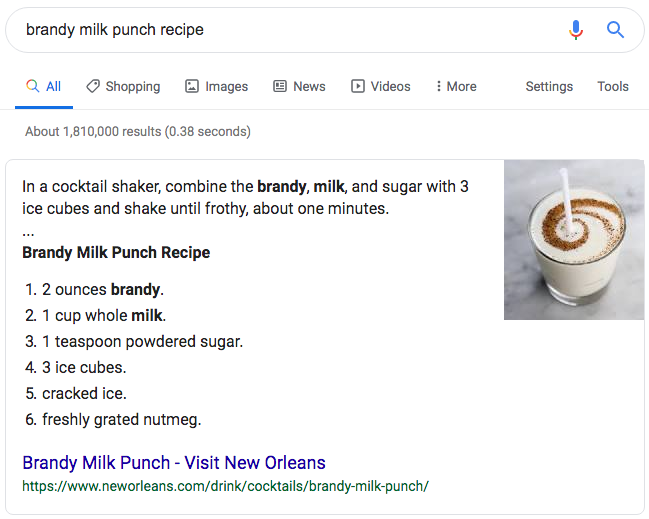
    If you’ve used Google to perform a search for a recipe, an answer to a question, to find a restaurant, or find out the time a concert starts, you’ve probably noticed that not all search results look the same. Some of the results have extra information, some appear with pictures in a “carousel” at the top of the page, and some have reviews with stars on them. These are what have been called “Rich Snippets” by Google, and more recently are being referred to as “Rich Results” in Google documentation. There are many types available, and if you have a website that you are trying to drive traffic to, then there is probably a way for you to take advantage of these features.

    What’s a Rich Snippet?

    The results returned by Google for each recommended web page that consist of a title, a description, and the URL for the page are “snippets” of information taken from the pages of websites. For example, take our LinkedIn page as it appears in the search results:

    Typical Snippet

    Rich snippet data on a SERP result for Search Influence's LinkedIn page

    The title and description are pulled from meta information stored on the pages of websites that are referenced in the results. These are typically added to the code of the site using some simple HTML that can be read in the source code but does not display for site visitors on the page.

    Rich Snippet

    Example of a rich snippet being served up in the Google SERP

    Similarly, Rich Snippets use code on the page to provide more information to Google and can result in additional information that is displayed more prominently in search results.

    How Do I Get My Site to Show as a Rich Snippet in the Search Results?

    In order for Google to display your webpage(s) as rich snippets in the search results, you need to have the information required for the Rich Snippet type in a coded format that Google can read. This is done with “Structured Data,” which, just as the name would suggest, is information specified in a particular format. Google uses the vocabulary of schema.org for most of it’s structured data, and there are several different formats that can be used. Google’s preferred format is JSON-LD (JavaScript Object Notation for Linked Data) which is a common format for communicating information in web-based applications and other domains. This code format can be a bit tricky to write, so you’d likely be better off using examples provided by Google’s documentation and replacing the values with your own information or using a tool or plugin that will generate the code for you.

    If you are familiar with HTML, there are some more easily writable ways to implement structured data on your site using Microdata and RDFa. These use additional HTML attributes to define structured data.

    If you use a popular CMS (content management system) like WordPress or Shopify, there are also a variety of plugins or add-ons that can assist you in adding structured data to your site.

    What Types of Structured Data Does Google Use for Rich Snippets?

    There are 29 different rich result displays, and Google has just announced some more upcoming display options that will be available on certain search types. I would recommend checking out Google’s documentation for a comprehensive list and all the different structured data that is required for a web page to appear with various display perks and in certain sections of the results. I’ll cover some of the primary ones that will apply to the broadest number of sites.

    Article

    Blog posts and news articles can use the article structured data to potentially be featured in Google’s top stories, carousel, and display, with extra features like headline text and a larger image than the normal thumbnails from results.

    Breadcrumb

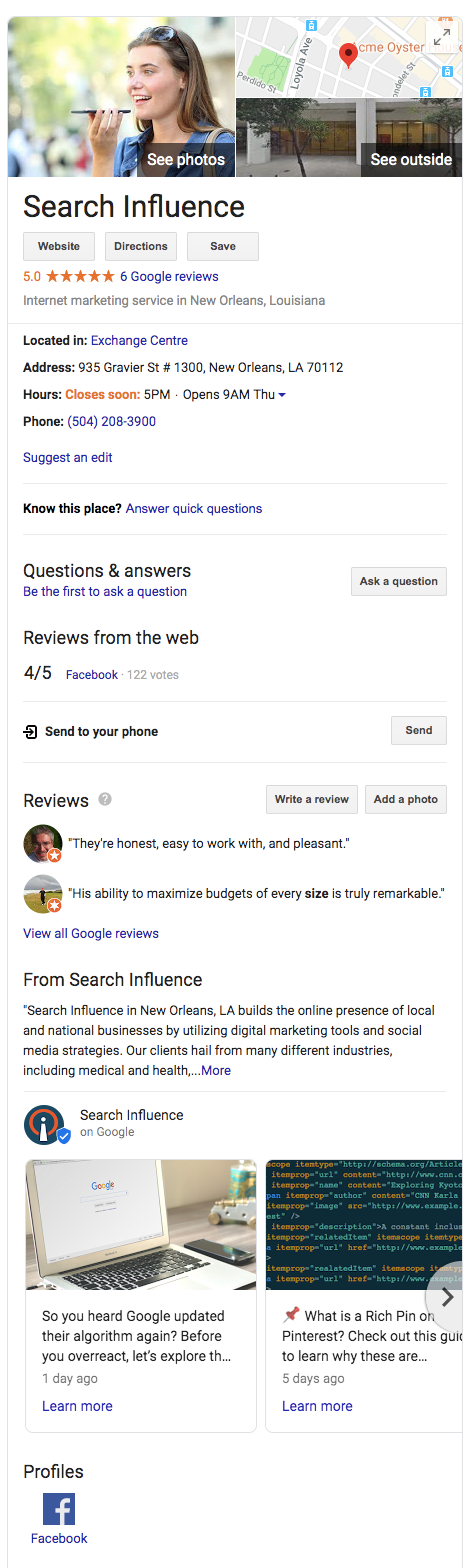
    Breadcrumb structured data can be used to display the pages in relation to the rest of the site.Example of a knowledge graph result using Search Influence as the businessFor example, a specific product page could fall under a category page, which falls under a broader category. With breadcrumbs displayed in the search results, navigation to any of these pages is just a click away.

    Carousel

    Google’s search carousel feature, a prominent interactive display with images that appear at the top of search results, can be unlocked with the carousel structured data. This usually works in conjunction with other structure data like article, recipe, or course structured data.

    Course

    For Education, schools and businesses offering courses can lay out information that will be displayed in the Google search results.

    Event

    This type is an interactive rich result that shows a list of organized events, such as concerts or art festivals, that people may attend at a particular time and place.

    FAQ Page

    A Frequently Asked Questions page structured data is for common questions posed on the page’s subject, often used by businesses to provide information about its products and services.

    How-To

    A How-To walks users through a set of steps to successfully complete a task, featuring video, images, and text.

    Local Business

    Local businesses will benefit greatly from this type of structured data. It allows your business to appear in the knowledge graph with important information like address, hours of operation, contact info, logo, and business description.

    Logo

    This allows your organization’s logo to appear in search results and the Google Knowledge Graph.

    Product

    Structured data for products includes price, availability, and reviews.

    Q&A Page

    Similar to an FAQ page, Q&A structured data can be used on pages that present information in question and answer format.

    Recipe

    This structured data type will allow recipes to potentially display in Google search results with ingredients list and instructions.

    Review Snippet

    A review snippet is a rating or short review excerpt. It can apply to products, recipes, movies, and local businesses.

    Video

    These snippets allow you to markup video content and appear in video results of Google search results.

    Where Can I Learn More?

    You can see example code, required information, and images of the resulting rich snippets that structured data types make possible in Google’s documentation here. I also recommend checking out Schema.org, where you can learn more about the structured data that Google used as a base for all their structured data conventions.

    If you need help implementing code or appearing higher on Google’s search results, the Google and SEO experts at Search Influence can help. Contact us today.

    Images

    Dollar sign

  • Oh No! Where Did Medical Schema Go?

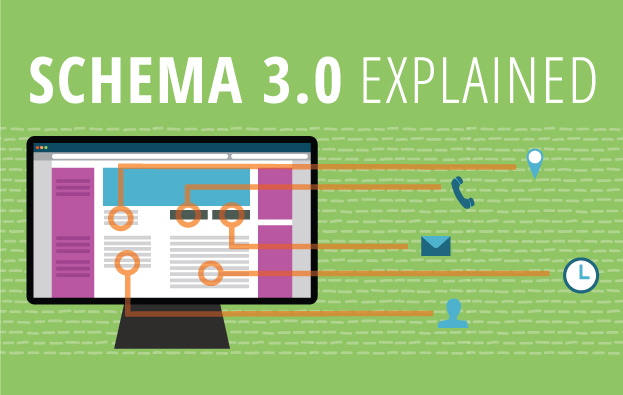
    Schema 3.0 Explained

    While working on implementing some schema markup for a medical clinic last week, I went to schema.org to see my available property choices, but when I went to the same page I’ve visited a hundred times before, https://schema.org/MedicalClinic, instead of the list of properties and their definitions I was expecting, I got this perplexing message:

    Medical Schema Change

    After doing a little poking around on schema.org, I noticed their release notes mentioned the implementation of a new version of schema, Schema 3.0.

    What does that mean for those of us who use schema on our websites? Well, not too much for most industries. Some new schema properties have been added here and there. You can see the release notes for a full list of schema updates. However, if you manage a medical industry website, then you should be aware of a fairly significant change. Schema has re-organized their site and created a new “extension” for Medical schemas. Medical schemas like “MedicalClinic,” “MedicalProcedure,” “Physician,” and even “Dentist” have been migrated to a new subdomain, https://health-lifesci.schema.org/. Most but not all pages on schema.org that used to contain properties available for medical schema types now show the same core vocabulary message. Some pages, like https://schema.org/Physician, still display their property types. ​There are new pages on the health-lifesci subdomain for medical schema types, so we can still mark up these schema types using the new URLs for these pages:

    Currently, Google has not followed suit—their structured data testing tool has not been updated. If you replace https://www.schema.org/MedicalProcedure with https://health-lifesci.schema.org/MedicalProcedure, Google doesn’t throw up an error; it just completely ignores the schema. This update raises some pretty big questions. Will Google update their schema validation, and will the old schema URLs be deprecated and invalid?

    Another variable that makes updating your schema iffy is the information on the new schema extension page, “The terms defined in this extension may be considered moderately stable, but some changes are still likely (including renaming and restructuring) through ongoing community collaboration.” I also think that this may indicate that the restructuring may not be limited to just these schema types, and schema.org may start creating more extensions for specific schemas, rather than including them in the core schema language.

    Right now all we can do is watch and wait. So long as Google is only validating the old schema URLs, we recommend continuing to use those, but stay on the lookout for some big changes yet to come.

    Edited on 5-16-2016 at 3:24 pm:

    “As of this afternoon, Google has already made updates to their validation tool so the new health-lifesci extension will now validate. The old URL for these schema types continues to work as well and does not produce a warning or error. Hopefully this is a sign that those of us with medical schema already implemented on our sites will not have to update the schema to the new format any time soon. Kudos to Google for the swift update.” 

    Feature image credit.

  • Art of War: Keyword Edition

    So you want to improve your online presence, crush your competitors, and rule the market with an iron fist from the coveted #1 spot on Google? Well, that’s all fine and good, but you may be getting a little ahead of yourself. Before you can dominate Google, you need to know which searches are worth dominating for your business.

    This is a simple question that often plagues those new to online marketing, keeps them awake at night, haunts their dreams, and, through perpetual second-guessing and overanalyzing, crushes the enthusiasm that began their quest for Internet marketing supremacy in the first place. What starts as a simple guessing game (“How would I look this up?”) often protracts itself over time into “What is every conceivable combination of words that could possibly describe my business?” Next thing you know, you’re soliciting family members, friends, and random strangers to participate in the game as you compile a list that more and more resembles a schizophrenic fit than viable keywords for site optimization. Let me save you the time, trouble, and expensive psychiatric treatment that is the inevitable result of the aforementioned method and let you in on how to sensibly go about this rudimentary phase of online marketing.

    Step One: Think Obvious

    ouijaboardforkeywordsimageThink of the most obvious way you would search for your business. This should be simple, to the point, and usually very general. Think, “If I sustained a life-altering injury that rendered me incapable of speech and left me with only a basic grasp of the English language, and I could only communicate through the use of my single working stump arm and a special stump-optimized typewriter, how would I search for my own business?” Great! You should probably have around ten simple and obvious ideas, and most often, these will be the most rife for traffic. In addition to these terms, you should also think, realistically, of where most of your clients reside. If you are a small business or storefront with services offered to those in your immediate area, keep focused on your local region or the nearest metropolitan area if you are in a suburb. If you overreach and try to optimize for every suburb and town within 1,000 miles, you’re not going to do well anywhere. Stay focused, and you will fare much better.

    Step Two: All Is Fair in Love and Marketing

    kingofgoogleimageTime for some good old-fashioned espionage! Use your simple search terms to pull up some results on Google. These will likely be your competitors showing up, the ones you will eventually need to dethrone in your quest for fame and fortune. Take a gander at their sites and see what key terms they’ve used to optimize their pages. What title shows in the Google results, and what do the headers on their pages say? These can give you some good ideas.


    Step Three: Teenage Mutant Ninja Keywords

    Gather the keywords you’ve thought up and the ones you have stolen from your enemies— ahem, I mean borrowed from your competitors—and consolidate them into a single list. Now, take your list of areas where your clients reside and combine each keyword with every location. Next, you will need to mutate these amalgamations into a number of different forms. Have one mutation listing keywords first and another reversing the order, add minor variations like using the word “in” before the location, use the plural version of your keywords, include the state in the location, take the state out, use the abbreviation of the state, and so on and so forth until your original list of obvious search terms is now an army of permutations of the originals. For instance, if you were a restaurant in New Orleans, you would take your keyword “restaurant” and geographic term “New Orleans” and end up with the following variations:

    • “restaurant New Orleans”
    • “New Orleans restaurant”
    • “restaurant in New Orleans”
    • “restaurant New Orleans LA”
    • “restaurants New Orleans”
    • “restaurants in New Orleans”
    • etc. etc.

    Step 4: The Meat

    Enough with the games—it’s time for some cold, hard facts to help guide us. For this, we turn to the invaluable resource provided by Google itself for this purpose: Google AdWords. To create a free account, just pop on over to adwords.google.com, and you will have the ability to sidestep random guesses and find out from the source whether your keyword ideas are actually being used. Within the AdWords dashboard is a Keyword Planner section. Within this section, you can select the option to “Get search volume for a list of keywords or group them into ad groups.” This allows you to take your precious list of keywords and all the variations created from the last step and see if anyone has searched for them in the last 12 months. The AdWords dashboard also has the ability to suggest keywords based on your industry. This is another good resource to consult for ideas, but try not to lose focus. It is important to get your initial keyword search completed, and you can always come back and do more research at a later date.

    Step 5: Survival of the Fittest

    So, you have your list of results, and now it’s just a matter of choosing the very best ones. Your choice will be based on the results from searches in the last year and which ones actually fit your business and service area the best. Finally! You now have the precious search terms to incorporate in your marketing strategy, and you’re ready for phase two of your plan to usurp the top seat of Google search results. You still have a long journey ahead before you can fully decimate the competition, but for the moment, at least you can stride forward knowing your key search terms are sound.

  • Those Who Do Not Learn From The Past Are Doomed To Have Poor Search Value

    If you’re reading this blog you’re probably already aware that Google has been busy updating their algorithms. If you work in the Internet marketing industry you may be on edge, cowering at the very mention of any animal whose name begins with the letter P. Ever since the first Panda update in 2012, followed by the introduction of the infamous Penguin algorithm that laid waste to the search engine rankings of many a carefully formulated marketing campaigns, ended careers, crushed SEO companies, and changed the hierarchy of competing businesses across the globe, people have kept an ear to the ground for the approach of further updates.

    Unfortunately, the secrets behind these algorithms are tightly guarded, and only general guidelines and information are provided to the public by the clandestine data giant, Google. So what are we to do? How can we avoid being penalized for our efforts and implement a lasting marketing strategy that won’t blow up in our faces like some Looney Toons derived Acme product?

    Threading Through the Maze: Birth of the Search Engine

    In search for the most strategic tactics to create a future-perfect website, I believe we must first visit the distant past, the primordial pre-digital world of 1945. Yes, its time for a flashback.

    BackToTheFutureImage

    The heated global conflict of World War II has induced a brave new world of scientific development spurred on by allied nations sharing research to gain a technological edge in the war. In the wake of the conflict, a newly established international science community, having proven itself as an invaluable resource in every aspect of the war, is continuing to progress at an unprecedented rate. As the head of the U.S. Office of Scientific Research and Development, Vannevar Bush, has been coordinating between a broad range of scientific disciplines from all over the world since 1941. Frustrated with the inefficiencies involved with sharing massive amounts of data between specialized fields of study, namely the inability to quickly find pertinent information, Bush devised a solution that he described in his essay As We May Think.

    “The summation of human experience is being expanded at a prodigious rate, and the means we use for threading through the consequent maze to the momentarily important item is the same as was used in the days of square-rigged ships.”

    Bush’s vision was to create a system that more naturally indexed information by association, implementing “associative trails”  allowing a person to further explore particular ideas within an article as opposed to having to put down one resource to take up the search for information anew. He envisioned the ability to view multiple articles on a single screen, with the ability to add comments that could be stored and recalled with the article thereafter and the creation of links between related articles, allowing users to map out a network of information easily accessed and built upon by future users.

    Of course, in that day, the technology did not exist to implement Bush’s machine. Bush’s device, the “Memex”, he proposed would use every 60’s spy film’s favorite storage format — microfilm. His vision inspired further development within the scientific community that above all other things resulted in streamlining the exchange of information making exponential leaps and bounds in development and implementation of new science possible.

    Back to the Future

    WhereWereGoingDontNeedRoadsImage

    So you’re probably thinking at this point. “Awesome. A guy back in the 1940’s thought up something vaguely search-engine like. Great. Maybe next time I need to change the oil in my Nissan you can tell me about the inception of the steam engine.”

    Okay. I like nerding out about history. Guilty as charged, but this brief walk through the annals of history does have some significance to the modern webmaster. As much as technology changes and improves, the demands that drive development remain unaltered. The desire for an intuitive means to access a large network of information led to a series of advancements that reshaped modern society.

    The entire history and continued development of search engines lies within the scientific community as an effective means to index and provide relevant information to those that are looking for it. Every search engine adheres to these concepts and despite the negative association with algorithm updates in the Internet marketing community these updates are, at the very least, intended to improve on Google’s ability to provide the most relevant and desirable information to the user.

    For those looking to the future, bare in mind that Google isn’t just getting better at devising its algorithms and penalizing what it interprets to be undesirable marketing practices, Google also provides ever increasing access to information and incorporates more user behavior into how they determine the validity of a website. As the #1 search engine in the world, and largest provider of analytics solutions, Google has access to massive amounts of user data which is being actively used to determine search rankings. While you can fool search engine crawlers and automated ranking processes, Internet users of today are savvy, experienced, and don’t take kindly to spammy or misleading marketing practices.

    Preparing for the Inevitable

    The oversimplified answer to how to implement a website that will succeed on the search engines, and continue to do so, is one that embraces the ideals on which Bush’s Memex was based and all search engines were built — to put useful information into the hands of the people that are looking for it.

    STEP 1: To best do this, the important first step is determining what information your clients need and want most. Don’t get tripped up analyzing at this part of the process. Think simple. If it’s a product you’re selling, generally a wealth of user reviews on the Internet will tell of the user’s opinions and desires. Tap into these for inspiration.

    STEP 2: Next, create original, well-written and researched content. The content should provide users with the information they are looking for, clearly labeled and organized to enable a user to quickly find the tidbits that are most relevant to their search. Updating or adding to this information often is important. Keeping your site current and error-free will help continue visits to your site and an upward progression in ranks.

    Step 3: In addition to text, it’s important to provide high-quality images, videos, and other media, and it’s even more important to label these properly. The more original media you provide the better.

    Step 4: Established social media sites and Internet communities relevant to your industry are important places to have a presence in order to connect directly with potential clients and establish your site’s authority.

    I know these tips are nothing new. These are the time-tested practices for Internet success that have barely changed since the genesis of the Internet.

    I understand the general reaction to algorithm updates. It’s crushing to struggle up the ranks using all your know-how just to have those efforts ripped to pieces. And when battling for exposure in the dog-eat-dog world of marketing, many, if not most, will turn to any competitive advantage they can muster.

    It’s important to realize, however, that with regular updates occurring that further marginalize the gains of shady marketing practices, anyone looking for more than a flash in the pan needs to embrace the ideals from which the search engine was born and connect people to the information they are looking for.

    Image Sources:

    Thanks to Don’t Count Your Chickens and to halbschwer for the Back To The Future Gifs. Also, thanks to Mark Bourne for the Wile E. Coyote image.